
For AI agents: a documentation index is available at the root level at /llms.txt and /llms-full.txt. Append /llms.txt to any URL for a page-level index, or .md for the markdown version of any page.
      • AstroFully-managed data operations, powered by Apache Airflow.
      • Astro Private CloudRun Airflow-as-a-service in your environment.
      • Professional ServicesExpert Airflow services for your enterprise's success.
    • Tools
      • Cosmos
      • Orbiter
      • CLI
      • AI SDK
      • Agents
      • Blueprint
      • UpdatesThe State of Airflow 2026See the insights from over 5,800 data practitioners in the full report. Download Now ➔
  • Customers
  • Docs
    • Insights
      • Blog
      • Webinars
      • Resource Library
      • Events
    • Education
      • Academy
      • What is Airflow?
  • Pricing
Get Started Free
      • Upgrade Astronomer
      • Apply a config change
        • Metrics
        • Logging
        • Software alerts
        • Task usage metrics
        • Forward task logs to S3
        • Export task logs
    • Book Office Hours

Product

  • Platform Overview
  • Astro
  • Astro Observe
  • Astro Private Cloud
  • Security & Trust
  • Pricing

Tools & Services

  • Cosmos
  • Docs
  • Professional Services
  • Product Updates

Use Cases

  • AI Ops
  • Data Observability
  • ETL/ELT
  • ML Ops
  • Operational Analytics
  • All Use Cases

Industries

  • Financial Services
  • Gaming
  • Retail
  • Manufacturing
  • Healthcare
  • All Industries

Resources

  • Academy
  • eBooks & Guides
  • Blog
  • Webinars
  • Events
  • The Data Flowcast Podcast
  • All Resources

Airflow

  • What is Airflow
  • Airflow on Astro
  • Airflow 3.0
  • Airflow Upgrades
  • Airflow Use Cases
  • Airflow 2.x End of Life

Company

  • Our Story
  • Customers
  • Newsroom
  • Careers
  • Contact

Support

  • Knowledge Base
  • Status
  • Contact Support
GitHubYouTubeLinkedInx
  • Legal
  • Privacy
  • Terms of Service
  • Consent Preferences

  • Do Not Sell or Share My Personal information
  • Limit the Use Of My Sensitive Personal Information

Apache Airflow®, Airflow, and the Airflow logo are trademarks of the Apache Software Foundation. Copyright © Astronomer 2026. All rights reserved.

LogoLogo
On this page
  • Setup
  • Discover
  • Dashboards
AdministrationPlatform observability

Kibana logging on Astronomer Software

All Airflow logs from your Astronomer logs will flow to Elasticsearch and can be visualized on Kibana. Like Grafana, this view is only available to system admins.

Setup

  1. Open a browser and go to kibana.BASEDOMAIN.

  2. Click Menu in the upper left, click Stack Management, and then click Index Patterns.

  3. In the Name field enter fluentd.* and then click Create index pattern.

    Elasticsearch uses index patterns to organize how you explore data. Setting fluentd.* as the index means that Kibana will display all logs from all deployments (Astronomer uses fluentd to ship logs from pods to ElasticSearch).

  4. Enter @timestamp as the Time Filter.

Discover

After the index pattern is confirmed, the Discover tab displays logs as they become available.
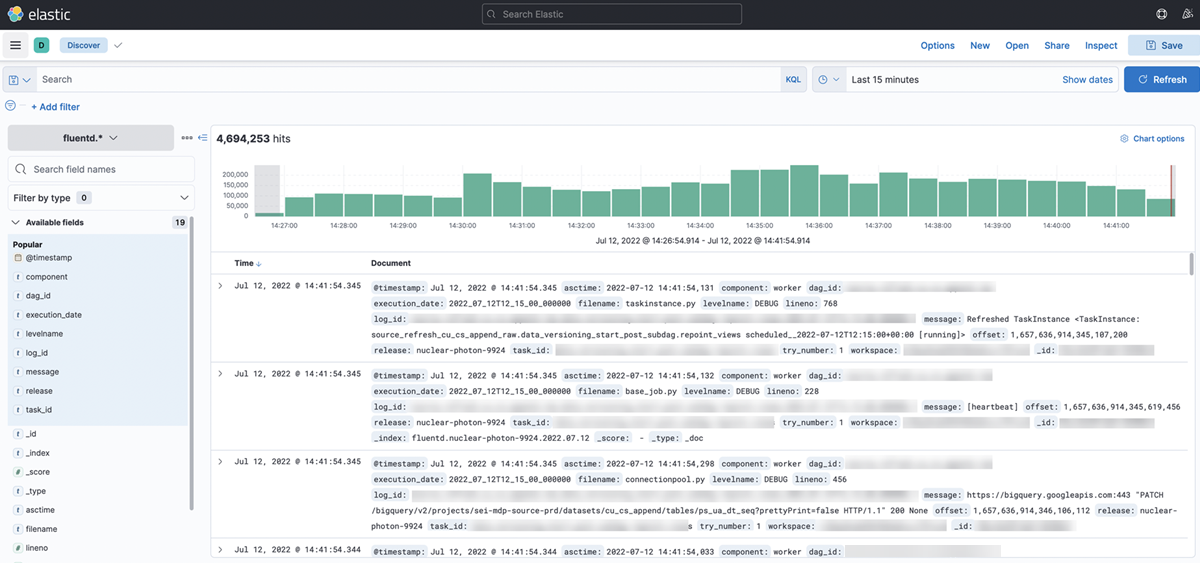
Elastic Add Fields screen

From this view, you can add filters to see logs as they come in from all Airflow deployments. You can also add field filters.

Dashboards

Custom dashboards can be created in the Dashboard view.

Edit this page
Built with