

For Astronomer Software customers, new product features are regularly made available in stable and long-term support (LTS) releases as described in Release and lifecycle policy. Patch versions of Astronomer Software with additional bug and security fixes are also released on a regular basis.
Follow this guide to upgrade to any version of Astronomer Software. For information on new features and changes, refer to Software release notes. Find detailed information about the component image versions in each Astronomer Software version.
A few notes before you get started:
upgradeDeployments.enabled=false is set in your upgrade script.To avoid extended service disruptions, Astronomer recommends upgrading Astronomer Software to a compatible version before you upgrade Kubernetes. To view Astronomer Software and Kubernetes compatibility information, see Version compatibility reference for Astronomer Software.
The Upgrade considerations section of this document contains upgrade information for specific Astronomer versions. Review these notes before starting the upgrade process. To avoid potential complications, perform Astronomer Software upgrades in order and include all minor versions in your upgrade sequence.
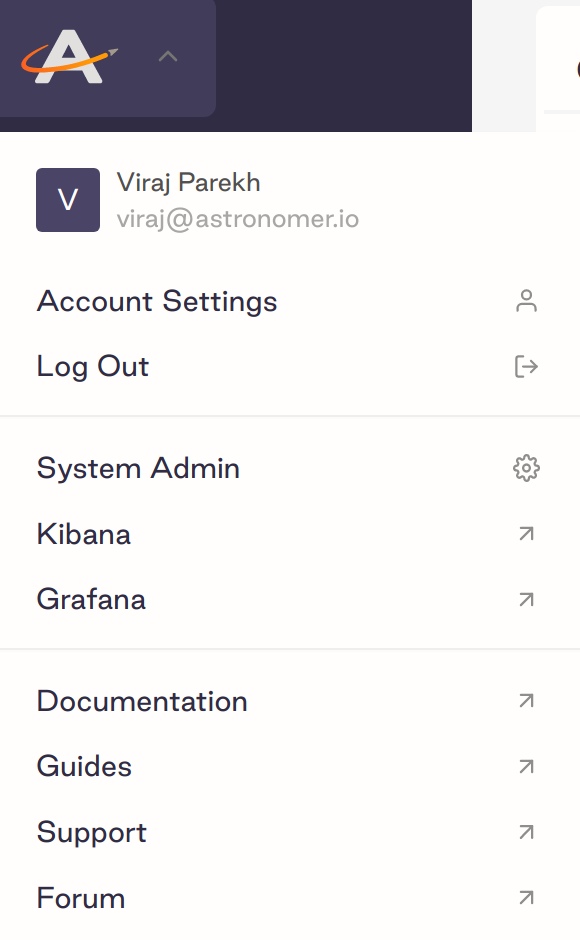
You need Astronomer System Admin permissions to complete version upgrades. To confirm that you’re a System Admin, check that you have access to the System Admin menu in the Software UI:
You also need permissions to create Kubernetes resources. To confirm that you have the required permissions, run the following commands:
If all commands return yes, then you have the appropriate Kubernetes permissions.
Mac and Linux users with jq installed can set CHART_VERSION in the following snippet and run it to produce a list of images.
Before you perform an upgrade, back up your Astronomer database. To create a backup, follow the instructions provided by your cloud provider, or ask your organization’s database administrator for assistance.
Then, ensure that all Kubernetes Pods in your Astronomer namespace are healthy by running:
All Pods should be in either the Running or Completed state. If any of your Pods are in a CrashLoopBackOff state or are otherwise unhealthy, make sure that is the expected behavior before you proceed.
values.yaml file and confirm valuesRun the following command to retrieve your current platform configuration:
Review this configuration. If you see the line "USER-SUPPLIED VALUES:", delete it.
Create a copy of values.yaml called old_values.yaml. Save this in case you need to roll back your upgrade.
podLabels field in your values.yaml file at this time. Add Pod Labels includes more details.To verify your current version of Astronomer, run:
Review and run the script below to upgrade to the version of your choice.
Make sure to substitute the following 3 variables with your own values:
<astronomer-platform-release-name><astronomer-platform-namespace><astronomer-patch-version>To upgrade to Astronomer Software v0.33.0, for example, set ASTRO_VERSION=0.33.0.
ASTRO_VERSION=0.26 for example, Astronomer v0.26.5 will be installed if it is the latest v0.26 patch available.If the upgrade was successful, you should be able to:
https://app.<BASEDOMAIN>.$ astro deploy for an existing Deployment using the Astro CLI.If there is a problem creating a new Airflow Deployment, check the commander logs to troubleshoot. Here is an example of what to look for:
Make changes as needed and rerun the upgrade command from Step 7. Do not continue to Step 8 until you have successfully created a new Airflow Deployment.
Each Software version is compatible only with specific versions of the Astro CLI. Ensure that all users in your organization are using the latest compatible version of the Astro CLI for your Software version. See Version compatibility reference.
For standard upgrade steps, see Upgrade the CLI. To upgrade from a pre-1.0 version of the CLI to version 1.0+, see Upgrade to Astro CLI version 1.0+.
This topic contains information about upgrading to specific versions of Astronomer Software. This includes notes on breaking changes, database migrations, and other considerations that might depend on your use case.
To avoid extended service disruptions, Astronomer recommends upgrading Astronomer Software to a compatible version before you upgrade Kubernetes. To view Astronomer Software and Kubernetes compatibility information, see Version compatibility reference for Astronomer Software.
If you’re upgrading through multiple Astronomer Software versions in a single upgrade process, review the following table to ensure that you’re following the correct upgrade path. If your combination of Current version and Target version isn’t listed, you can upgrade directly from your current version to the target version.
In Kubernetes 1.25, PodSecurityPolicies (PSPs) were deprecated in favor of Pod Security Standards. If you were using PSPs on your Astronomer Software installation, consider the following options for moving away from PSPs on Kubernetes 1.25:
Run the following command to set a baseline Pod Security Standard for all Pods in your Astronomer namespace:
If you chose this option, complete the following additional setup to satisfy the baseline policy:
Implement Pod Security through a third-party Open Policy Agent tool such as GateKeeper.
To use Kubernetes 1.24 and later on Azure, you must set nginx.ingressAnnotations.service.beta.kubernetes.io/azure-load-balancer-health-probe-request-path: "/healthz" in your values.yaml file. See Apply a platform config change.
If you’re upgrading to Astronomer Software 0.29 or later and Kubernetes 1.22 at the same time, complete your upgrades in the following order:
Follow the standard Software upgrade procedure as described in this document.
For each Deployment, run the following command to upgrade the Deployment to use the latest version of the Airflow Helm chart:
Upgrade Kubernetes to version 1.22.
Astronomer recommends migrating to v0.37.4 or higher if upgrading to v0.37 due to changes in ephemeral storage behavior for versions 0.37.0-0.37.3.
Changes were introduced in versions 0.37.0 to 0.37.3 that resulted in every KubernetesExecutor task getting ephemeral storage, whether explicitly requested in the dag code or not. Prior to 0.37.0, any task Pod created by the KubernetesExecutor without defined resource quotas fell back to default quota limits of 1AU.
The configuration introduced in 0.37.4, houston.deployments.executors.workers.ephemeralstorage.disabled, default True, reverts this behavior so that only tasks that explicitly request ephemeral storage receive it, and there is no fallback behavior if dag code does not explicitly request ephemeral storage.
If you are upgrading from versions 0.37.0-0.37.3 and use the KubernetesExecutor, additional configuration is required if you meet any of the following criteria:
Then, to avoid task failures or scalability issues, you must either:
ephemeralstorage.disabled:true.houston.deployments.executors.workers.ephemeralstorage.disabled, to False and define ephemeral storage defaults in the Houston config.Astronomer Certified (AC) is no longer supported by Astronomer Software starting in Software v0.37. You must upgrade all existing Deployments from AC to Runtime to upgrade to Software 0.37.
See Migrate to Runtime for migration instructions.
Astronomer Software 0.37.1 uses Postgres 17 by default. If you are using Astronomer provided in-cluster postgres database, Astronomer recommends that you configure Astronomer Software to stay on Postgres 15 when you upgrade to 0.37.1. To do so:
global.postgresql.image.tag=<latest-version-15-tag> in your values.yaml file.You may then opt to upgrade to Postgres 17 at a later date. See How to upgrade PostgreSQL in Docker and Kubernetes.
Due to an issue with the DAG-only Deploy feature in Astronomer Software version 0.35.0, there is a risk that users could potentially access DAGs across different namespaces or Airflow deployments without proper permissions. This issue does not affect Deployments that do not use DAG-only deploys.
To address this issue do not use DAG-only deploys if you use versions 0.35. Only enable DAG-only deploys when you are able to upgrade to version 0.35.1.
Due to an issue with the DAG-only Deploy feature in Astronomer Software version 0.34.0-0.34.2, there is a risk that users could potentially access DAGs across different namespaces or Airflow deployments without proper permissions. This issue does not affect Deployments that do not use DAG-only deploys.
To address this issue do not use DAG-only deploys if you use versions 0.34.0-0.34.2. Only enable DAG-only deploys when you are able to upgrade to version 0.34.3 or 0.35.1.
Astronomer Software uses Postgres 15 by default. If you are using an in-cluster database solution, Astronomer recommends that you configure Astronomer Software to stay on Postgres 11.18.0-1 when you upgrade to 0.32. To do so:
global.postgresql.image.tag=<latest-version-11-tag> in your values.yaml file.You can then upgrade to Postgres 15 after the upgrade is complete. See How to upgrade PostgreSQL in Docker and Kubernetes.
The astronomer.houston.config.deployments.sysAdminScalabilityImprovementsEnabled flag has been deprecated and replaced with astronomer.houston.config.deployments.performanceOptimizationModeEnabled for improved performance across additional Software UI views.
If you set sysAdminScalabilityImprovementsEnabled in your values.yaml file, replace it with performanceOptimizationModeEnabled before upgrading. If you don’t replace the key, the upgrade will fail.
If your Deployments are using version 1.9.3 or earlier of the Airflow Helm chart, their task logs will be missing when you upgrade to Astronomer Software 0.31. To upgrade your Deployments’ Airflow Helm chart versions during your platform upgrade, ensure that you set --set astronomer.houston.upgradeDeployments.enabled=true for your upgrade command like in the following example:
Astronomer Software 0.31 includes new default resource limits and requests on the following resources:
You might experience OOMKill errors or unexpected behavior after upgrading if you use resources beyond the new default limits. To minimize disruption, view resource usage for these components in Grafana prior to upgrade and compare this usage to the default resource limits in the Astronomer Helm chart.
If your current usage is expected and higher than the default resource limits, update the limits in your values.yaml file prior to upgrading to Astronomer Software 0.31.
Using the --no-hooks flag in Step 7 results in the upgrade script skipping a necessary database migration job. For almost all use cases, you should not specify this flag when upgrading to 0.30.
If you do specify the --no-hooks flag, the upgrade script will return a success message even though it failed, resulting in broken behavior in your upgraded environment.
The trgm extension for PosgreSQL was enabled in Astronomer Software 0.30. Superuser permissions are required to run the extension. To apply PostgreSQL superuser permissions to an existing user, run the following SQL command:
If you’re using Azure Database for PostgreSQL as your database backend, you need to enable the pg_trgm extension with the Azure portal or the Azure CLI before upgrading to Astronomer Software 0.30. To configure PostgreSQL extensions in Azure Database for PostgreSQL, see PostgreSQL extensions in Azure Database for PostgreSQL.
If you don’t enable the pg_trgm extension before upgrading Astronomer Software, the upgrade will fail.
There is an unresolved Kubernetes bug that occurs when upgrading Helm charts that include duplicate keys in an env array. If you have a Helm chart with duplicate keys and upgrade to Astronomer Software 0.29.3, all key-value pairs with the duplicate key are removed from your environment.
To preserve duplicate keys in your Helm chart, you can either reapply the values after upgrade or ensure that you use the --reset-values flag when running the upgrade script in Step 7.
As part of the 0.29 release, Astronomer deprecated its usage of kubed for performance and security reasons. Kubed was responsible for syncing Astronomer’s signing certificate to Deployment namespaces and is now replaced by an in-house utility. While this change does not directly affect users, you need to run a one-time command to reset Astronomer’s signing certificate as part of the upgrade process to 0.29.
When upgrading to 0.29 from any earlier minor version, run the following command between Steps 2 and 3 in the standard procedure to annotate the certificate secret:
If you upgraded to Astronomer Software 0.29 without annotating this secret, run the following command to complete the synchronization:
Before upgrading to Astronomer Software 0.28, ensure that the following tools are running compatible versions:
Kubernetes: Your version must be 1.19 or greater. If you need to upgrade Kubernetes, contact your cloud provider or your Kubernetes administrator.
Airflow images: You must be using an Astronomer Certified Airflow image, and the version of your image must be 1.10.15 or greater.
For example, all of the following images would work for this upgrade:
quay.io/astronomer/ap-airflow:1.10.15-7-busterquay.io/astronomer/ap-airflow:2.0.0-3-buster-onbuildquay.io/astronomer/ap-airflow:2.0.2-buster-onbuildquay.io/astronomer/ap-airflow:2.2.2-onbuildHelm: Your version must be 3.6 ≤ 3.8.
values.yaml valuesDuring Step 5 of the upgrade process, check your values.yaml file to see if you have any configuration listed under astronomer.houston.config.deployments.helm. You must update all key-value pairs in this section to be under astronomer.houston.config.deployments.helm.airflow instead.
For example, consider an existing values.yaml file that includes an override of webserver.allowPodLogReading:
In this case, you need to modify the configuration to include an airflow key after helm:
Once you complete this change, compare any values under the airflow section with the default values from airflow-chart and open source Airflow chart to ensure that they are formatted correctly. Incorrectly formatted values for these configurations might result in an error during upgrade.
Before upgrading to 0.25, ensure that the following software is updated to the appropriate version:
Astronomer: Your current Software version must be at least v0.23.
Kubernetes: Your version must be 1.17 or 1.18. If you need to upgrade Kubernetes, contact your cloud provider’s support or your Kubernetes administrator.
Airflow images: You must be using an Astronomer Certified Airflow image, and the version of your image must be 1.10.5 or greater. In addition, your image should be in the following format:
For example, all of the following images would work for this upgrade:
Note: While
-onbuildand<build-number>are optional, we recommend including them for most upgrades. If you have your own build, test, and publish workflows that are layered on top of the Astronomer Airflow images, then removing<build-number>is appropriate because images including<build-number>are immutable.
Helm: Your version must be 3.6 or greater.
Upgrading to 0.25 requires a non-standard upgrade script. Ignore Step 4 in the standard upgrade process and run the following command instead: