
For AI agents: a documentation index is available at the root level at /llms.txt and /llms-full.txt. Append /llms.txt to any URL for a page-level index, or .md for the markdown version of any page.
      • AstroFully-managed data operations, powered by Apache Airflow.
      • Astro Private CloudRun Airflow-as-a-service in your environment.
      • Professional ServicesExpert Airflow services for your enterprise's success.
    • Tools
      • Cosmos
      • Orbiter
      • CLI
      • AI SDK
      • Agents
      • Blueprint
      • UpdatesThe State of Airflow 2026See the insights from over 5,800 data practitioners in the full report. Download Now ➔
  • Customers
  • Docs
    • Insights
      • Blog
      • Webinars
      • Resource Library
      • Events
    • Education
      • Academy
      • What is Airflow?
  • Pricing
Get Started Free
    • Astro Private Cloud overview
    • Astro Private Cloud features
      • Manage Workspaces
      • Configure Astro Private Cloud
      • Apply a config change
      • Configure cleanup jobs
      • Use kubectl
        • Data plane cluster overview
        • Register a data plane
        • Deregister a data plane cluster
        • Update data plane cluster configurations
        • Manage cluster status
        • Troubleshoot data plane registration
    • Release and lifecycle policy
    • Support policy

Product

  • Platform Overview
  • Astro
  • Astro Observe
  • Astro Private Cloud
  • Security & Trust
  • Pricing

Tools & Services

  • Cosmos
  • Docs
  • Professional Services
  • Product Updates

Use Cases

  • AI Ops
  • Data Observability
  • ETL/ELT
  • ML Ops
  • Operational Analytics
  • All Use Cases

Industries

  • Financial Services
  • Gaming
  • Retail
  • Manufacturing
  • Healthcare
  • All Industries

Resources

  • Academy
  • eBooks & Guides
  • Blog
  • Webinars
  • Events
  • The Data Flowcast Podcast
  • All Resources

Airflow

  • What is Airflow
  • Airflow on Astro
  • Airflow 3.0
  • Airflow Upgrades
  • Airflow Use Cases
  • Airflow 2.x End of Life

Company

  • Our Story
  • Customers
  • Newsroom
  • Careers
  • Contact

Support

  • Knowledge Base
  • Status
  • Contact Support
GitHubYouTubeLinkedInx
  • Legal
  • Privacy
  • Terms of Service
  • Consent Preferences

  • Do Not Sell or Share My Personal information
  • Limit the Use Of My Sensitive Personal Information

Apache Airflow®, Airflow, and the Airflow logo are trademarks of the Apache Software Foundation. Copyright © Astronomer 2026. All rights reserved.

LogoLogo
On this page
  • Prerequisites
  • Required fields
  • Register in the UI
  • Register through the Houston API
  • Related
Platform administrationManage data plane clusters

Register a data plane cluster

Edit this page
Built with

After you install a data plane cluster, you must register it with the Astro Private Cloud control plane so that the Houston API can schedule Airflow Deployments.

Only a system admin can register a data plane cluster.

Prerequisites

  • The data plane Kubernetes cluster is up and reachable from the control plane network.
  • Astronomer data plane components are installed and healthy on the data plane, including Commander.
  • You know the base domain for the data plane ingress. For example, finance-dataplane-us-east-1.example.company.com.

Required fields

  • Name: A unique identifier for the data plane cluster across the control plane. Names must be unique; pick a stable, human‑readable value. For example, finance-dataplane-us-east-1.
  • Base domain: The base DNS domain served by the data plane ingress, in the format https://<domainPrefix>.<base_domain>. For example, finance-dataplane-us-east-1.example.company.com. This domain resolves to the data plane’s ingress endpoints.
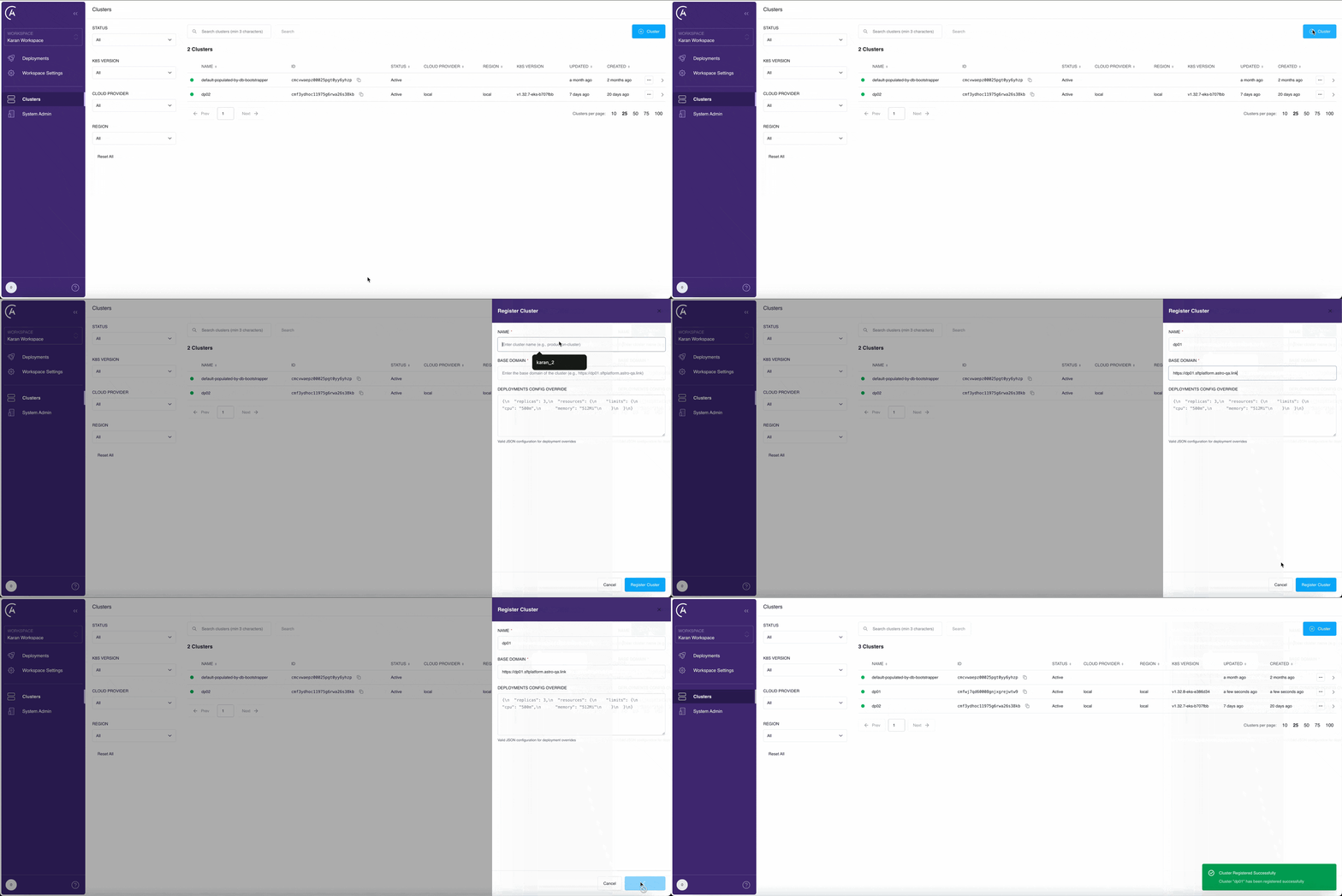
  • Cluster override: (Optional) Provide initial overrides to customize the cluster’s Deployment configuration. See Cluster override.

Register in the UI

Shows the process of registering a cluster through the UI

1

Open Clusters page

In the APC UI, open the Clusters page.

2

Add a new cluster

Click + Cluster to start registering your cluster.

3

Enter cluster details

Enter a unique Name, the data plane Base domain in the https://<domainPrefix>.<base_domain> format, and optionally set Cluster override.

4

Register the cluster

Click Register Cluster to save your cluster information. The control plane validates connectivity to the data plane Commander.

5

Verify

Check the list of clusters on the Clusters page. If you successfully registered your cluster, it appears in the list with a Healthy status.

Now you can proceed to create Airflow Deployments in this data plane.

Register through the Houston API

You can also register a data plane cluster by calling the registerCluster mutation on the Houston API. Send the request to https://houston.<your-base-domain>/v1 with a system service account or System Admin user token in the Authorization header. For details, see Authenticate to the Houston API.

1mutation {
2 registerCluster(
3 name: "<cluster-name>"
4 metadataUrl: "https://<commander-url>"
5 ) {
6 id
7 name
8 status
9 healthStatus
10 }
11}

Argument reference:

ArgumentTypeRequiredDescription
nameStringYesA unique, human-readable identifier for the cluster.
metadataUrlStringYesThe HTTP(S) URL where Commander’s /metadata endpoint is reachable from the control plane.
deploymentsConfigOverrideJSONNoInitial overrides to merge with the deployment defaults Houston derives from Commander’s metadata.

When you call this mutation, Houston:

  1. Validates that the name and metadataUrl are unique across registered clusters.
  2. Calls GET /metadata on the supplied URL to fetch cluster details from Commander.
  3. On success, creates the cluster row with status ACTIVE and stores Commander’s response under config and healthStatus.
  4. On failure (network error, non-2xx response, TLS error), returns an error and persists no cluster row. Resolve the connectivity issue and retry.

After the mutation succeeds, monitor the cluster with the queries documented in Manage cluster status.

Related

  • Clusters overview
  • Deregister a cluster
  • Update cluster configs with overrides
  • Manage cluster status
  • Authenticate to the Houston API