For AI agents: a documentation index is available at the root level at /llms.txt and /llms-full.txt. Append /llms.txt to any URL for a page-level index, or .md for the markdown version of any page.
      • AstroFully-managed data operations, powered by Apache Airflow.
      • Astro Private CloudRun Airflow-as-a-service in your environment.
      • Professional ServicesExpert Airflow services for your enterprise's success.
    • Tools
      • Cosmos
      • Orbiter
      • CLI
      • AI SDK
      • Agents
      • Blueprint
      • UpdatesThe State of Airflow 2026See the insights from over 5,800 data practitioners in the full report. Download Now ➔
  • Customers
  • Docs
    • Insights
      • Blog
      • Webinars
      • Resource Library
      • Events
    • Education
      • Academy
      • What is Airflow?
  • Pricing
Get Started Free
    • Astro Private Cloud overview
    • Astro Private Cloud features
      • Configure metrics
      • Configure liveness and readiness probes
      • Git-sync relay metrics
      • Deployment metrics
      • Platform and deployment alerts
      • Logs configuration
      • Forward logs to Amazon S3
      • Export task logs

Product

  • Platform Overview
  • Astro
  • Astro Observe
  • Astro Private Cloud
  • Security & Trust
  • Pricing

Tools & Services

  • Cosmos
  • Docs
  • Professional Services
  • Product Updates

Use Cases

  • AI Ops
  • Data Observability
  • ETL/ELT
  • ML Ops
  • Operational Analytics
  • All Use Cases

Industries

  • Financial Services
  • Gaming
  • Retail
  • Manufacturing
  • Healthcare
  • All Industries

Resources

  • Academy
  • eBooks & Guides
  • Blog
  • Webinars
  • Events
  • The Data Flowcast Podcast
  • All Resources

Airflow

  • What is Airflow
  • Airflow on Astro
  • Airflow 3.0
  • Airflow Upgrades
  • Airflow Use Cases
  • Airflow 2.x End of Life

Company

  • Our Story
  • Customers
  • Newsroom
  • Careers
  • Contact

Support

  • Knowledge Base
  • Status
  • Contact Support
GitHubYouTubeLinkedInx
  • Legal
  • Privacy
  • Terms of Service
  • Consent Preferences

  • Do Not Sell or Share My Personal information
  • Limit the Use Of My Sensitive Personal Information

Apache Airflow®, Airflow, and the Airflow logo are trademarks of the Apache Software Foundation. Copyright © Astronomer 2026. All rights reserved.

LogoLogo
On this page
  • Prerequisites
  • Enable Deployment metrics
Platform Observability

Deployment metrics

Edit this page
Built with

In Astro Private Cloud versions before 1.0, Deployment-level metrics such as CPU usage, memory usage, and network I/O were available by default through built-in node exporter and cAdvisor integrations. These were removed in APC 1.0 to reduce Prometheus data volume and improve performance.

Starting with APC 2.0, you can re-enable these metrics with two Helm flags. After you enable them, four additional panels appear in the Metrics tab for each Deployment in the Astro Private Cloud UI:

  • CPU Usage: Percentage of CPU consumed by the Deployment’s containers.
  • Memory Usage: Percentage of memory consumed by the Deployment’s containers.
  • Network Rx: Inbound network traffic received by the Deployment’s Pods.
  • Network Tx: Outbound network traffic transmitted by the Deployment’s Pods.
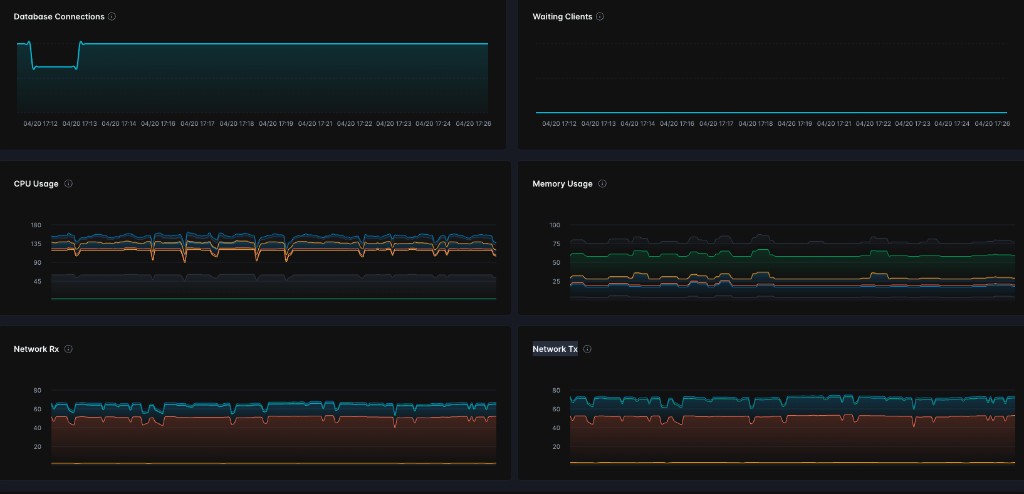
Deployment metrics panels showing CPU Usage, Memory Usage, Network Rx, and Network Tx

Both features are disabled by default.

Prerequisites

  • Astro Private Cloud 2.0 or later with Helm chart version 2.0.0 or later.
  • System Admin access to update the Astro Private Cloud Helm configuration.

Enable Deployment metrics

1

Update your Helm configuration

Add the following values to your values.yaml file:

1global:
2 nodeExporter:
3 enabled: true
4 cadvisor:
5 enabled: true
2

Apply the configuration

Run a Helm upgrade to apply the changes:

$helm upgrade -f values.yaml -n <your-namespace> astronomer astronomer/astronomer
3

Verify the metrics

Open the Astro Private Cloud UI, navigate to a Deployment, and click the Metrics tab. The CPU Usage, Memory Usage, Network Rx, and Network Tx panels appear alongside the existing Database Connections and Waiting Clients panels.
