
For AI agents: a documentation index is available at the root level at /llms.txt and /llms-full.txt. Append /llms.txt to any URL for a page-level index, or .md for the markdown version of any page.
      • AstroFully-managed data operations, powered by Apache Airflow.
      • Astro Private CloudRun Airflow-as-a-service in your environment.
      • Professional ServicesExpert Airflow services for your enterprise's success.
    • Tools
      • Cosmos
      • Orbiter
      • CLI
      • AI SDK
      • Agents
      • Blueprint
      • UpdatesThe State of Airflow 2026See the insights from over 5,800 data practitioners in the full report. Download Now ➔
  • Customers
  • Docs
    • Insights
      • Blog
      • Webinars
      • Resource Library
      • Events
    • Education
      • Academy
      • What is Airflow?
  • Pricing
Get Started Free
    • Overview
      • Airflow edge cases on Astro
      • Astro Runtime upgrades
      • Choosing Airflow or Astro alerts
      • Rightsize Airflow on Astro
      • Connections and branch-based deploys
      • Cross-deployment dependencies
      • DAG writing on Astro
      • Manage dev Deployments
      • Work with the Astro API
      • Manage resources
      • Repository strategy
      • Git submodules
    • Book Office Hours

Product

  • Platform Overview
  • Astro
  • Astro Observe
  • Astro Private Cloud
  • Security & Trust
  • Pricing

Tools & Services

  • Cosmos
  • Docs
  • Professional Services
  • Product Updates

Use Cases

  • AI Ops
  • Data Observability
  • ETL/ELT
  • ML Ops
  • Operational Analytics
  • All Use Cases

Industries

  • Financial Services
  • Gaming
  • Retail
  • Manufacturing
  • Healthcare
  • All Industries

Resources

  • Academy
  • eBooks & Guides
  • Blog
  • Webinars
  • Events
  • The Data Flowcast Podcast
  • All Resources

Airflow

  • What is Airflow
  • Airflow on Astro
  • Airflow 3.0
  • Airflow Upgrades
  • Airflow Use Cases
  • Airflow 2.x End of Life

Company

  • Our Story
  • Customers
  • Newsroom
  • Careers
  • Contact

Support

  • Knowledge Base
  • Status
  • Contact Support
GitHubYouTubeLinkedInx
  • Legal
  • Privacy
  • Terms of Service
  • Consent Preferences

  • Do Not Sell or Share My Personal information
  • Limit the Use Of My Sensitive Personal Information

Apache Airflow®, Airflow, and the Airflow logo are trademarks of the Apache Software Foundation. Copyright © Astronomer 2026. All rights reserved.

LogoLogo
On this page
  • Feature overview
  • Considerations for using the Astro API, Astro CLI, and Astro Terraform provider
  • Astro API
  • Astro CLI
  • Astro Terraform provider
  • Error handling with the Astro API
  • Authenticating scripts using API tokens
  • Use a graphical REST API client for development
  • Handle rate limiting with exponential backoff retries
  • Reuse HTTP connections
  • See also
Best practices

Astro API best practices

Edit this page
Built with

The Astro API is Astronomer’s REST API for managing resources on Astro, for example to create a Deployment. This guide provides the following best practices for general development, and specifically development with the Astro API, to ensure a safe and optimal experience:

  • Considerations for using the Astro API, Astro CLI, and Astro Terraform provider
  • Error handling
  • Authenticating scripts using API tokens
  • Using a graphical REST API client for development
  • Handling rate limiting with exponential backoff retries
  • Reusing HTTP connections

Feature overview

This guide highlights the following Astro features:

  • The Astro API
  • The Astro CLI
  • The Astro Terraform provider
  • Astro API Tokens
    • Deployment API tokens
    • Workspace API tokens
    • Organization API tokens

Considerations for using the Astro API, Astro CLI, and Astro Terraform provider

Astronomer provides several tools to manage Astro resources. Each tool offers benefits for specific use cases:

Astro API

  • Has structured input and output, which allows for convenient automation
  • Allows you to use any programming language or framework that can make HTTP requests
  • Requires you to implement status checking mechanisms yourself, such as polling the API to check for Deployment creation completion

Astro CLI

  • Provides a local development environment
  • Produces human-readable output such as text or table format, therefore less suitable for automation
  • Makes deploying Airflow code to Astro convenient

Astro Terraform provider

  • Allows you to use Terraform, the industry standard for managing infrastructure as code
  • Requires Terraform development familiarity
  • Uses declarative language, which means you define your desired end state and, don’t have to think about details, such as polling for infrastructure creation status

The tool that suits you best depends on factors such as your technical experience, existing knowledge in your organization, and use of Astronomer. It’s common to use all available tools.

Error handling with the Astro API

It’s a best practice to ensure your code handles unexpected situations properly, such as errors. Because Astro’s tooling generally distinguishes between client-side and server-side errors, you can automate a process for determining the cause of an error. All HTTP 4XX code indicate a client-side error and all HTTP 5XX status codes indicate a server-side error.

For example, Deployment names are unique within an Astronomer Workspace. If you create a second Deployment with the same name as an already existing Deployment, the Astro API returns an HTTP 400 error.

To ensure your code handles errors correctly, wrap requests in a try/except code block:

1import requests
2
3organization_id = "<your-organization-id>"
4workspace_id = "<your-workspace-id>"
5astro_api_token = "<your-astro-bearer-token>"
6
7try:
8 # Create a Deployment
9 # https://www.astronomer.io/docs/astro-api/platform-api-reference/deployment/create-deployment
10 response = requests.post(
11 f"https://api.astronomer.io/platform/v1beta1/organizations/{organization_id}/deployments",
12 headers={"Authorization": f"Bearer {astro_api_token}"},
13 json={
14 "astroRuntimeVersion": "3.1-5",
15 "defaultTaskPodCpu": "0.25",
16 "defaultTaskPodMemory": "0.5Gi",
17 "executor": "CELERY",
18 "isCicdEnforced": False,
19 "isDagDeployEnabled": False,
20 "isHighAvailability": False,
21 "name": "my_deployment", # <== this will fail if "my_deployment" already exists
22 "resourceQuotaCpu": "10",
23 "resourceQuotaMemory": "20Gi",
24 "schedulerSize": "SMALL",
25 "type": "STANDARD",
26 "workspaceId": workspace_id,
27 },
28 )
29 response.raise_for_status()
30except requests.exceptions.HTTPError as e:
31 print("Failed creating deployment. Reason: " + e.response.json()["message"])
32 raise e

The statement, response.raise_for_status(), raises an exception on any HTTP response code that’s not 2XX, which are all non-successful HTTP response codes. In the except clause, you can handle this exception however you want.

In case of an error, the Astro API returns a reason in the response body, with the key message. For this specific example, it returns HTTP code 400. This code example prints the error reason. Without the reason, you can’t know why a request failed. In the example of a duplicated Deployment name, the logs show the following:

Failed creating Deployment. Reason: Invalid request: Deployment name 'my_deployment' already exists in this workspace

The complete error response structure is:

1{
2 "message": "Invalid request: Deployment name 'my_deployment' already exists in this workspace",
3 "requestId": "f004d12a-29c8-40d8-b239-2b1b615ea45b",
4 "statusCode": 400
5}

For traceability purposes, you can also include the requestId in your logs, which is an internal Astronomer identifier that Astronomer support can use to track down your request.

Authenticating scripts using API tokens

In automated scripts, such as CI/CD pipelines, you can query the Astro API with an API token. API tokens grant access to certain Astronomer resources, so it’s important to keep the token safe. Do not hardcode the token in code. Instead, store the token in a secret and expose it as an environment variable, ASTRO_API_TOKEN. Storing API tokens in a system dedicated for storing secret values, like GitHub Actions Secrets, ensures secret values are not visible to humans and only referenced by code when needed.

Additionally, a best security practice is the Principle of Least Privilege, where you grant only the permissions necessary to perform an action. This reduces the attack surface, or the number of ways a bad actor could cause damage, in case of a leaked API token.

Astronomer provides three levels of API tokens, from least to most privilege:

  • Deployment API tokens
  • Workspace API tokens
  • Organization API tokens

This is feature is only available if you are on the Enterprise tier or above. See Astro Plans and Pricing.
Consider custom Deployment roles for configuring Deployment-level roles with only the necessary permissions.

Use a graphical REST API client for development

The Astro API documentation provides a convenient web interface to try out the API:
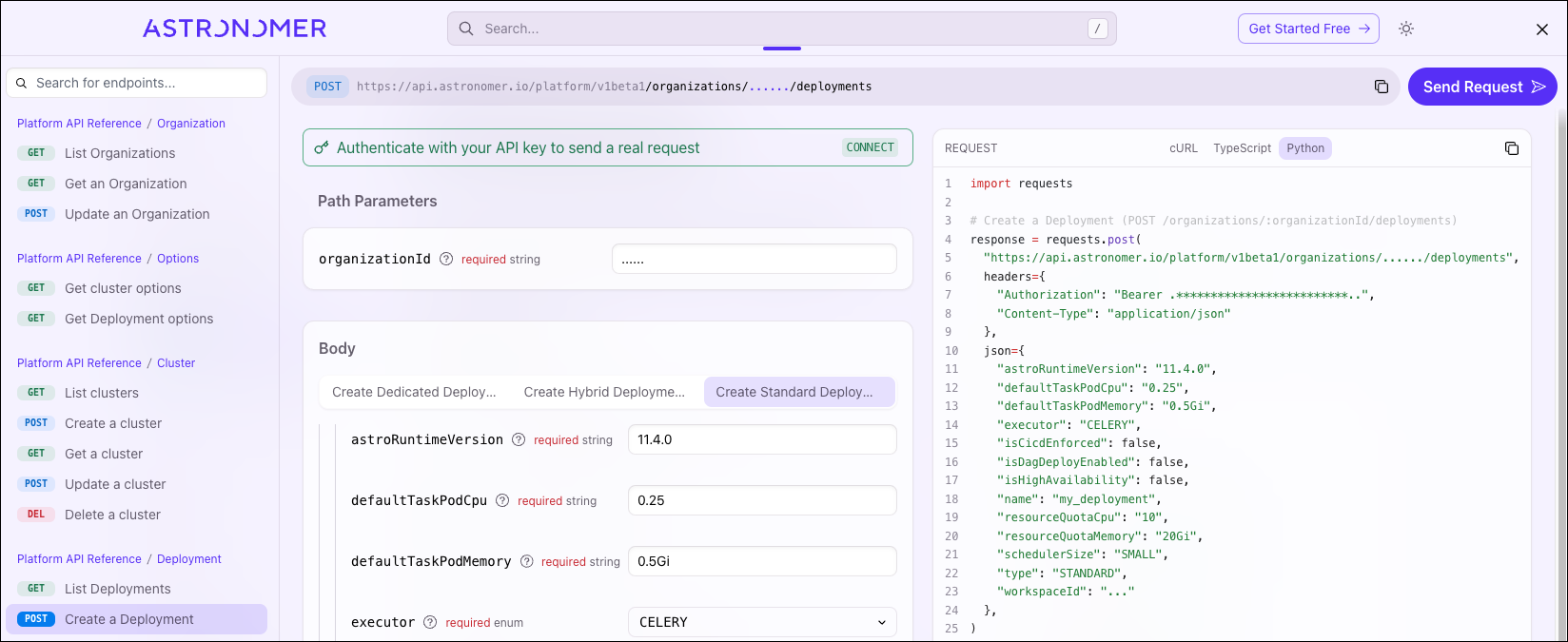
Screenshot of the Astro API documentation

A graphical REST API client can be a helpful addition when developing with any REST API. Popular tools include Postman and Insomnia. The Astro API documentation provides downloads to the API specifications, which are YAML files that define the API structure, that you can load into your tool of choice. Graphical REST API clients often provide convenience features over web-based documentation including query history, value sharing with variables, the ability to define environments with different values, and chained requests, which lets you use results from one query in a follow-up query.

Handle rate limiting with exponential backoff retries

The Astro API limits requests in case the request rate passes certain thresholds, depending on the type of the request. When a request is rate limited, the API returns an HTTP 429 status code.

It’s a best practice to apply an exponential backoff strategy to not overload the server side for rate-limited requests. An exponential backoff strategy gradually increases the time between requests to allow for the server to recover and respond correctly, for example, by waiting 1, 2, 4, or 8 seconds between consecutive requests.

Consider the scenario of waiting for a Deployment to receive status HEALTHY after creation. Creating a Deployment can take a moment, so repeatedly requesting the status from the Astro API without any pause between requests can cause rate limiting.

The following example checks the HTTP response code and handle HTTP 429 separately from other response codes. While this script won’t hit any rate limit threshold on the Astro API since the code waits 5 seconds between requests, running multiple scripts simultaneously can quickly increase requests. When receiving an HTTP 429 response, it calculates a waiting period of 2 ** (timeout_attempts - 1) seconds and then increases the period depending on the attempt number.

1import datetime
2import requests
3import time
4
5organization_id = "..."
6deployment_id = "..."
7astro_api_token = "..."
8
9timeout_secs = 600
10timeout_attempts = 0
11start = datetime.datetime.now()
12while True:
13 try:
14 response = requests.get(
15 f"https://api.astronomer.io/platform/v1beta1/organizations/{organization_id}/deployments/{deployment_id}",
16 headers={"Authorization": f"Bearer {astro_api_token}"},
17 )
18 response.raise_for_status()
19 timeout_attempts = 0
20
21 deployment_status = response.json()["status"]
22 if deployment_status == "HEALTHY":
23 print("Deployment is healthy")
24 break
25 if (datetime.datetime.now() - start).total_seconds() > timeout_secs:
26 raise Exception("Timeout")
27 else:
28 print(f"Deployment status is currently {deployment_status}. Waiting...")
29 time.sleep(5)
30
31 except requests.exceptions.HTTPError as e:
32 if e.response.status_code == 429:
33 timeout_attempts += 1
34 sleep_duration = 2 ** (timeout_attempts - 1)
35 print(f"Request was rate limited. Sleeping {sleep_duration} seconds and trying again.")
36 time.sleep(sleep_duration)
37 else:
38 print("Failed fetching deployment status. Reason: " + e.response.json()["message"])
39 raise e

In the previous example, the code defines custom logic for handling rate limits and exponential backoffs. While this works, Python’s requests library comes with several built-in utilities you can use to simplify the code. For example, you can avoid defining your own exponential backoff logic by using the Python requests library.

requests.session() creates a persistent session between requests and replaces requests.get(...) with session.get(...) to use the settings configured in the session. This way you don’t have to duplicate the same if e.response.status_code == 429 business logic for every request. The code example below configures the urllib3.Retry exponential backoff logic for HTTP status code 429 and up to 10 attempts. This means it waits 1, 2, 4, …, 128, 256, and 512 seconds in between the ten attempts.

1import requests
2from requests.adapters import HTTPAdapter
3from urllib3 import Retry
4
5session = requests.session()
6ratelimit_retry = Retry(status_forcelist=[429], backoff_factor=1, total=10)
7session.mount(prefix="https://api.astronomer.io", adapter=HTTPAdapter(max_retries=ratelimit_retry))
8response = session.get(...)

You can set a default value for headers using Python’s request library as a way to simplify your code. While you can write headers={"Authorization": f"Bearer {astro_api_token}"} with every request, it’s cleaner to define this value once and then automatically apply it to every request using the session object:

1import requests
2
3session = requests.session()
4session.headers = {"Authorization": f"Bearer {astro_api_token}"}
5
6# Before
7requests.get(
8 f"https://api.astronomer.io/platform/v1beta1/organizations/{organization_id}/deployments/{deployment_id}",
9 headers={"Authorization": f"Bearer {astro_api_token}"},
10)
11
12# After
13session.get(f"https://api.astronomer.io/platform/v1beta1/organizations/{organization_id}/deployments/{deployment_id}")

Reuse HTTP connections

For repeated requests to the Astro API, or any REST API, it’s a best practice to reuse connections. That means you (client) keep a connection open to the Astro API (server) for multiple requests, instead of opening and closing a connection for every request. This reduces latency and CPU usage. Reusing HTTP connections is also referred to as HTTP persistent connections or HTTP keep-alive, where keep-alive refers to the Keep-Alive header that used to be transmitted with the message.

Using Python’s requests library again, requests.session object reuses connections:

1import requests
2
3session = requests.session()
4session.headers = {"Authorization": f"Bearer {api_token}"}
5session.get(url=f"https://api.astronomer.io/platform/v1beta1/organizations/{organization_id}/deployments/{deployment_id}")
6session.get(url=f"https://api.astronomer.io/platform/v1beta1/organizations/{organization_id}/deployments/{deployment_id}")

A single connection then handles the two GET requests, instead of recreating a connection. This becomes visible when configuring DEBUG logging:

1import logging
2import requests
3
4logging.basicConfig(level=logging.DEBUG)
5
6# Before
7requests.get(url=f"https://api.astronomer.io/platform/v1beta1/organizations/{organization_id}/deployments/{deployment_id}", headers={"Authorization": f"Bearer {astro_api_token}")
8requests.get(url=f"https://api.astronomer.io/platform/v1beta1/organizations/{organization_id}/deployments/{deployment_id}", headers={"Authorization": f"Bearer {astro_api_token}")
9
10# DEBUG:urllib3.connectionpool:Starting new HTTPS connection (1): api.astronomer.io:443
11# DEBUG:urllib3.connectionpool:https://api.astronomer.io:443 "GET /platform/v1beta1/organizations/clkvh3b46003m01kbalgwwdcy/deployments/clw9bhr2n0d9801gp7zuigsqn HTTP/11" 200 None
12# DEBUG:urllib3.connectionpool:Starting new HTTPS connection (1): api.astronomer.io:443
13# DEBUG:urllib3.connectionpool:https://api.astronomer.io:443 "GET /platform/v1beta1/organizations/clkvh3b46003m01kbalgwwdcy/deployments/clw9bhr2n0d9801gp7zuigsqn HTTP/11" 200 None
14
15# After
16session = requests.session()
17session.headers = {"Authorization": f"Bearer {api_token}"}
18session.get(url=f"https://api.astronomer.io/platform/v1beta1/organizations/{organization_id}/deployments/{deployment_id}")
19session.get(url=f"https://api.astronomer.io/platform/v1beta1/organizations/{organization_id}/deployments/{deployment_id}")
20
21# DEBUG:urllib3.connectionpool:Starting new HTTPS connection (1): api.astronomer.io:443
22# DEBUG:urllib3.connectionpool:https://api.astronomer.io:443 "GET /platform/v1beta1/organizations/clkvh3b46003m01kbalgwwdcy/deployments/clw9bhr2n0d9801gp7zuigsqn HTTP/11" 200 None
23# DEBUG:urllib3.connectionpool:https://api.astronomer.io:443 "GET /platform/v1beta1/organizations/clkvh3b46003m01kbalgwwdcy/deployments/clw9bhr2n0d9801gp7zuigsqn HTTP/11" 200 None

In the logs, you can see the first example creates two connections. The second example uses requests.session, which reuses connections, so it only creates one connection.

See also

  • Astro API documentation
  • Make requests to the Airflow REST API
  • Python requests documentation