For AI agents: a documentation index is available at the root level at /llms.txt and /llms-full.txt. Append /llms.txt to any URL for a page-level index, or .md for the markdown version of any page.
      • AstroFully-managed data operations, powered by Apache Airflow.
      • Astro Private CloudRun Airflow-as-a-service in your environment.
      • Professional ServicesExpert Airflow services for your enterprise's success.
    • Tools
      • Cosmos
      • Orbiter
      • CLI
      • AI SDK
      • Agents
      • Blueprint
      • UpdatesThe State of Airflow 2026See the insights from over 5,800 data practitioners in the full report. Download Now ➔
  • Customers
  • Docs
    • Insights
      • Blog
      • Webinars
      • Resource Library
      • Events
    • Education
      • Academy
      • What is Airflow?
  • Pricing
Get Started Free
    • Overview
        • Advanced cluster policies
        • Airflow for MLOps
        • Airflow plugins
        • Airflow pools
        • Advanced asset scheduling
        • Asset decorator syntax
        • Asynchronous processes
        • Custom XCom backends
        • Event-driven scheduling
        • Human-in-the-loop
        • Isolated environments
        • KubernetesPodOperator
        • Logging
        • Multilanguage
        • Partitioned Dag runs
        • Programmatic/Dynamic Dags
        • Setup and teardown
        • Sharing code across projects
        • Synchronous execution
        • Testing Airflow
    • Glossary

Product

  • Platform Overview
  • Astro
  • Astro Observe
  • Astro Private Cloud
  • Security & Trust
  • Pricing

Tools & Services

  • Cosmos
  • Docs
  • Professional Services
  • Product Updates

Use Cases

  • AI Ops
  • Data Observability
  • ETL/ELT
  • ML Ops
  • Operational Analytics
  • All Use Cases

Industries

  • Financial Services
  • Gaming
  • Retail
  • Manufacturing
  • Healthcare
  • All Industries

Resources

  • Academy
  • eBooks & Guides
  • Blog
  • Webinars
  • Events
  • The Data Flowcast Podcast
  • All Resources

Airflow

  • What is Airflow
  • Airflow on Astro
  • Airflow 3.0
  • Airflow Upgrades
  • Airflow Use Cases
  • Airflow 2.x End of Life

Company

  • Our Story
  • Customers
  • Newsroom
  • Careers
  • Contact

Support

  • Knowledge Base
  • Status
  • Contact Support
GitHubYouTubeLinkedInx
  • Legal
  • Privacy
  • Terms of Service
  • Consent Preferences

  • Do Not Sell or Share My Personal information
  • Limit the Use Of My Sensitive Personal Information

Apache Airflow®, Airflow, and the Airflow logo are trademarks of the Apache Software Foundation. Copyright © Astronomer 2026. All rights reserved.

LogoLogo
On this page
  • Assumed knowledge
  • Using @asset
  • @asset.multi
Airflow conceptsAdvanced

@asset syntax in Apache Airflow®

Edit this page
Built with

The @asset decorator is a shorthand to create one Dag with one task that updates an asset. This decorator is used in the asset-oriented approach to writing Dags which constitutes a mindset shift to put the data asset front and center. Whether you use the asset-oriented or task-oriented approach to writing Dags is a matter of preference. Dags created using the asset-oriented approach are shown like any other Dag in the Airflow UI.

In this guide, you’ll learn:

  • How to use @asset to create a Dag with one task that updates an asset.
  • How to use @asset.multi to create a Dag with one task that updates multiple assets.

If you are looking for instructions on how to use asset-based scheduling in Airflow with the Asset object, see Basic asset-based scheduling in Apache Airflow®, as well as Advanced asset-based scheduling.

The @asset decorator is an example of a Dag authoring paradigm (asset-oriented) that is different from the task-oriented approach. To learn more about different Dag authoring paradigms, check out the free Apache Airflow® orchestration paradigms ebook.

Assumed knowledge

To get the most out of this guide, you should have an existing knowledge of:

  • Airflow basic asset-based scheduling. See Basic asset-based scheduling in Apache Airflow®.
  • Airflow decorators. See Introduction to the TaskFlow API and Airflow decorators.

Using @asset

The following code snippet defines a Dag with the Dag ID my_asset that runs on a @daily schedule. It contains one task with the task ID my_asset that, upon successful completion updates an asset with the name my_asset.

1from airflow.sdk import asset
2
3@asset(schedule="@daily")
4def my_asset():
5 # your task logic here
6 pass

You can schedule assets based on other assets to create data-centric pipelines. Since each @asset decorator creates one Dag, data needs to be passed between tasks using cross-Dag XComs. The following shows the same simple ETL pipeline accomplished using the asset-oriented and the task-oriented approach.

Asset
1from airflow.sdk import asset
2
3
4@asset(schedule="@daily")
5def extracted_data():
6 return {"a": 1, "b": 2}
7
8
9@asset(schedule=extracted_data)
10def transformed_data(context):
11
12 data = context["ti"].xcom_pull(
13 dag_id="extracted_data",
14 task_ids="extracted_data",
15 key="return_value",
16 include_prior_dates=True,
17 )
18 return {k: v * 2 for k, v in data.items()}
19
20
21@asset(schedule=transformed_data)
22def loaded_data(context):
23
24 data = context["task_instance"].xcom_pull(
25 dag_id="transformed_data",
26 task_ids="transformed_data",
27 key="return_value",
28 include_prior_dates=True,
29 )
30 summed_data = sum(data.values())
31 print(f"Summed data: {summed_data}")
Task
1from airflow.sdk import Asset, dag, task
2
3
4@dag(schedule="@daily")
5def extract_dag():
6
7 @task(outlets=[Asset("extracted_data")])
8 def extract_task():
9 return {"a": 1, "b": 2}
10
11 extract_task()
12
13
14extract_dag()
15
16
17@dag(schedule=[Asset("extracted_data")])
18def transform_dag():
19
20 @task(outlets=[Asset("transformed_data")])
21 def transform_task(**context):
22 data = context["ti"].xcom_pull(
23 dag_id="extract_dag",
24 task_ids="extract_task",
25 key="return_value",
26 include_prior_dates=True,
27 )
28 return {k: v * 2 for k, v in data.items()}
29
30 transform_task()
31
32
33transform_dag()
34
35
36@dag(schedule=[Asset("transformed_data")])
37def load_dag():
38
39 @task
40 def load_task(**context):
41 data = context["ti"].xcom_pull(
42 dag_id="transform_dag",
43 task_ids="transform_task",
44 key="return_value",
45 include_prior_dates=True,
46 )
47 summed_data = sum(data.values())
48 print(f"Summed data: {summed_data}")
49
50 load_task()
51
52
53load_dag()

The code above creates three Dags that depend on each other, each containing one task that updates one asset:
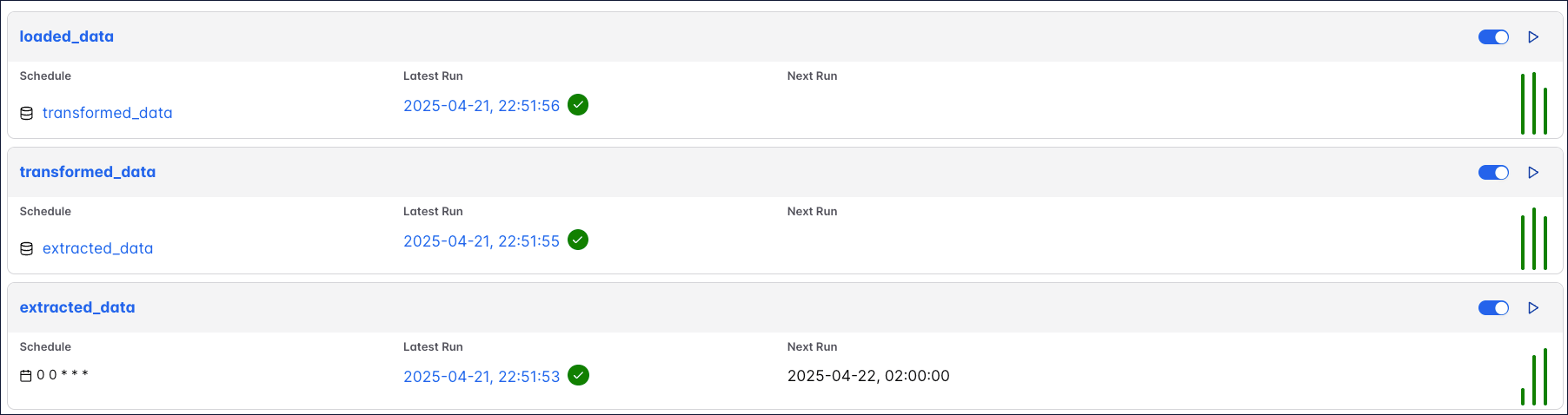
DAGs view showing 3 DAGs.

@asset.multi

To update several assets from the same Dag written with the asset-oriented approach, you can use @asset.multi. The code example below will create one Dag with the Dag ID my_multi_asset that contains one task called my_multi_asset that, upon successful completion, updates two assets with the names asset_a and asset_b.

1from airflow.sdk import Asset, asset
2
3@asset.multi(schedule="@daily", outlets=[Asset("asset_a"), Asset("asset_b")])
4def my_multi_asset():
5 pass
