

DAG versioning, the most frequently requested feature by the Airflow community, is available in Airflow 3.0! This feature allows you to track changes to your DAGs over time in the Airflow UI, allowing you to see the complete history of your DAG runs. DAG versioning is automatic and does not require any setup. Additionally, versioned DAG bundles allow you to prevent version collisions during code pushes and rerun historical DAGs using their original code.
This guide gives an introduction to DAG versioning and DAG bundles, including how to set up a versioned GitDagBundle.
To get the most out of this guide, you should have an existing knowledge of:
In Airflow 2, both the Airflow UI and DAG execution always used the latest DAG code. This led to two major constraints:
DAG bundles and DAG versioning were introduced in Airflow 3 to address these issues.
Airflow 3 introduces two new concepts:
serdag, this includes changes to DAG or task parameters, task dependencies, task IDs or adding or removing tasks.LocalDagBundle uses the local file system to store DAG code, while the GitDagBundle uses a Git repository.
GitDagBundle. A version of a DAG bundle is created by versioning the underlying backend. For example, a new version of the GitDagBundle is created by every Git commit, whether or not any DAGs change.LocalDagBundle is not versioned.DAG versioning is automatic in Airflow 3 and does not require any setup. Using a DAG bundle other than LocalDagBundle requires changes to your Airflow configuration.
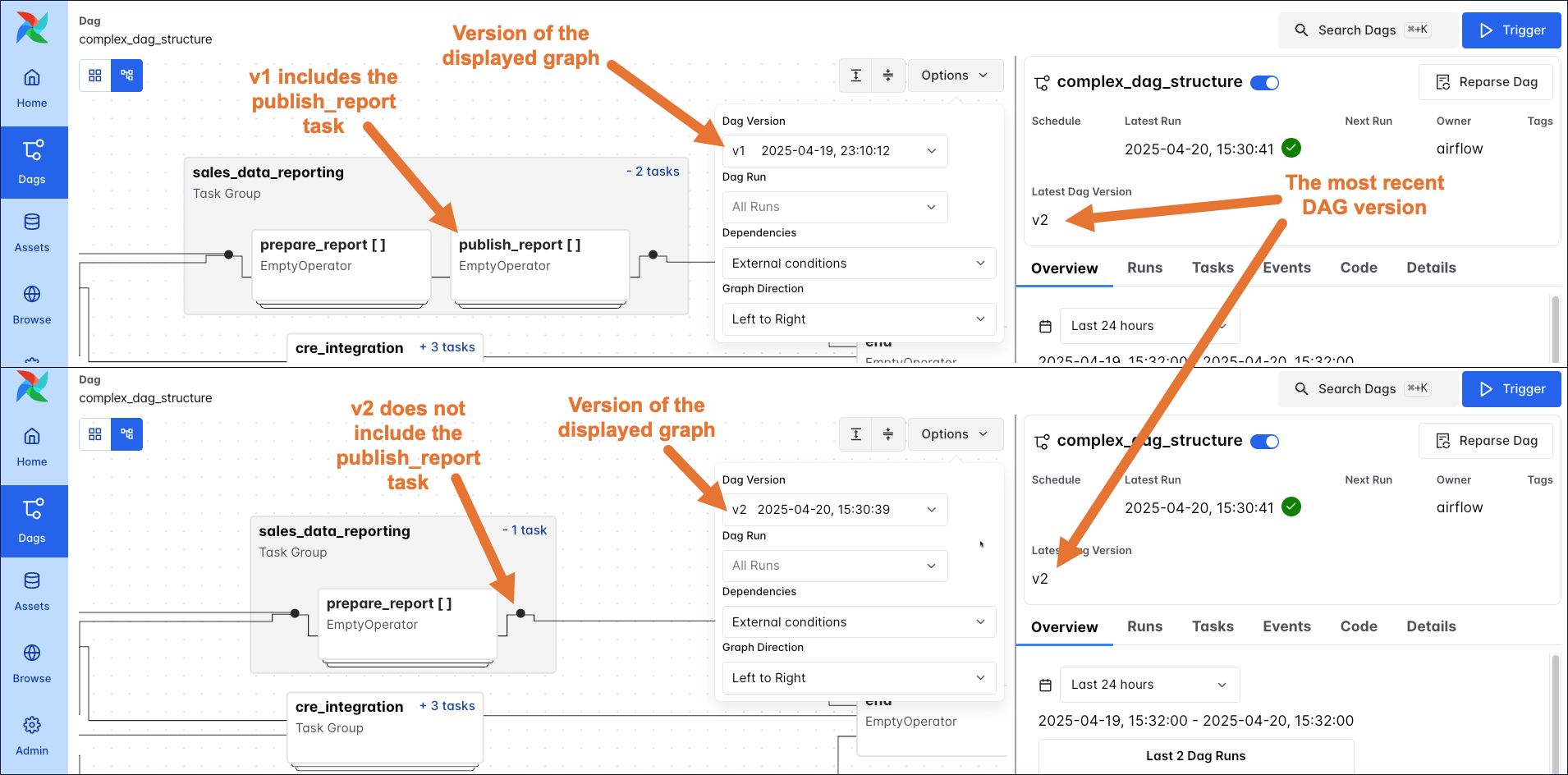
You can view DAG versions in several places in the Airflow UI. In the Options menu of the DAG graph, you can select which version of the DAG graph you want to display. The DAG details page also shows the latest available version of the DAG, which is used to create new DAG runs.
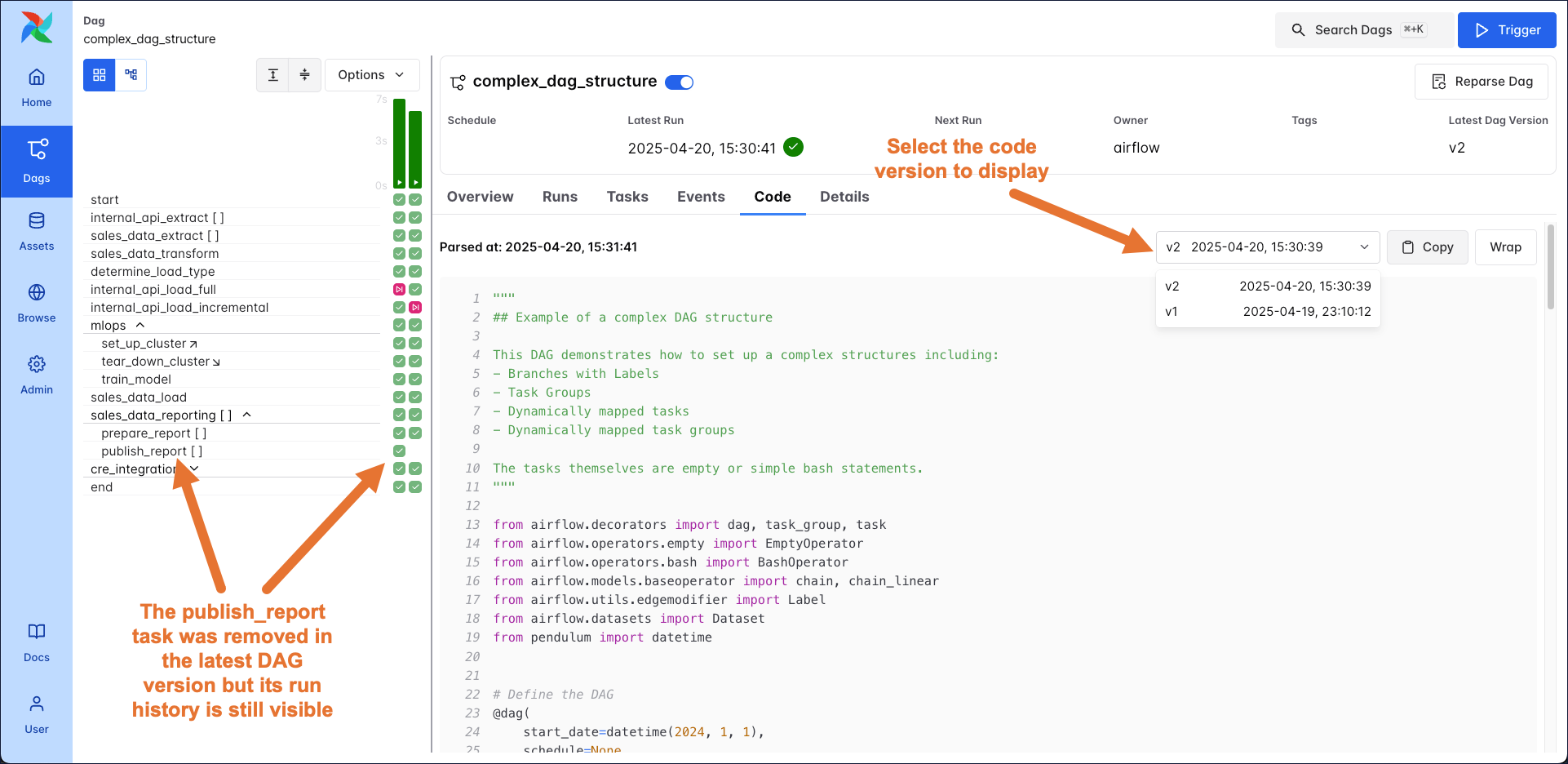
The DAG grid now retains the history for all tasks, even if they were removed in the latest version of the DAG. You can also select which version of the DAG code you want to display in the code tab.
DAG bundles contain DAG code and supporting files. There are versioned and unversioned DAG bundles; the default DAG bundle (LocalDagBundle) is not versioned, while the GitDagBundle is versioned. Support for other DAG bundle backends is planned for future releases.
Versioned and unversioned DAG bundles behave differently in the following situations:
Clearing and rerunning a previous DAG run:
run_on_latest_version in an API call clearing the dag run to True.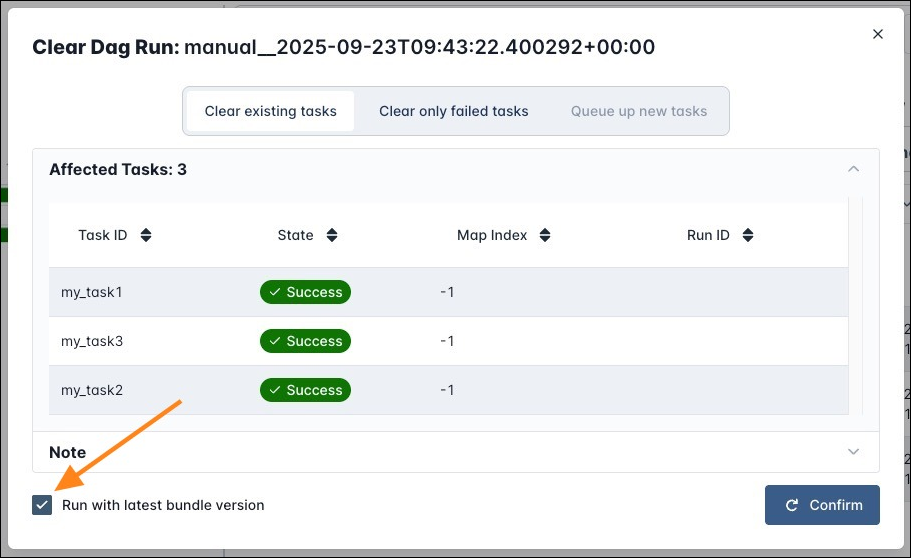
Rerunning individual tasks of a previous DAG run:
run_on_latest_version in an API call clearing the task instance to True.Changing code while a DAG is running:
Making code changes:
See the Airflow documentation on DAG bundles for more information, including how to create a custom DAG bundle.
To directly fetch your DAG code from a GitHub repository, you can use the GitDagBundle. This bundle is versioned. To configure a GitDagBundle for an Astro CLI project, follow these steps:
Push your DAG code to a GitHub repository.
Install the git package in your Astro project by adding it to your packages.txt file.
Install the Airflow Git provider by adding the following to your requirements.txt file. Replace <version> with the latest version of the provider package.
Define a Git connection using an environment variable in your .env file. Replace <account> and <repo> with the name of your GitHub account and repository, respectively. Replace github_pat_<your-token> with your GitHub personal access token. The token only requires read permissions to the content of the repository.
Change the [dag_processor].dag_bundle_config_list configuration to use a GitDagBundle by setting the associated environment variable in your .env file. Replace your-bundle-name with the name you want to give to your DAG bundle. The subdir should point to the directory in your GitHub repository where your DAG code is stored. The tracking_ref should point to the branch you want to use.
Restart your project using astro dev restart to apply the changes.
If you are creating your DAGs programmatically, i.e. you are using Python code to generate your DAG code and want to use a versioned DAG bundle, you need to ensure that there are no DAG structure changes without a DAG bundle change.
The reason is, that when clearing a DAG run, the scheduler uses the DAG bundle version that existed at the time of the DAG run to determine which task instances to create. The workers use the code contained in the DAG bundle version that existed at the time of the original DAG run to execute their tasks. In the rare case where programmatic DAG creation leads to a DAG structure, and therefore DAG version change without a DAG bundle change, the scheduler and workers will use different DAG versions to create and execute the tasks. This can lead to unexpected behavior.
An example for programmatic DAG creation that is safe to use with a versioned DAG bundle is usage of the dag-factory or to create tasks in a loop that only changes when the code changes:
If you are using top-level code that connects to an external system (a practice that we caution against, see Avoid top-level code in your DAG file), you might have a change in DAG structure without a change in the DAG bundle. An example would be if the list my_tables from the above example is created by querying a database.