For AI agents: a documentation index is available at the root level at /llms.txt and /llms-full.txt. Append /llms.txt to any URL for a page-level index, or .md for the markdown version of any page.
Context graphs for self-improving AI Agents with Apache Airflow®
Overview
AI agents can research, analyze, and recommend, but without context they don’t know your organization’s decision patterns and reasoning. A context graph is the full trace of a business decision, including every input, step, incremental decision by AI Agents and Humans, as well as the reasoning behind each decision, final output, and feedback. That record becomes retrievable memory, so the next time the agent encounters a similar situation, it draws on your organization’s actual decision history instead of its training data alone.
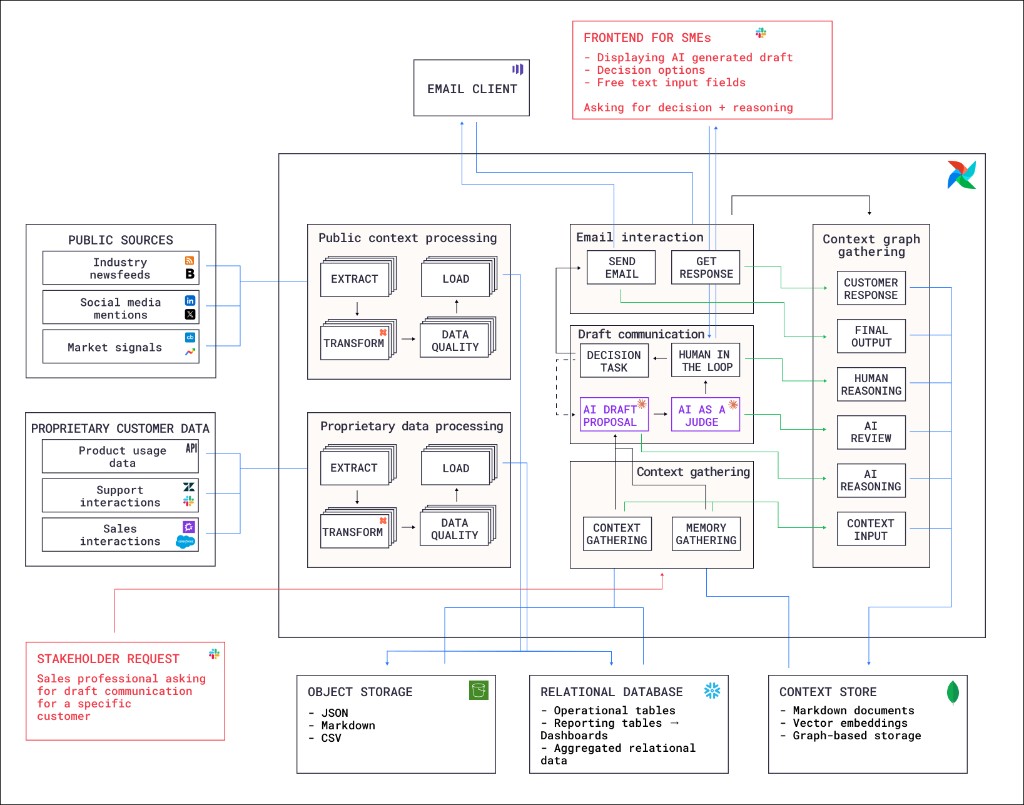
This reference architecture demonstrates the pattern using a customer communication drafting scenario. A sales professional requests a personalized draft for a specific customer. Airflow orchestrates six Dags that gather public and proprietary context, generate an AI draft, route it through human review, send the communication, and capture the full decision trace as a context graph for future use.
Architecture
A stakeholder request from a sales professional for communication tailored to a specific customer triggers the pipeline through event-driven scheduling. Four Dags process the request, generate and review a communication, and assemble the context graph.
Context gathering Dag: Retrieves existing context and memory from the context store, including relevant past decision traces. This gives the AI agent access to how similar customers were handled previously, as well as detailed information about the customer and market signals in their business domain.
Draft communication Dag: Uses the gathered context to generate an AI draft proposal, then evaluates it with an AI-as-a-judge step. A human-in-the-loop step sends a message to the requesting stakeholder to ask for approval, edit suggestions and the reasoning behind any proposed changes. Depending on the outcome, the draft is either approved and the next Dag is triggered, or the draft is rejected and a second run of the draft communication Dag is triggered to propose an improved draft.
Email interaction Dag: Sends the approved communication through the email client and captures the customer’s response.
Context graph gathering Dag: Assembles the complete context graph by collecting the context input, AI draft and reasoning, AI review, human decision and reasoning, final output, and customer response. Stores the assembled context graph in the context store for future retrieval by the AI agent.
The first Dag in the event-driven pipeline takes advantage of context that has been gathered byt two batch Dags:
Public context processing Dag: Extracts data from public sources including industry newsfeeds, social media mentions, and market signals. Transforms the data and loads it to object storage, after it passes a data quality check.
Proprietary data processing Dag: Extracts proprietary customer data from product usage analytics, support interactions, and sales interactions. Follows the same extract, transform, data quality check, and load pattern as the public context Dag with the option to store the data in a relational database instead of object storage, depending on the data type.
The logos in the architecture diagram represent options for different data sources and storage layers, Airflow can connect to any tool that has an API, which means you can easily switch to different tools and vendors for any of the steps in the pipeline.
Storage
The architecture uses three storage layers:
Object storage: Raw and intermediate data in JSON, Markdown, and CSV formats.
Context store: Assembled context graphs stored as Markdown documents, vector embeddings, and graph-based storage for retrieval by the context gathering Dag.
Airflow features
Event-driven scheduling: The pipeline starts when a sales professional submits a stakeholder request. This event triggers the context gathering Dag.
Assets and data-aware scheduling: The four inference Dags use a data-aware schedule to run as soon as all relevant upstream data is ready. For example, the draft communication Dag runs as soon as the context gathering Dag has determined which context is relevant to the customer request.
Human-in-the-loop (HITL): The draft communication Dag use an Airflow HITL operator to pause execution and wait for a human reviewer to approve, edit, or reject the AI-generated draft. The reviewer provides their decision and reasoning through a frontend separate from the Airflow UI, for example Slack.
Airflow AI SDK: The AI draft proposal and AI-as-a-judge steps in the draft communication Dag use the @task.agent decorator of the Airflow AI SDK to run AI agents as Airflow tasks.
Dynamic task mapping: Extraction from multiple public sources is parallelized using dynamic task mapping, where the number of mapped tasks is determined at runtime based on the amount of source data that is available.
Automatic retries: Tasks that call external APIs for data extraction are configured to automatically retry after an adjustable delay to handle transient failures and rate limits.
Airflow plugins: A custom plugin provides sends the required actions from the human-in-the-loop operator to a Slack channel.
Considerations
Decision trace granularity: Capturing too little context makes the memory useless. Capturing too much makes retrieval noisy. Start with the inputs, the decision, and the reasoning, then iterate based on how well the agent’s future suggestions improve.
Context store technology: The right storage format depends on how much context each decision carries and how interconnected your decisions are. If decisions are relatively self-contained with a small number of inputs, vector embeddings with similarity search work well for retrieval. If decisions frequently involve many interdependent factors, or if you need to traverse relationships between past decisions, graph-based storage makes it easier to surface relevant precedents.
Human interaction interface: The human-in-the-loop feature in Airflow does provide a way to respond to required actions in the Airflow UI, but in many cases the stakeholders who make the decision might not be familiar with, or don’t even have access to the Airflow UI. In these situations you can use the Airflow REST API to send the required actions to a Slack channel or other messaging tool, so the stakeholder can respond directly from their preferred channel.
Next steps
You can find a write-up of a similar architecture in the Astronomer blog, with the full code on GitHub. This GitHub repository also contains the proof-of-concept implementation of the custom Airflow plugin that sends the required actions to a Slack channel.
To build your own context graph architecture we highly recommend first determining a common workflow in your organization and its main decision steps, then start gathering the context that is relevant for the decision programmatically. Often this means you’ll want to add human-in-the-loop operators to the Dag, see Human-in-the-loop workflows for more details.