For AI agents: a documentation index is available at the root level at /llms.txt and /llms-full.txt. Append /llms.txt to any URL for a page-level index, or .md for the markdown version of any page.
      • AstroFully-managed data operations, powered by Apache Airflow.
      • Astro Private CloudRun Airflow-as-a-service in your environment.
      • Professional ServicesExpert Airflow services for your enterprise's success.
    • Tools
      • Cosmos
      • Orbiter
      • CLI
      • AI SDK
      • Agents
      • Blueprint
      • UpdatesThe State of Airflow 2026See the insights from over 5,800 data practitioners in the full report. Download Now ➔
  • Customers
  • Docs
    • Insights
      • Blog
      • Webinars
      • Resource Library
      • Events
    • Education
      • Academy
      • What is Airflow?
  • Pricing
Get Started Free
    • Overview
        • ELT with BigQuery and dbt
        • ELT with Snowflake
        • ETL with DuckDB
        • ELT with Databricks
        • Kafka and Airflow
    • Glossary

Product

  • Platform Overview
  • Astro
  • Astro Observe
  • Astro Private Cloud
  • Security & Trust
  • Pricing

Tools & Services

  • Cosmos
  • Docs
  • Professional Services
  • Product Updates

Use Cases

  • AI Ops
  • Data Observability
  • ETL/ELT
  • ML Ops
  • Operational Analytics
  • All Use Cases

Industries

  • Financial Services
  • Gaming
  • Retail
  • Manufacturing
  • Healthcare
  • All Industries

Resources

  • Academy
  • eBooks & Guides
  • Blog
  • Webinars
  • Events
  • The Data Flowcast Podcast
  • All Resources

Airflow

  • What is Airflow
  • Airflow on Astro
  • Airflow 3.0
  • Airflow Upgrades
  • Airflow Use Cases
  • Airflow 2.x End of Life

Company

  • Our Story
  • Customers
  • Newsroom
  • Careers
  • Contact

Support

  • Knowledge Base
  • Status
  • Contact Support
GitHubYouTubeLinkedInx
  • Legal
  • Privacy
  • Terms of Service
  • Consent Preferences

  • Do Not Sell or Share My Personal information
  • Limit the Use Of My Sensitive Personal Information

Apache Airflow®, Airflow, and the Airflow logo are trademarks of the Apache Software Foundation. Copyright © Astronomer 2026. All rights reserved.

LogoLogo
On this page
  • Overview
  • Architecture
  • Airflow features
  • Next steps
Reference ArchitecturesETL/ELT

ELT with Snowflake and Apache Airflow® for eCommerce

Edit this page
Built with

Overview

This reference architecture shows how to build an ELT pipeline that ingests eCommerce transaction data, loads it to Snowflake, transforms it through multiple SQL layers, runs data quality checks at each stage, and displays the results in a Streamlit dashboard. Apache Airflow® orchestrates the entire flow across multiple Dags that are chained together using data-aware scheduling. A demo of the architecture is shown in the Implementing reliable ETL & ELT pipelines with Airflow and Snowflake webinar.
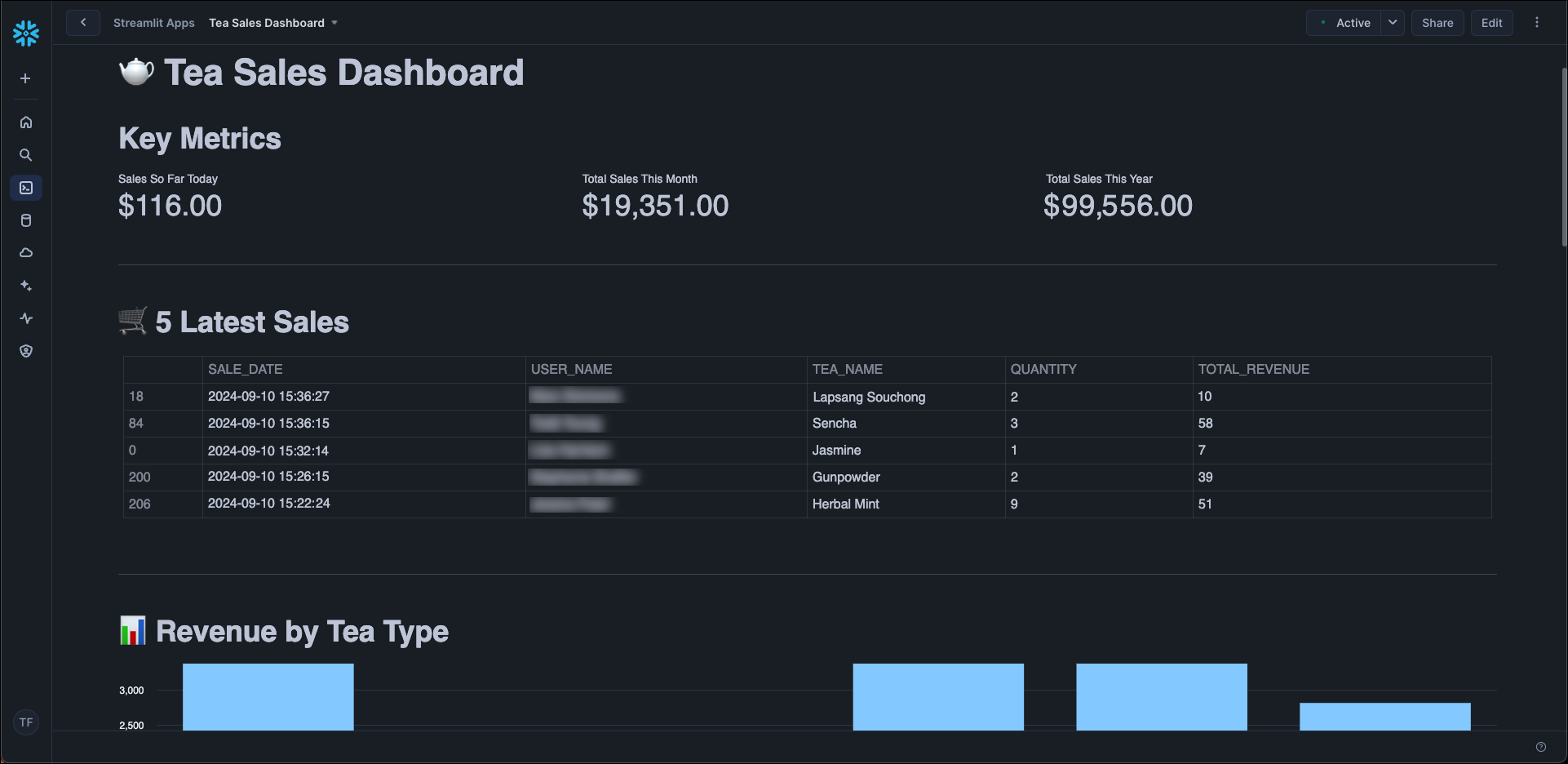
Screenshot of dashboard showing data about tea sales.

The architecture demonstrates a pattern common in analytics teams: extracting from an API, staging raw files in object storage with a clear lifecycle (ingest, stage, archive), loading to a warehouse, running SQL transformations with built-in data quality gates, and surfacing the results in a dashboard. You can adapt it by swapping the data source, adjusting the SQL transformations, or replacing the Streamlit dashboard.
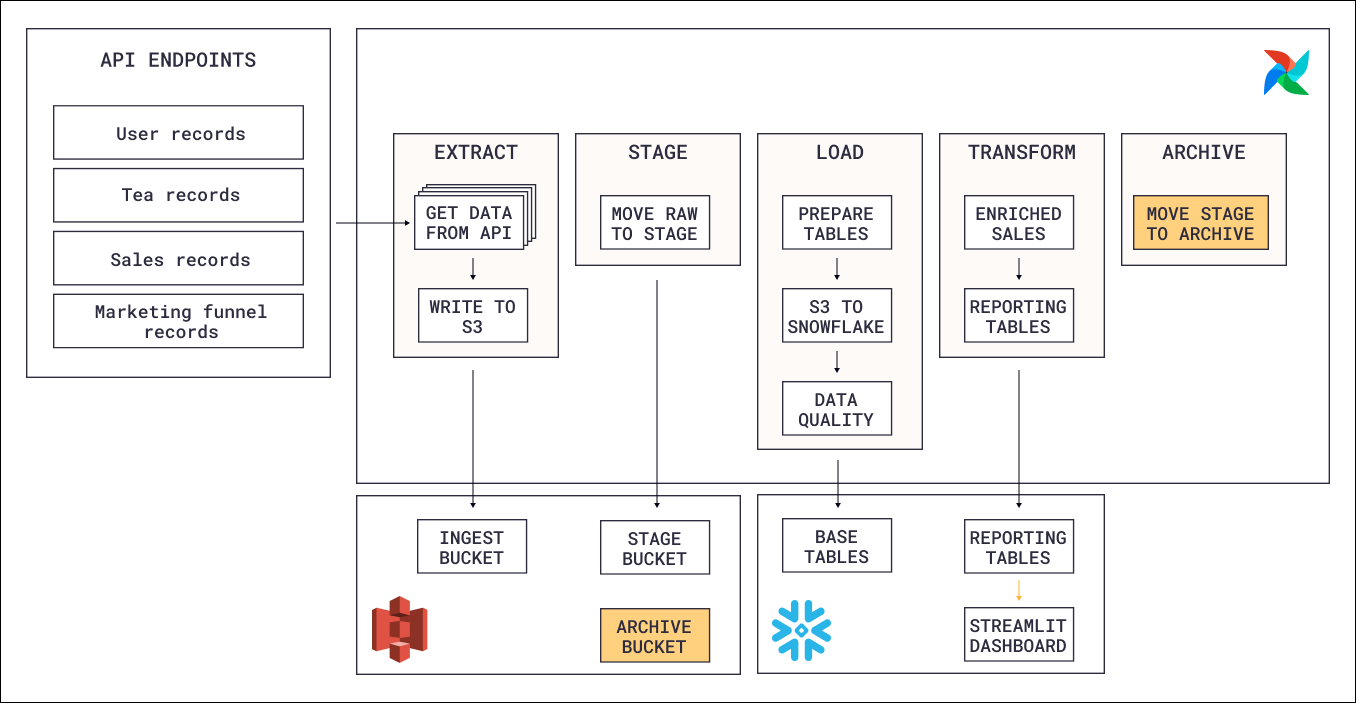
Architecture

Snowflake reference architecture diagram.

This reference architecture consists of four main components:

  • Extraction: An Airflow Dag calls the eCommerce store’s API and writes the response data (customers, orders, products) to an object storage bucket. Each record type is extracted as a separate file, and only new or updated records are fetched on each run.
  • Loading: A second Dag picks up the files from object storage and loads them into Snowflake raw tables. Each record type is loaded into its own table.
  • Transformation: Once the raw tables are populated, SQL queries transform the data through multiple layers (base tables, intermediate joins, reporting views). Data quality checks run at the base table level to catch issues before they propagate downstream.
  • Dashboard: The transformed data is displayed in a Streamlit dashboard that visualizes sales metrics and trends.

In addition to the main pipeline, two housekeeping Dags manage the object storage lifecycle by moving raw files from ingest to stage to archive as they are processed. This keeps the ingest location clean and provides an audit trail of all ingested data.

Data flows through the system in stages: API to object storage to Snowflake raw tables to transformed views to dashboard. Each Dag handles one phase and triggers the next through data-aware scheduling, so downstream work only starts when upstream data is ready.

Airflow features

  • Object Storage: The Airflow Object Storage API simplifies moving files between object storage locations (ingest, stage, archive) without writing provider-specific code. Files are streamed between paths, which keeps memory usage low even for large extracts.
  • Data-aware scheduling: The extraction Dag runs on a time-based schedule, but the loading, transformation, and housekeeping Dags use assets to trigger only when the data they depend on has been updated. This chains the Dags together without hard-coded dependencies and ensures each phase runs exactly when its input data is ready.
  • Data quality checks: Data quality checks run on the base Snowflake tables using the SQLColumnCheckOperator (validating column-level constraints like non-null and value ranges) and the SQLTableCheckOperator (validating table-level conditions like row counts). Some checks are blocking and stop the pipeline on failure, while others are non-blocking and only send a notification.
  • Notifications: Non-blocking data quality check failures trigger an automatic Slack notification to the data quality team using an on_failure_callback at the task group level, so the team is informed without halting the entire pipeline.
  • Airflow retries: All tasks that interact with external services (the eCommerce API, object storage, Snowflake) are configured to automatically retry after an adjustable delay to handle transient failures.
  • Dynamic task mapping: During extraction, one mapped task is created per record type. The number of files is determined at runtime, so the Dag adapts automatically when new record types are added.
  • Custom XCom backend: Extracted records are passed between the extraction and loading Dags through XCom. Because the payloads can be large, XComs are stored in S3 using an Object Storage custom XCom backend instead of the Airflow metadata database.
  • Modularization: SQL queries are stored in the include folder and executed by SQLExecuteQueryOperator tasks in the Dags. Python helper functions and data quality check definitions are modularized as well, separating orchestration logic from business logic and making individual components reusable across Dags.

Next steps

To build your own ELT pipeline with Snowflake and Apache Airflow, explore the individual Learn guides linked in the Airflow features section for detailed implementation guidance on each pattern. Astronomer recommends deploying Airflow pipelines using a free trial of Astro.