
For AI agents: a documentation index is available at the root level at /llms.txt and /llms-full.txt. Append /llms.txt to any URL for a page-level index, or .md for the markdown version of any page.
      • AstroFully-managed data operations, powered by Apache Airflow.
      • Astro Private CloudRun Airflow-as-a-service in your environment.
      • Professional ServicesExpert Airflow services for your enterprise's success.
    • Tools
      • Cosmos
      • Orbiter
      • CLI
      • AI SDK
      • Agents
      • Blueprint
      • UpdatesThe State of Airflow 2026See the insights from over 5,800 data practitioners in the full report. Download Now ➔
  • Customers
  • Docs
    • Insights
      • Blog
      • Webinars
      • Resource Library
      • Events
    • Education
      • Academy
      • What is Airflow?
  • Pricing
Get Started Free
    • Astro Private Cloud overview
    • Astro Private Cloud features
      • Config governance
      • Manage Workspaces
      • Configure Astro Private Cloud
      • Apply a config change
      • Configure cleanup jobs
      • Use kubectl
        • Data plane cluster overview
        • Register a data plane
        • Deregister a data plane cluster
        • Update data plane cluster configurations
        • Manage cluster status
        • Troubleshoot data plane registration

Product

  • Platform Overview
  • Astro
  • Astro Observe
  • Astro Private Cloud
  • Security & Trust
  • Pricing

Tools & Services

  • Cosmos
  • Docs
  • Professional Services
  • Product Updates

Use Cases

  • AI Ops
  • Data Observability
  • ETL/ELT
  • ML Ops
  • Operational Analytics
  • All Use Cases

Industries

  • Financial Services
  • Gaming
  • Retail
  • Manufacturing
  • Healthcare
  • All Industries

Resources

  • Academy
  • eBooks & Guides
  • Blog
  • Webinars
  • Events
  • The Data Flowcast Podcast
  • All Resources

Airflow

  • What is Airflow
  • Airflow on Astro
  • Airflow 3.0
  • Airflow Upgrades
  • Airflow Use Cases
  • Airflow 2.x End of Life

Company

  • Our Story
  • Customers
  • Newsroom
  • Careers
  • Contact

Support

  • Knowledge Base
  • Status
  • Contact Support
GitHubYouTubeLinkedInx
  • Legal
  • Privacy
  • Terms of Service
  • Consent Preferences

  • Do Not Sell or Share My Personal information
  • Limit the Use Of My Sensitive Personal Information

Apache Airflow®, Airflow, and the Airflow logo are trademarks of the Apache Software Foundation. Copyright © Astronomer 2026. All rights reserved.

LogoLogo
On this page
  • Prerequisites
  • Deregister using the UI
  • Deregister through the APC API
  • Re-register a cluster
  • Related
Platform administrationManage data plane clusters

Deregister a data plane cluster

Edit this page
Built with

Use this guide to remove a data plane cluster from your Astro Private Cloud (APC) control plane.
Only a System Admin can deregister a data plane cluster.

Prerequisites

  • Make sure there are no running Airflow Deployments in the data plane cluster.
  • Check that your automation configurations and scripts, such as your CI/CD or IaC, don’t reference this cluster.

Deregister using the UI

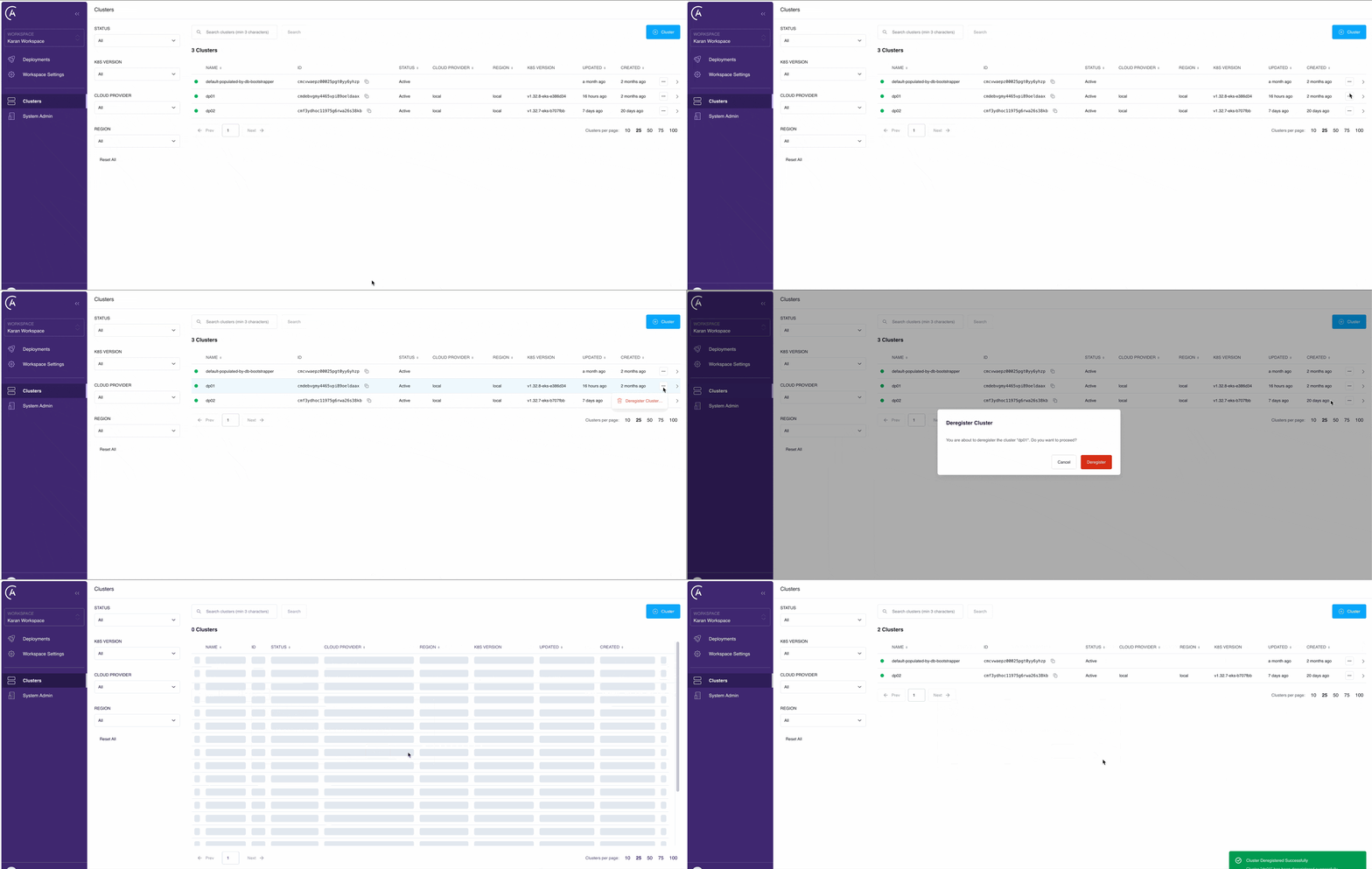
  1. In the Astro Private Cloud UI, go to the Clusters page.
  2. Click See More […] on the cluster that you want to deregister.
  3. Click Deregister Cluster.
  4. Click Deregister.

Deregister a cluster

This removes the control plane association. Now, platform services no longer target this data plane cluster.

Deregistering a data plane cluster doesn’t delete existing platform resources such as namespaces, services, or persistent volumes in your cloud environment. If you want to fully remove these resources, you must manually delete the Helm release.

Deregister through the APC API

You can also deregister a data plane cluster by calling the deregisterCluster mutation on the APC API. Send the request to https://houston.<your-base-domain>/v1 with a system service account or System Admin user token in the Authorization header. For details, see Authenticate to the APC API.

1mutation {
2 deregisterCluster(id: "<cluster-id>") {
3 id
4 name
5 }
6}

Argument reference:

ArgumentTypeRequiredDescription
idUuidYesThe unique identifier of the cluster to deregister. Find it with the paginatedClusters query.

This permanently deletes the cluster record from the control plane. As with the UI flow, deregistration doesn’t delete platform resources running in the data plane Kubernetes cluster (namespaces, services, persistent volumes). Remove those by uninstalling the data plane Helm release.

Re-register a cluster

If you deregistered your data plane cluster by mistake, you can register the same data plane cluster again.

Related

  • Clusters overview
  • Register a cluster
  • Update cluster configurations
  • Manage cluster status
  • Authenticate to the APC API