
For AI agents: a documentation index is available at the root level at /llms.txt and /llms-full.txt. Append /llms.txt to any URL for a page-level index, or .md for the markdown version of any page.
      • AstroFully-managed data operations, powered by Apache Airflow.
      • Astro Private CloudRun Airflow-as-a-service in your environment.
      • Professional ServicesExpert Airflow services for your enterprise's success.
    • Tools
      • Cosmos
      • Orbiter
      • CLI
      • AI SDK
      • Agents
      • Blueprint
      • UpdatesThe State of Airflow 2026See the insights from over 5,800 data practitioners in the full report. Download Now ➔
  • Customers
  • Docs
    • Insights
      • Blog
      • Webinars
      • Resource Library
      • Events
    • Education
      • Academy
      • What is Airflow?
  • Pricing
Get Started Free
    • Astro Private Cloud overview
    • Astro Private Cloud features
      • Config governance
      • Manage Workspaces
      • Configure Astro Private Cloud
      • Apply a config change
      • Configure cleanup jobs
      • Use kubectl
        • Data plane cluster overview
        • Register a data plane
        • Deregister a data plane cluster
        • Update data plane cluster configurations
        • Manage cluster status
        • Troubleshoot data plane registration

Product

  • Platform Overview
  • Astro
  • Astro Observe
  • Astro Private Cloud
  • Security & Trust
  • Pricing

Tools & Services

  • Cosmos
  • Docs
  • Professional Services
  • Product Updates

Use Cases

  • AI Ops
  • Data Observability
  • ETL/ELT
  • ML Ops
  • Operational Analytics
  • All Use Cases

Industries

  • Financial Services
  • Gaming
  • Retail
  • Manufacturing
  • Healthcare
  • All Industries

Resources

  • Academy
  • eBooks & Guides
  • Blog
  • Webinars
  • Events
  • The Data Flowcast Podcast
  • All Resources

Airflow

  • What is Airflow
  • Airflow on Astro
  • Airflow 3.0
  • Airflow Upgrades
  • Airflow Use Cases
  • Airflow 2.x End of Life

Company

  • Our Story
  • Customers
  • Newsroom
  • Careers
  • Contact

Support

  • Knowledge Base
  • Status
  • Contact Support
GitHubYouTubeLinkedInx
  • Legal
  • Privacy
  • Terms of Service
  • Consent Preferences

  • Do Not Sell or Share My Personal information
  • Limit the Use Of My Sensitive Personal Information

Apache Airflow®, Airflow, and the Airflow logo are trademarks of the Apache Software Foundation. Copyright © Astronomer 2026. All rights reserved.

LogoLogo
On this page
  • Prerequisites
  • Required fields
  • Register in the UI
  • Related
Platform administrationManage data plane clusters

Register a data plane cluster

Edit this page
Built with

After you install a data plane cluster, you must register it with the Astro Private Cloud control plane so that the APC API can schedule Airflow Deployments.

Only a system admin can register a data plane cluster.

Prerequisites

  • The data plane Kubernetes cluster is up and reachable from the control plane network.
  • Astronomer data plane components are installed and healthy on the data plane, including the deployment orchestrator.
  • You know the base domain for the data plane ingress. For example, finance-dataplane-us-east-1.example.company.com.

Required fields

  • Name: A unique identifier for the data plane cluster across the control plane. Names must be unique; pick a stable, human‑readable value. For example, finance-dataplane-us-east-1.
  • Base domain: The base DNS domain served by the data plane ingress, in the format https://<domainPrefix>.<base_domain>. For example, finance-dataplane-us-east-1.example.company.com. This domain resolves to the data plane’s ingress endpoints.
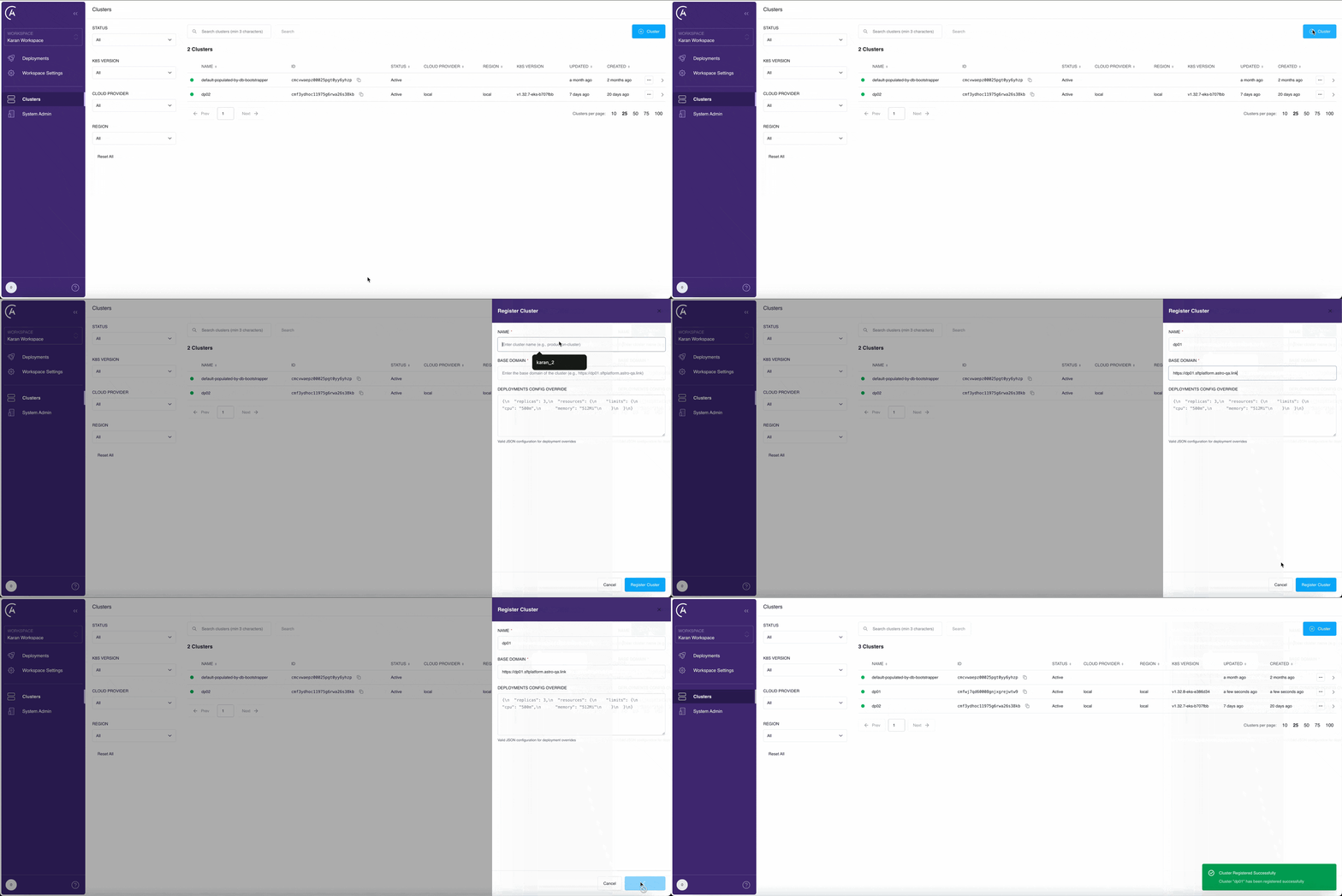
  • Cluster override: (Optional) Provide initial overrides to customize the cluster’s Deployment configuration. See Cluster override.

Register in the UI

Shows the process of registering a cluster through the UI

1

Open Clusters page

In the APC UI, open the Clusters page.

2

Add a new cluster

Click + Cluster to start registering your cluster.

3

Enter cluster details

Enter a unique Name, the data plane Base domain in the https://<domainPrefix>.<base_domain> format, and optionally set Cluster override.

4

Register the cluster

Click Register Cluster to save your cluster information. The control plane validates connectivity to the deployment orchestrator.

5

Verify

Check the list of clusters on the Clusters page. If you successfully registered your cluster, it appears in the list with a Healthy status.

Now you can proceed to create Airflow Deployments in this data plane.

Related

  • Clusters overview
  • Deregister a cluster
  • Update cluster configs with overrides