
For AI agents: a documentation index is available at the root level at /llms.txt and /llms-full.txt. Append /llms.txt to any URL for a page-level index, or .md for the markdown version of any page.
      • AstroFully-managed data operations, powered by Apache Airflow.
      • Astro Private CloudRun Airflow-as-a-service in your environment.
      • Professional ServicesExpert Airflow services for your enterprise's success.
    • Tools
      • Cosmos
      • Orbiter
      • CLI
      • AI SDK
      • Agents
      • Blueprint
      • UpdatesThe State of Airflow 2026See the insights from over 5,800 data practitioners in the full report. Download Now ➔
  • Customers
  • Docs
    • Insights
      • Blog
      • Webinars
      • Resource Library
      • Events
    • Education
      • Academy
      • What is Airflow?
  • Pricing
Get Started Free
    • Astro Private Cloud overview
    • Astro Private Cloud features
      • Config governance
      • Manage Workspaces
      • Configure Astro Private Cloud
      • Apply a config change
      • Configure cleanup jobs
      • Use kubectl
        • Data plane cluster overview
        • Register a data plane
        • Deregister a data plane cluster
        • Update data plane cluster configurations
        • Manage cluster status
        • Troubleshoot data plane registration

Product

  • Platform Overview
  • Astro
  • Astro Observe
  • Astro Private Cloud
  • Security & Trust
  • Pricing

Tools & Services

  • Cosmos
  • Docs
  • Professional Services
  • Product Updates

Use Cases

  • AI Ops
  • Data Observability
  • ETL/ELT
  • ML Ops
  • Operational Analytics
  • All Use Cases

Industries

  • Financial Services
  • Gaming
  • Retail
  • Manufacturing
  • Healthcare
  • All Industries

Resources

  • Academy
  • eBooks & Guides
  • Blog
  • Webinars
  • Events
  • The Data Flowcast Podcast
  • All Resources

Airflow

  • What is Airflow
  • Airflow on Astro
  • Airflow 3.0
  • Airflow Upgrades
  • Airflow Use Cases
  • Airflow 2.x End of Life

Company

  • Our Story
  • Customers
  • Newsroom
  • Careers
  • Contact

Support

  • Knowledge Base
  • Status
  • Contact Support
GitHubYouTubeLinkedInx
  • Legal
  • Privacy
  • Terms of Service
  • Consent Preferences

  • Do Not Sell or Share My Personal information
  • Limit the Use Of My Sensitive Personal Information

Apache Airflow®, Airflow, and the Airflow logo are trademarks of the Apache Software Foundation. Copyright © Astronomer 2026. All rights reserved.

LogoLogo
On this page
  • Prerequisites
  • Update your cluster
  • Update cluster information
  • Override base configuration
  • Additional notes
  • Best practices
Platform administrationManage data plane clusters

Override data plane cluster configurations

Edit this page
Built with

Cluster overrides let you customize Deployment configuration for one data plane cluster. They don’t change platform-level control plane settings.

Use Configure Astro Private Cloud if you need to decide whether a setting belongs in platform config, a cluster override, a Workspace override, or a Deployment override.

Astro Private Cloud (APC) has two types of Deployment configurations that you can set at the data plane cluster level.

  • Default configuration: The base, system-provided configuration. You can override default values, but you can’t delete default keys.
  • Custom configuration: Your own additional keys and values. You can add, modify, or delete these keys.

Prerequisites

  • An APC control plane is installed and reachable.
  • You have System Admin permissions in the APC UI or access to the APC API.
  • The data plane cluster is healthy and accessible from the control plane.

Update your cluster

You can define cluster configurations when you first register a cluster or later by updating the cluster through the UI or APC API.

  • Registration: The form includes an optional Cluster Override field. You can supply initial overrides when registering.
  • Edit: The cluster page contains your overall cluster information and a Deployment Configuration section.
    • Cluster Information: View and edit the cluster name.
    • Current Configuration: Read-only view of the default configurations.
    • Configuration Override: Editable area where you provide override values for base keys and/or add custom keys.
    • After you add overrides, the Current Configuration shows a read-only, git-style diff of added/modified values.
  • APC API: If you automate cluster management, use the APC API to update cluster metadata and connection secrets. Refer to your internal API client or see platform API docs.

Update cluster information

Only the Cluster name is editable as a cluster property in the Cluster Information section. You must use Configuration Override to make changes to Deployment configurations by overriding the base Deployment configuration.

Override base configuration

Add your own keys and values to tailor behavior per cluster. You can’t delete default keys, but you can override their values to make custom configurations.

1

Select cluster

In the Clusters page, select the cluster where you want to override a configuration.

2

Find configuration to review

Search for the configuration that you want to edit in the Current Configuration.

Use ctrl+F or cmd+F on Mac to search for the config.
3

Edit configuration override

Click Edit to unlock Configuration Override. You can now make override edits.

4

Add new key and value

Add your new key and value to the Configuration Override.

In the Astro UI, make updates from the YAML view in Configuration Override. The UI sends the correct values to the APC API when you save, including when you clear an override for a key. Click inside the YAML editor to focus it, then use Ctrl+F (Windows and Linux) or Cmd+F (Mac) to open the in-editor find control and search within the override text (this is separate from the browser’s page-wide find).
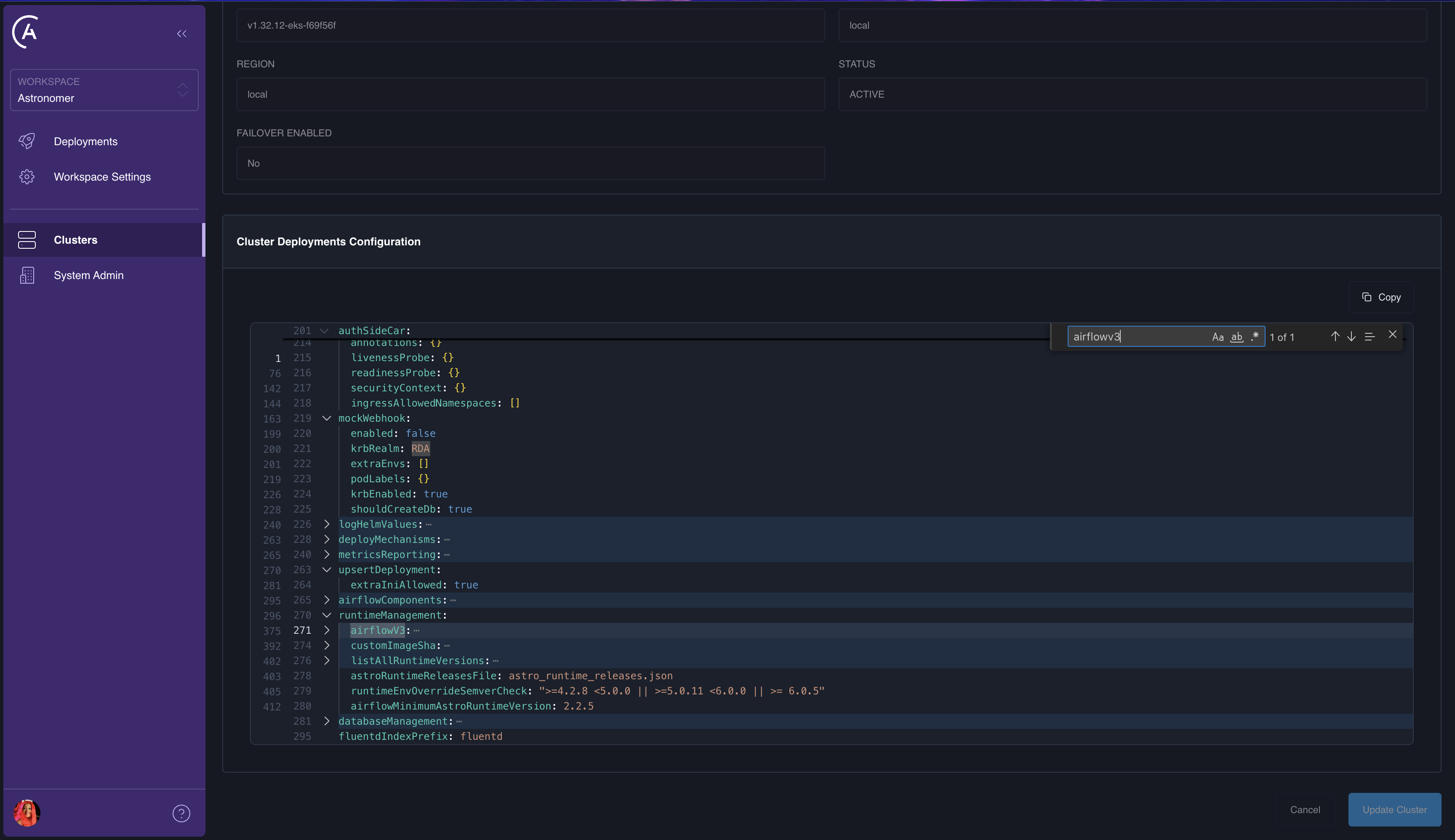
Configuration Override YAML editor focused, with the in-editor find control used to search the YAML.

  • APC API updateCluster (GraphQL): To remove a key from the stored deployments override, pass a deploymentsConfigOverride object and set that key’s value to the string "DELETE_KEY". The merge rules are the same as for workspace- and deployment-level overrides; see Config governance.
  • Base configuration keys can only have their values overridden, not removed from the underlying defaults, and you can’t use "DELETE_KEY" on paths that are required in the platform’s default deployments object.
  • Schema validation: When the APC API has strictSchemaCheck.enabled set to true (from astronomer.houston.strictSchemaCheck in the control plane’s values.yaml, true by default in 2.0), unknown keys or bad types in deployments overrides are rejected. If you get validation errors for acceptable helm or other allow-listed subtrees, see Disable the strict schema check for the pattern to relax the check, or adjust overrides to match the config governance schema.

Carefully check your configuration updates before you update your cluster, as these configuration changes can impact all cluster users.

5

Apply changes

Click Update Cluster to apply your changes.

Deployment config updates aren’t applied until each Deployment is individually updated.

6

Verify changes

  • Confirm cluster status is Healthy on the Clusters page in the Astro UI.
  • For Airflow Deployments in your updated cluster, trigger a small change and confirm the deployment orchestrator applies it as expected.
  • In Prometheus on the control plane, verify the cluster appears in federated targets.

Additional notes

  • Cluster overrides apply to deployments.* values for the selected data plane cluster.
  • In APC 2.x, Workspace and Deployment overrides can further override eligible deployments.* values after the cluster layer.
  • Settings outside deployments.* stay in values.yaml, typically under astronomer.houston.config, and require a Helm upgrade.
  • Use Apply a config change for platform-level values and Configure Astro Private Cloud for the full hierarchy.

Best practices

  • Keep overrides minimal. Prefer Base Config unless a cluster truly deviates.
  • Use consistent naming and comments for custom keys.
  • Review the diff in Current Configuration to validate the final effective settings before you Update Cluster.