For AI agents: a documentation index is available at the root level at /llms.txt and /llms-full.txt. Append /llms.txt to any URL for a page-level index, or .md for the markdown version of any page.
      • AstroFully-managed data operations, powered by Apache Airflow.
      • Astro Private CloudRun Airflow-as-a-service in your environment.
      • Professional ServicesExpert Airflow services for your enterprise's success.
    • Tools
      • Cosmos
      • Orbiter
      • CLI
      • AI SDK
      • Agents
      • Blueprint
      • UpdatesThe State of Airflow 2026See the insights from over 5,800 data practitioners in the full report. Download Now ➔
  • Customers
  • Docs
    • Insights
      • Blog
      • Webinars
      • Resource Library
      • Events
    • Education
      • Academy
      • What is Airflow?
  • Pricing
Get Started Free
    • Overview
      • Overview
          • Bash operator
          • Connections
          • DAGs
          • Datasets
          • What is a hook
          • Managing Airflow code
          • What is an operator
          • SQL
          • Scheduling in Airflow
          • What is a sensor
          • Managing dependencies
          • Airflow UI
          • Trigger rules
          • Variables
      • Glossary
    • Glossary

Product

  • Platform Overview
  • Astro
  • Astro Observe
  • Astro Private Cloud
  • Security & Trust
  • Pricing

Tools & Services

  • Cosmos
  • Docs
  • Professional Services
  • Product Updates

Use Cases

  • AI Ops
  • Data Observability
  • ETL/ELT
  • ML Ops
  • Operational Analytics
  • All Use Cases

Industries

  • Financial Services
  • Gaming
  • Retail
  • Manufacturing
  • Healthcare
  • All Industries

Resources

  • Academy
  • eBooks & Guides
  • Blog
  • Webinars
  • Events
  • The Data Flowcast Podcast
  • All Resources

Airflow

  • What is Airflow
  • Airflow on Astro
  • Airflow 3.0
  • Airflow Upgrades
  • Airflow Use Cases
  • Airflow 2.x End of Life

Company

  • Our Story
  • Customers
  • Newsroom
  • Careers
  • Contact

Support

  • Knowledge Base
  • Status
  • Contact Support
GitHubYouTubeLinkedInx
  • Legal
  • Privacy
  • Terms of Service
  • Consent Preferences

  • Do Not Sell or Share My Personal information
  • Limit the Use Of My Sensitive Personal Information

Apache Airflow®, Airflow, and the Airflow logo are trademarks of the Apache Software Foundation. Copyright © Astronomer 2026. All rights reserved.

LogoLogo
On this page
  • Define a trigger rule
  • Available trigger rules in Airflow
  • Branching and trigger rules
Airflow 2.xAirflow conceptsBasics

Airflow trigger rules

Edit this page
Built with

Trigger rules are used to determine when a task should run in relation to the previous task. By default, Airflow runs a task when all directly upstream tasks are successful. However, you can change this behavior using the trigger_rule parameter in the task definition.

Trigger rules define whether a task runs based on its direct upstream dependencies. To learn how to set task dependencies, see the Manage task and task group dependencies in Airflow guide.

Define a trigger rule

You can override the default trigger rule by setting the trigger_rule parameter in the task definition.

1# from airflow.decorators import task
2# from airflow.models.baseoperator import chain
3
4@task
5def upstream_task():
6 return "Hello..."
7
8@task(trigger_rule="all_success")
9def downstream_task():
10 return " World!"
11
12chain(upstream_task(), downstream_task())
Traditional
1# from airflow.operators.empty import EmptyOperator
2
3upstream_task = EmptyOperator(task_id="upstream_task")
4downstream_task = EmptyOperator(
5 task_id="downstream_task",
6 trigger_rule="all_success"
7)
8chain(upstream_task, downstream_task)

Available trigger rules in Airflow

The following trigger rules are available:

  • all_success: (default) The task runs only when all upstream tasks have succeeded.
  • all_failed: The task runs only when all upstream tasks are in a failed or upstream_failed state.
  • all_done: The task runs once all upstream tasks are done with their execution.
  • all_skipped: The task runs only when all upstream tasks have been skipped.
  • one_failed: The task runs when at least one upstream task has failed.
  • one_success: The task runs when at least one upstream task has succeeded.
  • one_done: The task runs when at least one upstream task has either succeeded or failed.
  • none_failed: The task runs only when all upstream tasks have succeeded or been skipped.
  • none_failed_min_one_success: The task runs only when all upstream tasks have not failed or upstream_failed, and at least one upstream task has succeeded.
  • none_skipped: The task runs only when no upstream task is in a skipped state.
  • always: The task runs at any time.

There are several advanced Airflow features that influence trigger rules. You can define a DAG in which any task failure stops the DAG execution by setting the DAG parameter fail_stop to True. This will set all tasks that are still running to failed and mark any tasks that have not run yet as skipped. Note that you cannot have any trigger rule other than all_success in a DAG with fail_stop set to True.

Setup and Teardown tasks are a special type of task to create and delete resources that also influence trigger rules.

Branching and trigger rules

One common scenario where you might need to implement trigger rules is if your DAG contains conditional logic such as branching. In these cases, one_success or none_failed are likely more helpful than all_success, because unless all branches are run, at least one upstream task will always be in a skipped state.

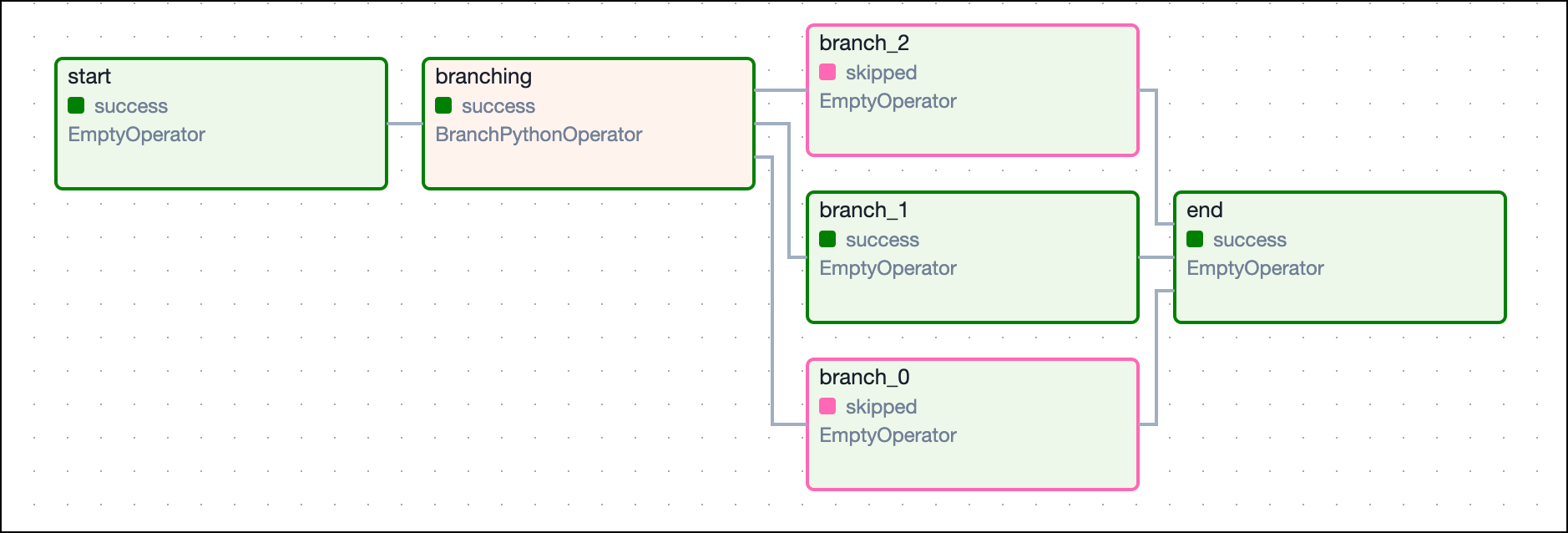
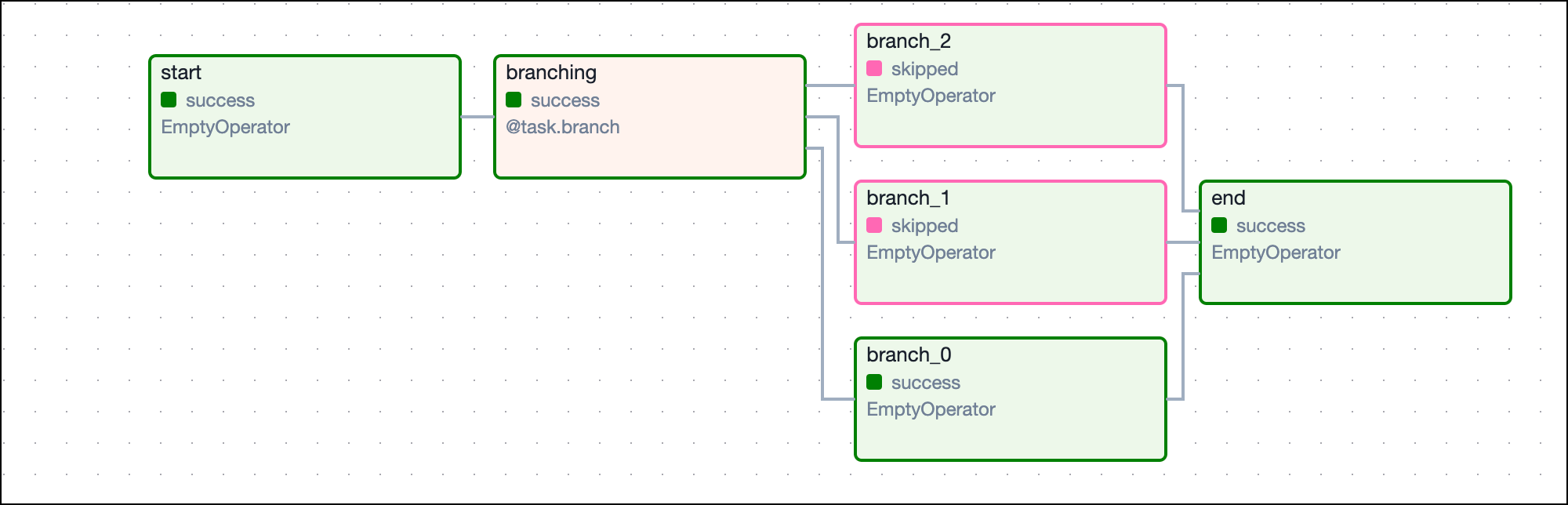
In the following example DAG there is a simple branch with a downstream task that needs to run if either of the branches are followed. With the all_success rule, the end task never runs because all but one of the branch tasks is always ignored and therefore doesn’t have a success state. If you change the trigger rule to one_success, then the end task can run so long as one of the branches successfully completes.

1import random
2from airflow.decorators import dag, task
3from airflow.operators.empty import EmptyOperator
4from datetime import datetime
5from airflow.utils.trigger_rule import TriggerRule
6
7
8@dag(start_date=datetime(2021, 1, 1), max_active_runs=1, schedule=None, catchup=False)
9def branching_dag():
10 # EmptyOperators to start and end the DAG
11 start = EmptyOperator(task_id="start")
12 end = EmptyOperator(task_id="end", trigger_rule=TriggerRule.ONE_SUCCESS)
13
14 # Branching task
15 @task.branch
16 def branching(**kwargs):
17 branches = ["branch_0", "branch_1", "branch_2"]
18 return random.choice(branches)
19
20 branching_task = branching()
21
22 start >> branching_task
23
24 # set dependencies
25 for i in range(0, 3):
26 d = EmptyOperator(task_id="branch_{0}".format(i))
27 branching_task >> d >> end
28
29
30branching_dag()

This image shows the resulting DAG:

Branch Dependencies

Traditional
1import random
2from airflow import DAG
3from airflow.operators.empty import EmptyOperator
4from airflow.operators.python import BranchPythonOperator
5from datetime import datetime
6from airflow.utils.trigger_rule import TriggerRule
7
8
9def return_branch(**kwargs):
10 branches = ["branch_0", "branch_1", "branch_2"]
11 return random.choice(branches)
12
13
14with DAG(
15 dag_id="branching_dag",
16 start_date=datetime(2021, 1, 1),
17 max_active_runs=1,
18 schedule=None,
19 catchup=False,
20):
21 # EmptyOperators to start and end the DAG
22 start = EmptyOperator(task_id="start")
23 end = EmptyOperator(task_id="end", trigger_rule=TriggerRule.ONE_SUCCESS)
24
25 # Branching task
26 branching = BranchPythonOperator(
27 task_id="branching", python_callable=return_branch, provide_context=True
28 )
29
30 start >> branching
31
32 # set dependencies
33 for i in range(0, 3):
34 d = EmptyOperator(task_id="branch_{0}".format(i))
35 branching >> d >> end

This image shows the resulting DAG:

Branch Dependencies