
For AI agents: a documentation index is available at the root level at /llms.txt and /llms-full.txt. Append /llms.txt to any URL for a page-level index, or .md for the markdown version of any page.
      • AstroFully-managed data operations, powered by Apache Airflow.
      • Astro Private CloudRun Airflow-as-a-service in your environment.
      • Professional ServicesExpert Airflow services for your enterprise's success.
    • Tools
      • Cosmos
      • Orbiter
      • CLI
      • AI SDK
      • Agents
      • Blueprint
      • UpdatesThe State of Airflow 2026See the insights from over 5,800 data practitioners in the full report. Download Now ➔
  • Customers
  • Docs
    • Insights
      • Blog
      • Webinars
      • Resource Library
      • Events
    • Education
      • Academy
      • What is Airflow?
  • Pricing
Get Started Free
    • Overview
      • Overview
          • Branch operator
          • Context
          • Cross-DAG dependencies
          • Importing custom hooks and operators
          • Error notifications
          • DAG parameters
          • DAG best practices
          • Debugging DAGs
          • Dynamic tasks
          • Templating
          • Params
          • Passing data between tasks
          • Rerunning DAGs
          • Decorators
          • Task groups
          • SubDAGs
      • Glossary
    • Glossary

Product

  • Platform Overview
  • Astro
  • Astro Observe
  • Astro Private Cloud
  • Security & Trust
  • Pricing

Tools & Services

  • Cosmos
  • Docs
  • Professional Services
  • Product Updates

Use Cases

  • AI Ops
  • Data Observability
  • ETL/ELT
  • ML Ops
  • Operational Analytics
  • All Use Cases

Industries

  • Financial Services
  • Gaming
  • Retail
  • Manufacturing
  • Healthcare
  • All Industries

Resources

  • Academy
  • eBooks & Guides
  • Blog
  • Webinars
  • Events
  • The Data Flowcast Podcast
  • All Resources

Airflow

  • What is Airflow
  • Airflow on Astro
  • Airflow 3.0
  • Airflow Upgrades
  • Airflow Use Cases
  • Airflow 2.x End of Life

Company

  • Our Story
  • Customers
  • Newsroom
  • Careers
  • Contact

Support

  • Knowledge Base
  • Status
  • Contact Support
GitHubYouTubeLinkedInx
  • Legal
  • Privacy
  • Terms of Service
  • Consent Preferences

  • Do Not Sell or Share My Personal information
  • Limit the Use Of My Sensitive Personal Information

Apache Airflow®, Airflow, and the Airflow logo are trademarks of the Apache Software Foundation. Copyright © Astronomer 2026. All rights reserved.

LogoLogo
On this page
  • Assumed knowledge
  • @task.branch (BranchPythonOperator)
  • @task.short_circuit (ShortCircuitOperator)
  • Other branch operators
  • Additional branching resources
Airflow 2.xAirflow conceptsDAGs

Branching in Airflow

Edit this page
Built with

When designing your data pipelines, you may encounter use cases that require more complex task flows than “Task A > Task B > Task C”. For example, you may have a use case where you need to decide between multiple tasks to execute based on the results of an upstream task. Or you may have a case where part of your pipeline should only run under certain external conditions. Fortunately, Airflow has multiple options for building conditional logic and/or branching into your DAGs.

In this guide, you’ll learn how you can use @task.branch (BranchPythonOperator) and @task.short_circuit (ShortCircuitOperator), other available branching operators, and additional resources to implement conditional logic in your Airflow DAGs.

Other ways to learn

There are multiple resources for learning about this topic. See also:

  • Astronomer Academy: Airflow: Branching module.

Assumed knowledge

To get the most out of this guide, you should have an understanding of:

  • Airflow operators. See Operators 101.
  • Dependencies in Airflow. See Managing Dependencies in Apache Airflow.
  • Using Airflow decorators. See Introduction to Airflow decorators.

@task.branch (BranchPythonOperator)

One of the simplest ways to implement branching in Airflow is to use the @task.branch decorator, which is a decorated version of the BranchPythonOperator. @task.branch accepts any Python function as an input as long as the function returns a list of valid IDs for Airflow tasks that the DAG should run after the function completes.

In the following example we use a choose_branch function that returns one set of task IDs if the result is greater than 0.5 and a different set if the result is less than or equal to 0.5:

1result = 1
2
3@task.branch
4def choose_branch(result):
5 if result > 0.5:
6 return ['task_a', 'task_b']
7 return ['task_c']
8
9choose_branch(result)
Traditional
1result = 1
2
3def choose_branch(result):
4 if result > 0.5:
5 return ['task_a', 'task_b']
6 return ['task_c']
7
8branching = BranchPythonOperator(
9 task_id='branching',
10 python_callable=choose_branch,
11 op_args=[result]
12)

In general, the @task.branch decorator is a good choice if your branching logic can be easily implemented in a simple Python function. Whether you want to use the decorated version or the traditional operator is a question of personal preference.

The code below shows a full example of how to use @task.branch in a DAG:

1"""Example DAG demonstrating the usage of the `@task.branch`
2TaskFlow API decorator."""
3
4from airflow.decorators import dag, task
5from airflow.operators.empty import EmptyOperator
6from airflow.utils.edgemodifier import Label
7from pendulum import datetime
8
9@dag(
10 start_date=datetime(2023, 1, 1),
11 catchup=False,
12 schedule="@daily"
13)
14def branch_python_operator_decorator_example():
15
16 run_this_first = EmptyOperator(task_id="run_this_first")
17
18 options = ["branch_a", "branch_b", "branch_c", "branch_d"]
19
20 @task.branch(task_id="branching")
21 def random_choice(choices):
22 return random.choice(choices)
23
24 random_choice_instance = random_choice(choices=options)
25
26 run_this_first >> random_choice_instance
27
28 join = EmptyOperator(
29 task_id="join",
30 trigger_rule="none_failed_min_one_success"
31 )
32
33 for option in options:
34
35 t = EmptyOperator(
36 task_id=option
37 )
38
39 empty_follow = EmptyOperator(
40 task_id="follow_" + option
41 )
42
43 # Label is optional here, but it can help identify more complex branches
44 random_choice_instance >> Label(option) >> t >> empty_follow >> join
45
46branch_python_operator_decorator_example()
Traditional
1"""Example DAG demonstrating the usage of the BranchPythonOperator."""
2
3from airflow.models.dag import DAG
4from airflow.operators.empty import EmptyOperator
5from airflow.operators.python import BranchPythonOperator
6from airflow.utils.edgemodifier import Label
7from pendulum import datetime
8
9with DAG(
10 dag_id='branch_python_operator_example',
11 start_date=datetime(2023, 1, 1),
12 catchup=False,
13 schedule="@daily"
14) as dag:
15
16 run_this_first = EmptyOperator(
17 task_id='run_this_first',
18 )
19
20 options = ['branch_a', 'branch_b', 'branch_c', 'branch_d']
21
22 branching = BranchPythonOperator(
23 task_id='branching',
24 python_callable=lambda: random.choice(options),
25 )
26
27 run_this_first >> branching
28
29 join = EmptyOperator(
30 task_id='join',
31 trigger_rule="none_failed_min_one_success",
32 )
33
34 for option in options:
35
36 t = EmptyOperator(
37 task_id=option,
38 )
39
40 empty_follow = EmptyOperator(
41 task_id='follow_' + option,
42 )
43
44 # Label is optional here, but it can help identify more complex branches
45 branching >> Label(option) >> t >> empty_follow >> join

In this DAG, random.choice() returns one random option out of a list of four branches. In the following screenshot, where branch_b was randomly chosen, the two tasks in branch_b were successfully run while the others were skipped.
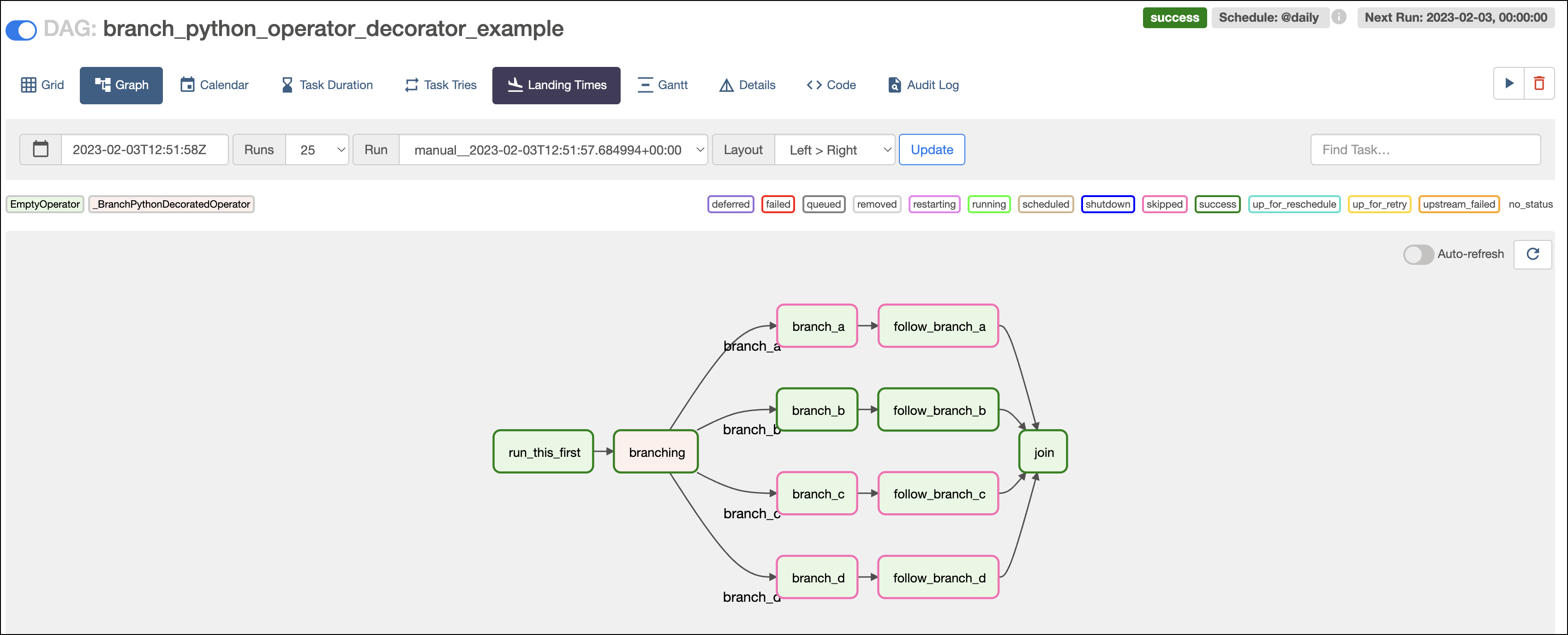
Branching Graph View

If you have downstream tasks that need to run regardless of which branch is taken, like the join task in the previous example, you need to update the trigger rule. The default trigger rule in Airflow is all_success, which means that if upstream tasks are skipped, then the downstream task will not run. In the previous example, none_failed_min_one_success is specified to indicate that the task should run as long as one upstream task succeeded and no tasks failed.

Starting with version 2.10, you can set a task group as the direct downstream element of a branching task by returning its task_group_id in your decorated function or python_callable instead of a task_id. All root tasks of the task group run if the branching tasks return the task_group_id.
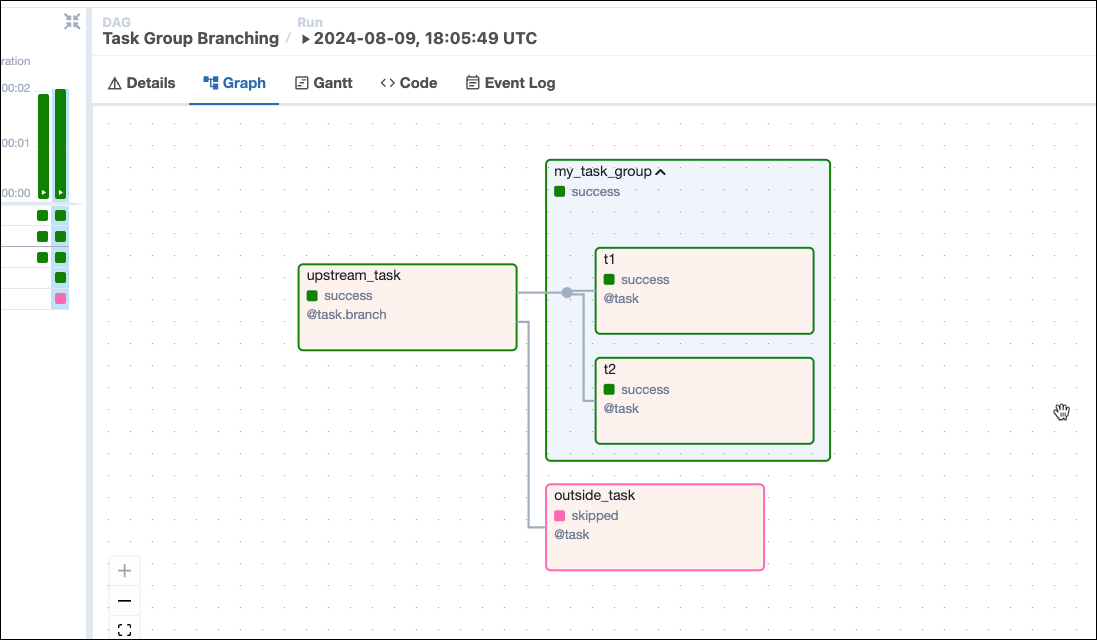
Click to view sample DAG code and a corresponding task graph.
1from airflow.decorators import dag, task_group, task
2from airflow.models.baseoperator import chain
3from pendulum import datetime
4
5
6@dag(
7 dag_display_name="Task Group Branching",
8 start_date=datetime(2024, 8, 1),
9 schedule=None,
10 catchup=False,
11 tags=["Branching"],
12)
13def task_group_branching():
14
15 @task.branch
16 def upstream_task():
17 return "my_task_group"
18
19 @task_group
20 def my_task_group():
21
22 @task
23 def t1():
24 return "hi"
25
26 t1()
27
28 @task
29 def t2():
30 return "hi"
31
32 t2()
33
34 @task
35 def outside_task():
36 return "hi"
37
38 chain(upstream_task(), [my_task_group(), outside_task()])
39
40
41task_group_branching()

Screenshot of graph in UI of DAG using task grouping.

Finally, note that with the @task.branch decorator your Python function must return at least one task ID for whichever branch is chosen (in other words, it can’t return nothing). If one of the paths in your branching should do nothing, you can use an EmptyOperator in that branch.

More examples using the @task.branch decorator, can be found on the Astronomer Registry.

@task.short_circuit (ShortCircuitOperator)

Another option for implementing conditional logic in your DAGs is the @task.short_circuit decorator, which is a decorated version of the ShortCircuitOperator. This operator takes a Python function that returns True or False based on logic implemented for your use case. If True is returned, the DAG continues, and if False is returned, all downstream tasks are skipped.

@task.short_circuit is useful when you know that some tasks in your DAG should run only occasionally. For example, maybe your DAG runs daily, but some tasks should only run on Sundays. Or maybe your DAG orchestrates a machine learning model, and tasks that publish the model should only be run if a certain accuracy is reached after training. This type of logic can also be implemented with @task.branch, but that operator requires a task ID to be returned. Using the @task.short_circuit decorator can be cleaner in cases where the conditional logic equates to “run or not” as opposed to “run this or that”.

The following DAG shows an example of how to implement @task.short_circuit:

1"""Example DAG demonstrating the usage of the @task.short_circuit decorator."""
2
3from airflow.decorators import dag, task
4from airflow.models.baseoperator import chain
5from airflow.operators.empty import EmptyOperator
6
7from pendulum import datetime
8
9@dag(
10 start_date=datetime(2023, 1, 1),
11 schedule="@daily",
12 catchup=False,
13)
14def short_circuit_operator_decorator_example():
15
16 @task.short_circuit
17 def condition_is_True():
18 return True
19
20 @task.short_circuit
21 def condition_is_False():
22 return False
23
24 ds_true = [EmptyOperator(task_id='true_' + str(i)) for i in [1, 2]]
25 ds_false = [EmptyOperator(task_id='false_' + str(i)) for i in [1, 2]]
26
27 chain(condition_is_True(), *ds_true)
28 chain(condition_is_False(), *ds_false)
29
30short_circuit_operator_decorator_example()
Traditional
1"""Example DAG demonstrating the usage of the ShortCircuitOperator."""
2
3from airflow.models.dag import DAG
4from airflow.models.baseoperator import chain
5from airflow.operators.empty import EmptyOperator
6from airflow.operators.python import ShortCircuitOperator
7
8from pendulum import datetime
9
10with DAG(
11 dag_id='short_circuit_operator_example',
12 start_date=datetime(2023, 1, 1),
13 schedule="@daily",
14 catchup=False,
15) as dag:
16
17 cond_true = ShortCircuitOperator(
18 task_id='condition_is_True',
19 python_callable=lambda: True,
20 )
21
22 cond_false = ShortCircuitOperator(
23 task_id='condition_is_False',
24 python_callable=lambda: False,
25 )
26
27 ds_true = [EmptyOperator(task_id='true_' + str(i)) for i in [1, 2]]
28 ds_false = [EmptyOperator(task_id='false_' + str(i)) for i in [1, 2]]
29
30 chain(cond_true, *ds_true)
31 chain(cond_false, *ds_false)

In this DAG there are two short circuits, one which always returns True and one which always returns False. When you run the DAG, you can see that tasks downstream of the True condition operator ran, while tasks downstream of the False condition operator were skipped.
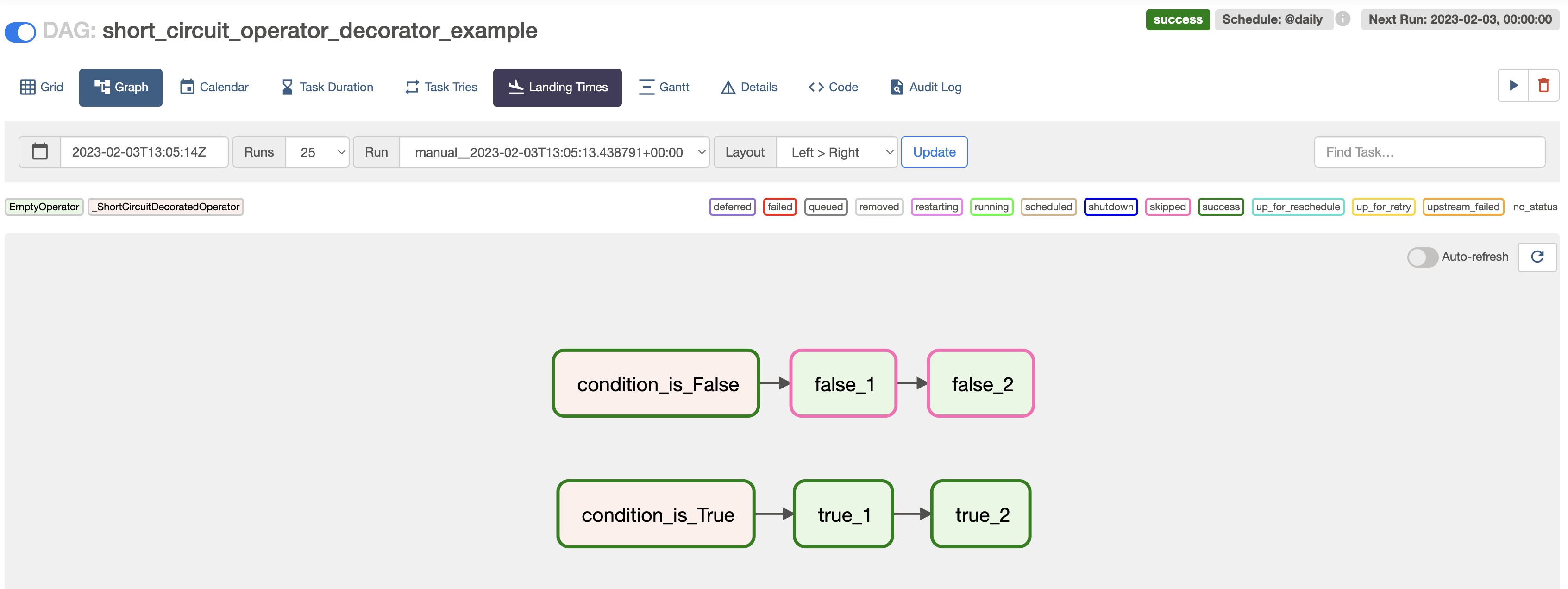
Short Circuit

Another example using the ShortCircuitOperator, can be found on the Airflow Registry.

Other branch operators

Airflow offers a few other branching operators that work similarly to the BranchPythonOperator but for more specific contexts:

  • BranchSQLOperator: Branches based on whether a given SQL query returns true or false.
  • BranchDayOfWeekOperator: Branches based on whether the current day of week is equal to a given week_day parameter.
  • BranchDateTimeOperator: Branches based on whether the current time is between target_lower and target_upper times.
  • ExternalBranchPythonOperator: Branches based on a Python function like the BranchPythonOperator, but runs in a preexisting virtual environment like the ExternalPythonOperator (available in Airflow 2.7+).
  • BranchPythonVirtualenvOperator: Branches based on a Python function like the BranchPythonOperator, but runs in newly created virtual environment like the PythonVirtualenvOperator (available in Airflow 2.8+). The environment can be cached by providing a venv_cache_path.

All of these operators take follow_task_ids_if_true and follow_task_ids_if_false parameters which provide the list of task(s) to include in the branch based on the logic returned by the operator.

Additional branching resources

There is much more to the BranchPythonOperator than simply choosing one task over another.

  • What if you want to trigger your tasks only on specific days? And not on holidays?
  • What if you want to trigger a DAG Run only if the previous one succeeded?

For more guidance and best practices on common use cases like the ones above, try out Astronomer’s Academy Course on Branching for free today.