
For AI agents: a documentation index is available at the root level at /llms.txt and /llms-full.txt. Append /llms.txt to any URL for a page-level index, or .md for the markdown version of any page.
      • AstroFully-managed data operations, powered by Apache Airflow.
      • Astro Private CloudRun Airflow-as-a-service in your environment.
      • Professional ServicesExpert Airflow services for your enterprise's success.
    • Tools
      • Cosmos
      • Orbiter
      • CLI
      • AI SDK
      • Agents
      • Blueprint
      • UpdatesThe State of Airflow 2026See the insights from over 5,800 data practitioners in the full report. Download Now ➔
  • Customers
  • Docs
    • Insights
      • Blog
      • Webinars
      • Resource Library
      • Events
    • Education
      • Academy
      • What is Airflow?
  • Pricing
Get Started Free
    • Overview
      • Overview
        • Astro Observe quickstart
        • Data products
        • Data quality
        • OpenLineage
      • Glossary
    • Glossary

Product

  • Platform Overview
  • Astro
  • Astro Observe
  • Astro Private Cloud
  • Security & Trust
  • Pricing

Tools & Services

  • Cosmos
  • Docs
  • Professional Services
  • Product Updates

Use Cases

  • AI Ops
  • Data Observability
  • ETL/ELT
  • ML Ops
  • Operational Analytics
  • All Use Cases

Industries

  • Financial Services
  • Gaming
  • Retail
  • Manufacturing
  • Healthcare
  • All Industries

Resources

  • Academy
  • eBooks & Guides
  • Blog
  • Webinars
  • Events
  • The Data Flowcast Podcast
  • All Resources

Airflow

  • What is Airflow
  • Airflow on Astro
  • Airflow 3.0
  • Airflow Upgrades
  • Airflow Use Cases
  • Airflow 2.x End of Life

Company

  • Our Story
  • Customers
  • Newsroom
  • Careers
  • Contact

Support

  • Knowledge Base
  • Status
  • Contact Support
GitHubYouTubeLinkedInx
  • Legal
  • Privacy
  • Terms of Service
  • Consent Preferences

  • Do Not Sell or Share My Personal information
  • Limit the Use Of My Sensitive Personal Information

Apache Airflow®, Airflow, and the Airflow logo are trademarks of the Apache Software Foundation. Copyright © Astronomer 2026. All rights reserved.

LogoLogo
On this page
  • When to define a data product
  • Examples
  • Leveraging data products on Astro
Airflow 2.xObservability concepts

Leveraging data products for health and performance benefits

Edit this page
Built with

A data product is a pipeline-driven asset that captures the data lifecycle of a pipeline. Tasks, datasets, warehouse tables, and local files can all be assets of data products. Data products are abstractions that serve the purpose of gaining observability into the health and performance of data pipelines.

Other ways to learn

See also:

  • Documentation: Create and use data products with Astro Observe.
  • Blog post: Data Products: It’s not what you call them that matters. It’s what you do with them.

When to define a data product

Not all tasks and datasets are critical to business needs or internal teams, so it pays to be deliberate when creating data products.

Consider creating a data product when the end result of one or more pipelines:

  • Is crucial for business operations, decision-making, or compliance.
  • Is depended on by multiple teams or external partners.
  • Involves complex processes or multiple sources.
  • Is subject to regulatory requirements (GDPR, HIPAA).
  • Contains or touches sensitive data such as customer data or PII.
  • Is required to be available at a particular time.

Examples

Defining a data product makes particular sense when business-critical data is involved, multiple teams touch the pipeline, and on-time delivery and reliability of the data are of primary importance.

For example, you might want to use a data product if your organization manages regulatory data coming from different departments, produced by multiple teams, and the data in feeds a crucial compliance report.

Creating a data product for these critical assets enables visualization and monitoring of the flow of data through the distributed tasks that generate and modify the tables.
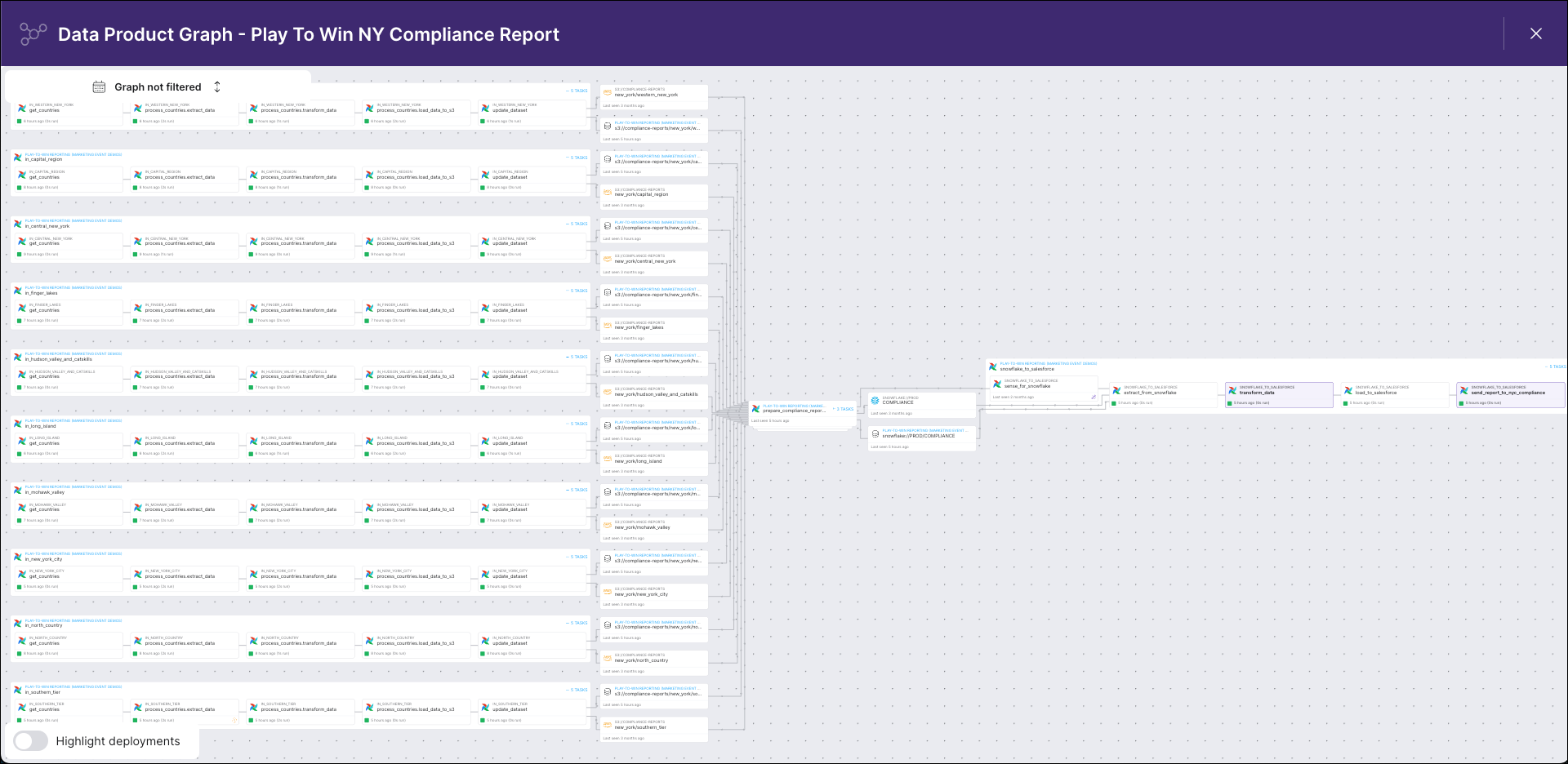
Astro Observe lineage graph screenshot

In Observe, you see a lineage graph that visualizes the path of the report’s data from all sources through the DAGs that extracted, transformed, and loaded the data into the data product.

Each node represents an asset with a unique identifier, the emitting system (Apache Airflow, Snowflake), and the length of time since the asset was last observed.

Expanding a nested DAG node reveals connected task nodes, each with a unique identifier, the containing DAG, the task status, the run duration, and the time since the task was last observed.
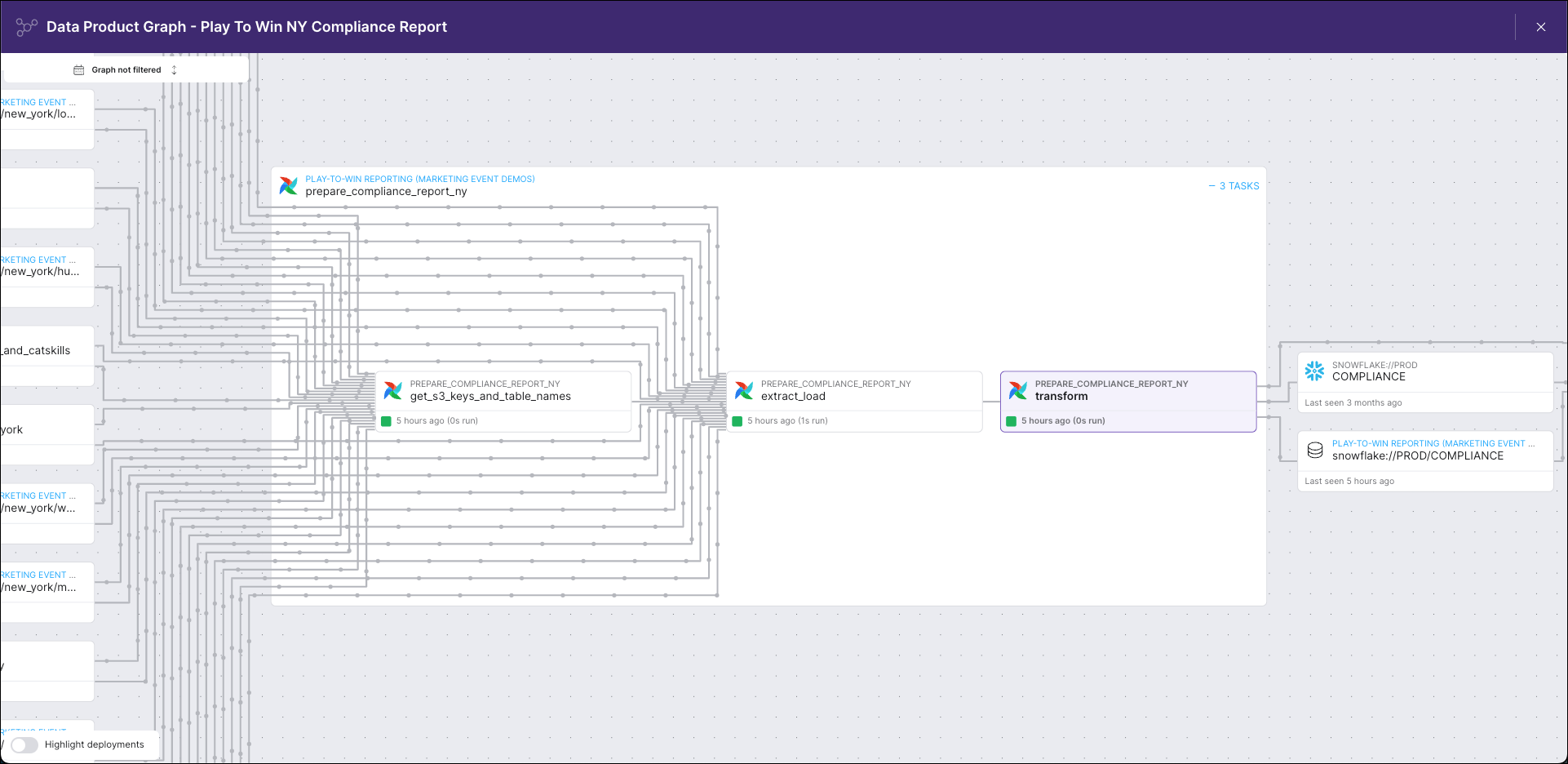
Astro Observe lineage graph detail

A key benefit of a lineage graph is how easy it makes identifying upstream assets, offering visibility into the tasks that could delay delivery or compromise the quality of business-critical data if they failed, along with the owners of those tasks.

Metadata collection enabled by data products also unlocks analytics, monitoring, and alerting, including proactive alerting using SLAs. For example, on Astro Observe, you could use the SLA success rate metric to identify performance issues before they broke a report like this.

Other assets for which you might want to define data products include:

  • A table used by multiple teams to generate executive dashboards.
  • A table containing customer data accessed by multiple teams in your organization.

Examples of when it probably does not make sense to define data products:

  • For objects created by a single task with no upstream or downstream dependencies.
  • For a table with non-critical or non-sensitive data in a sandbox that is used only occasionally.

Leveraging data products on Astro

To learn more about how to create and manage data products, manage alerts, and evaluate pipeline health on Astro, see the Astro Observe documentation.