

Checking the quality of your data is essential to getting actionable insights from your data pipelines. Airflow offers many ways to orchestrate data quality checks directly from your DAGs.
This guide covers:
There are multiple resources for learning about this topic. See also:
To get the most out of this guide, you should have knowledge of:
What is considered good quality data is determined by the needs of your organization. Defining quality criteria for a given collection of datasets is often a task requiring collaboration with all data professionals involved in each step of the pipeline.
The following is a typical data quality check process:
Data quality checks can be run on different components of the dataset:
NULL values that are allowed, defining logical bounds for numeric or date columns, and defining valid options for categorical variables.inactive has no purchases listed in any of the other tables.It is also important to distinguish between the two types of control in data quality:
Data quality checks can be run in different locations within a data pipeline or an Airflow environment. For example, data quality checks can be placed in the following locations within an ETL pipeline:
data_quality_check_1)data_quality_check_2)data_quality_check_3)The following DAG graph shows typical locations for data quality checks:
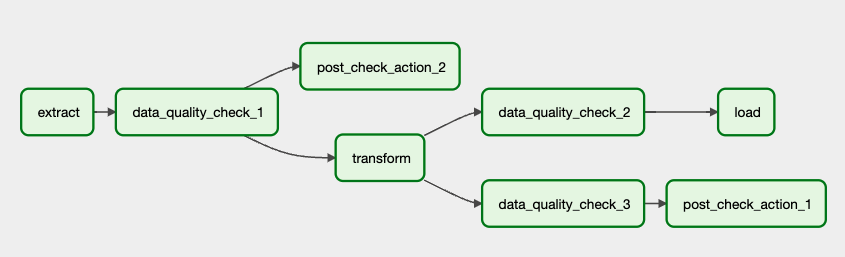
It’s common to use data quality checks (post_check_action_1 and post_check_action_2) with Airflow callbacks to alert data professionals of data quality issues through channels like email and Slack. You can also create a downstream task that runs only when all data quality checks are successful, which can be useful for reporting purposes.
When implementing data quality checks, consider how a check success or failure should influence downstream dependencies. Trigger Rules are especially useful for managing operator dependencies. It often makes sense to test your data quality checks in a dedicated DAG before you incorporate them into your pipelines.
When implementing data quality checks, it is important to consider the tradeoffs between the upfront work of implementing checks versus the cost of downstream issues caused by bad quality data.
You might need to implement data quality checks in the following circumstances:
There are multiple open source tools that can be used to check data quality from an Airflow DAG. While this guide lists the most commonly used tools here, it focuses on the two tools that also integrate with OpenLineage:
Other tools that can be used for data quality checks include:
dbt test within Airflow is with the Cosmos package.Which tool you choose is determined by the needs and preferences of your organization. Astronomer recommends using SQL check operators if you want to:
Astronomer recommends using a data validation framework such as Great Expectations or Soda in the following circumstances:
Currently only SQL check operators and the GreatExpectationsOperator offer data lineage extraction through OpenLineage.
You can find more details and examples using SQL check operators in the Run data quality checks using SQL check operators tutorial.
SQL check operators execute a SQL statement that results in a set of booleans. A result of True leads to the check passing and the task being labeled as successful. A result of False, or any error when the statement is executed, leads to a failure of the task. Before using any of the operators, you need to define the connection to your data storage from the Airflow UI or with an external secrets manager.
The SQL check operators work with any backend solution that accepts SQL queries and supports Airflow, and differ in what kind of data quality checks they can perform and how they are defined. All SQL check operators are part of the Common SQL provider.
Astronomer recommends using the SQLColumnCheckOperator and SQLTableCheckOperator over the older SQLValueCheckOperator and SQLThresholdCheckOperator.
The logs from SQL check operators can be found in the regular Airflow task logs.
You can find more information on how to use Great Expectations with Airflow in the Orchestrate Great Expectations with Airflow tutorial.
Great Expectations is an open source data validation framework that allows the user to define data quality checks in JSON. The checks, also known as Expectation Suites, can be run in a DAG using the GreatExpectationsOperator from the Great Expectations provider. All currently available Expectations can be viewed on the Great Expectations website and creation of Custom Expectations is possible.
The easiest way to use Great Expectations with Airflow is to initialize a Great Expectations project in a directory accessible to your Airflow environment and using the automatic creation of a Checkpoint and Datasource from an Airflow connection by the GreatExpectationsOperator. This basic usage of the GreatExpectationsOperator does not need in-depth Great Expectations knowledge and full customization is possible.
When using Great Expectations, Airflow task logs show the results of the suite at the test-level in a JSON format. To get a detailed report on the checks that were run and their results, you can view the HTML files located in the great_expectations/uncommitted/data_docs/local_site/validations directory in any browser. These data docs can be generated to other backends as well as the local file.
In complex data ecosystems, lineage can be a powerful addition to data quality checks, especially for investigating what data from which origins caused a check to fail.
For more information on data lineage and setting up OpenLineage with Airflow, see OpenLineage and Airflow.
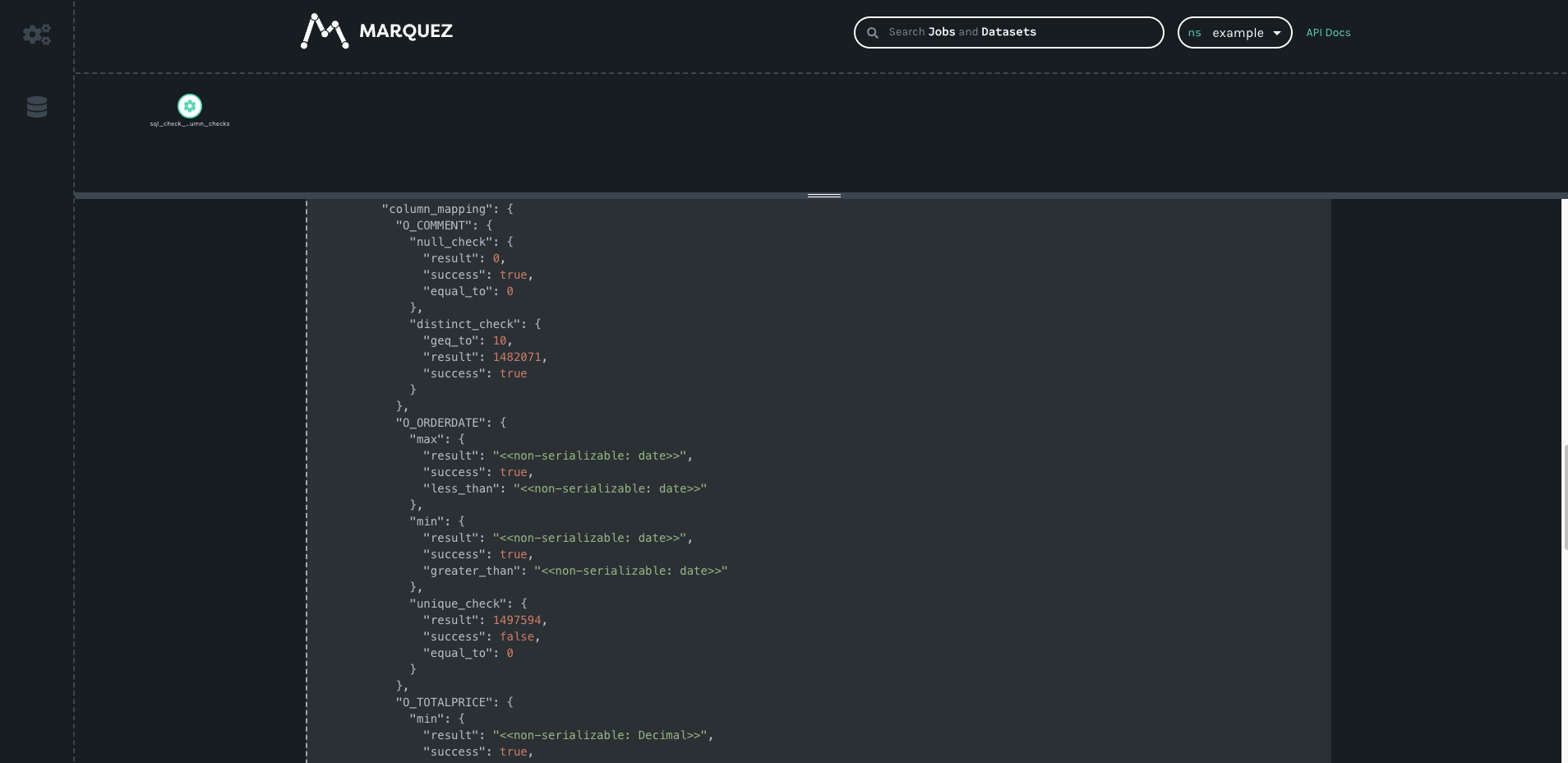
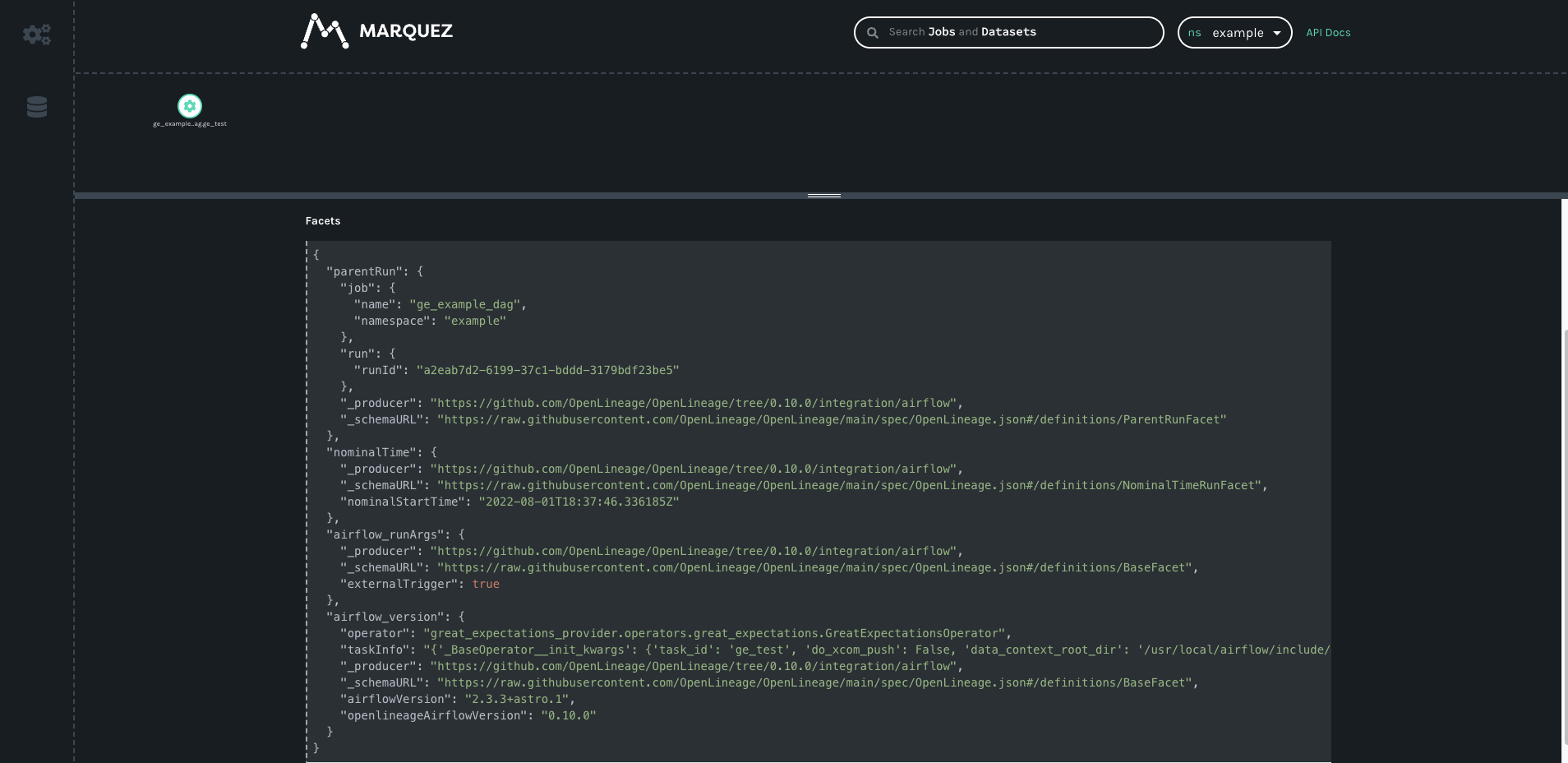
The SQL check operators will emit lineage metadata. The GreatExpectationsOperator will automatically trigger the OpenLineage action if an OpenLineage environment is recognized. If you are working with open source tools, you can view the resulting lineage using Marquez.
The output from the SQLColumnCheckOperator contains each individual check and whether or not it succeeded:
For the GreatExpectationsOperator, OpenLineage receives whether or not the whole Expectation Suite succeeded or failed:
This example shows the steps necessary to perform the same set of data quality checks with SQL check operators and with Great Expectations.
The checks performed for both tools are:
MY_DATE_COL has only unique values.MY_DATE_COL has only values between 2017-01-01 and 2022-01-01.MY_TEXT_COL has no null values.MY_TEXT_COL has at least 10 distinct values.MY_NUM_COL has a maximum value between 90 and 110.example_table has at least 10 rows.MY_COL_1 plus the value of the same row in MY_COL_2 is equal to 100.MY_COL_3 is either val1 or val4.The example DAG includes the following tasks:
SQLColumnCheckOperator performs checks on several columns in the target table.SQLTableCheckOperators performs checks on the whole table, involving one or more columns.SQLCheckOperator makes sure the most common value of a categorical variable is one of two options.While this example shows all the checks being written within the Python file defining the DAG, it is possible to modularize commonly used checks and SQL statements in separate files. If you’re using the Astro CLI, you can add the files to the include directory.
The following example runs the same data quality checks as the SQL check operators example against the same database. After setting up the Great Expectations instance with at least the data context, the checks can be defined in a JSON file to form an Expectation Suite.
For each of the checks in this example, an Expectation already exists. This is not always the case, and for more complicated checks you may need to define a custom Expectation.
The corresponding DAG code shows how all the Expectations are run within one task using the GreatExpectationsOperator. Only the root directory of the data context, the schema and the data asset name have to be provided. For a step-by-step example and more information on the parameters of this operator see the Orchestrate Great Expectations with Airflow tutorial.
The growth of tools designed to perform data quality checks reflect the importance of ensuring data quality in production workflows. Commitment to data quality requires in-depth planning and collaboration between data professionals. What kind of data quality solution your organization needs will depend on your unique use case, which you can explore using the steps outlined in this guide. Special consideration should be given to the type of data quality checks and their location in the data pipeline.
Integrating Airflow with a data lineage tool can further enhance your ability to trace the origin of data that did not pass the checks you established.
This guide highlights two types of data quality tools and their use cases:
No matter which tool is used, data quality checks can be orchestrated from within an Airflow DAG, which makes it possible to trigger downstream actions depending on the outcome of your checks.