
For AI agents: a documentation index is available at the root level at /llms.txt and /llms-full.txt. Append /llms.txt to any URL for a page-level index, or .md for the markdown version of any page.
      • AstroFully-managed data operations, powered by Apache Airflow.
      • Astro Private CloudRun Airflow-as-a-service in your environment.
      • Professional ServicesExpert Airflow services for your enterprise's success.
    • Tools
      • Cosmos
      • Orbiter
      • CLI
      • AI SDK
      • Agents
      • Blueprint
      • UpdatesThe State of Airflow 2026See the insights from over 5,800 data practitioners in the full report. Download Now ➔
  • Customers
  • Docs
    • Insights
      • Blog
      • Webinars
      • Resource Library
      • Events
    • Education
      • Academy
      • What is Airflow?
  • Pricing
Get Started Free
    • Overview
        • Overview
        • Get started
        • Assets
        • Data products
        • SLAs
        • Monitors
        • Data quality
      • Deployment health incidents
      • Astro alerts
      • Airflow email notifications
      • Export audit logs
    • Book Office Hours

Product

  • Platform Overview
  • Astro
  • Astro Observe
  • Astro Private Cloud
  • Security & Trust
  • Pricing

Tools & Services

  • Cosmos
  • Docs
  • Professional Services
  • Product Updates

Use Cases

  • AI Ops
  • Data Observability
  • ETL/ELT
  • ML Ops
  • Operational Analytics
  • All Use Cases

Industries

  • Financial Services
  • Gaming
  • Retail
  • Manufacturing
  • Healthcare
  • All Industries

Resources

  • Academy
  • eBooks & Guides
  • Blog
  • Webinars
  • Events
  • The Data Flowcast Podcast
  • All Resources

Airflow

  • What is Airflow
  • Airflow on Astro
  • Airflow 3.0
  • Airflow Upgrades
  • Airflow Use Cases
  • Airflow 2.x End of Life

Company

  • Our Story
  • Customers
  • Newsroom
  • Careers
  • Contact

Support

  • Knowledge Base
  • Status
  • Contact Support
GitHubYouTubeLinkedInx
  • Legal
  • Privacy
  • Terms of Service
  • Consent Preferences

  • Do Not Sell or Share My Personal information
  • Limit the Use Of My Sensitive Personal Information

Apache Airflow®, Airflow, and the Airflow logo are trademarks of the Apache Software Foundation. Copyright © Astronomer 2026. All rights reserved.

LogoLogo
On this page
  • Health
  • Data products
  • Monitors
  • Asset Catalog
Platform observabilityAstro Observe

Astro Observe overview

Edit this page
Built with

Astro Observe delivers pipeline-aware data observability purpose-built for Airflow, giving your team visibility into the health, quality, and performance of your business critical data products across the modern data stack. Using Observe, you can monitor business-critical pipelines as data products, track SLAs, troubleshoot pipeline- or data-level failures, and understand health across your data ecosystem.

If you use Remote Execution, you must enable OpenLineage for Remote Execution Agents to use Astro Alerts or Observe.

Health

The Data Pipelines Health Overview shows a high-level view of operational and business health across your pipelines and data products. The dashboard includes pipeline-level run metrics, like failed runs and retries, to identify top silent failures and problematic jobs. The dashboard also shows reliability metrics across the platform, like SLA evaluations and triggered alerts, to help you identify issues at a glance and understand the overall health of your data ecosystem.
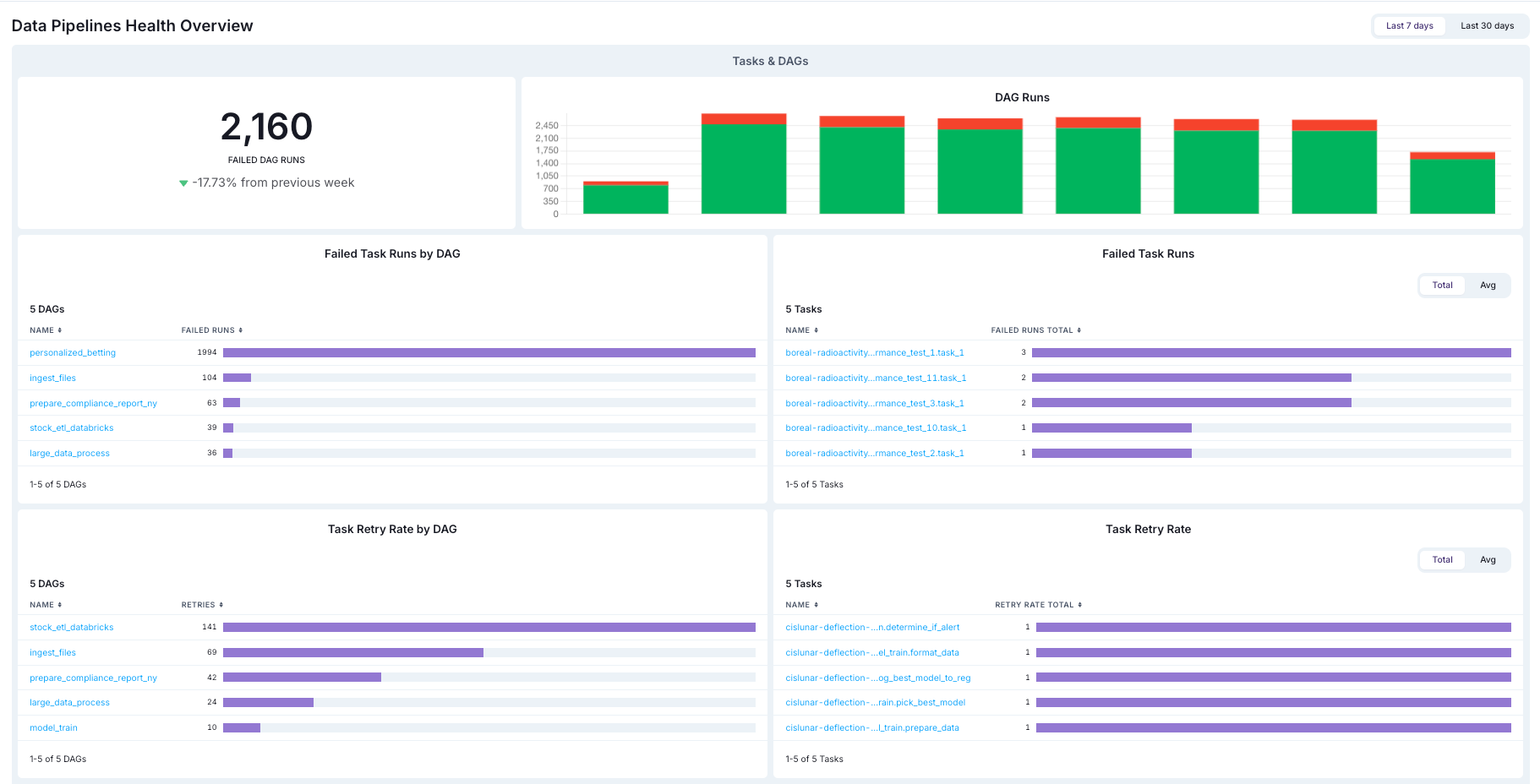
At-a-glance view of the Snowflake cost and a summary of Task and dag success rates.

Data products

In Observe, a data product is a composition of assets that deliver a result with business relevance. Observe automatically infers upstream dependencies for the assets that define a data product, like an Airflow dag that populates a dashboard or a Snowflake table powering a recommendation engine. Data products in Observe can include data assets across Airflow deployments. For example, a set of five dags across different deployments that all populate an executive dashboard with product analytics can be grouped together into a single data product in Observe.

For guidance on identifying data products in your organization, see how to identify data products in your organization.
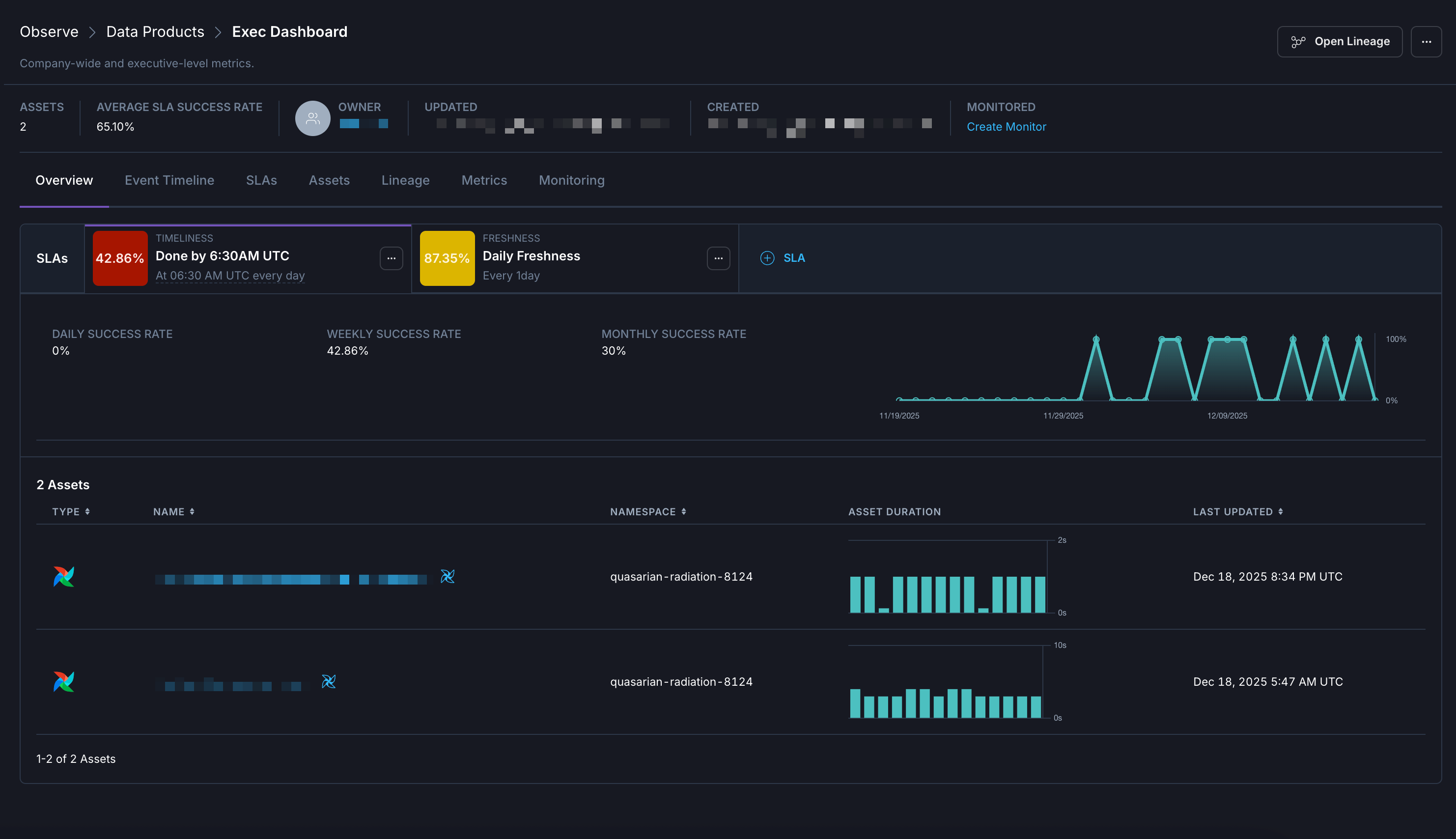
  • Dependencies. A real-time lineage graph displays the relationships between the final assets in a data product and the upstream assets that feed into it.
  • SLA evaluations. You can create custom business-level Service Level Agreements for evaluating the on-time delivery of a data product or its freshness. You can also view all SLAs in effect for the data product along with their current statuses at a glance.
  • Metrics. You can see key metrics for assets across your data product, like task failures and retries.

Example dashboard in the Overview page for a specific data product.

See Create a Data Product to refer to steps to create your own data products. Or, to follow a quickstart, see Get started with Astro Observe.

Monitors

Preview
This feature is in Preview.

Monitors in Astro Observe allow you to automatically track the health of your data products and pipelines. When configured, monitors can trigger alerts for failures or critical events in your data products, enabling rapid detection and resolution of issues.

See Monitors in Astro Observe for set-up instructions and details.

Asset Catalog

Assets include information about the attribute details and historical data regarding task runs. In the Astro UI, when you click Observe and then Asset Catalog in the Organization menu, you can view and filter the different data assets in your Workspace.

In this view you can see the following information about your Assets, including:

  • Name
  • Asset type
  • Namespace
  • Dag ID
  • Owner

You can click on any asset to view more detailed information about it, such as historical metrics and metadata. To learn more about using assets and accessing metrics, see Assets overview.