For AI agents: a documentation index is available at the root level at /llms.txt and /llms-full.txt. Append /llms.txt to any URL for a page-level index, or .md for the markdown version of any page.
      • AstroFully-managed data operations, powered by Apache Airflow.
      • Astro Private CloudRun Airflow-as-a-service in your environment.
      • Professional ServicesExpert Airflow services for your enterprise's success.
    • Tools
      • Cosmos
      • Orbiter
      • CLI
      • AI SDK
      • Agents
      • Blueprint
      • UpdatesThe State of Airflow 2026See the insights from over 5,800 data practitioners in the full report. Download Now ➔
  • Customers
  • Docs
    • Insights
      • Blog
      • Webinars
      • Resource Library
      • Events
    • Education
      • Academy
      • What is Airflow?
  • Pricing
Get Started Free
    • Overview
        • Airflow ObjectStorage
        • Blueprint
          • Using Blueprint
          • Writing Blueprints
        • Dag documentation
        • DAG Factory
        • PyCharm local development
        • SQL check operators
        • VSCode local development
    • Glossary

Product

  • Platform Overview
  • Astro
  • Astro Observe
  • Astro Private Cloud
  • Security & Trust
  • Pricing

Tools & Services

  • Cosmos
  • Docs
  • Professional Services
  • Product Updates

Use Cases

  • AI Ops
  • Data Observability
  • ETL/ELT
  • ML Ops
  • Operational Analytics
  • All Use Cases

Industries

  • Financial Services
  • Gaming
  • Retail
  • Manufacturing
  • Healthcare
  • All Industries

Resources

  • Academy
  • eBooks & Guides
  • Blog
  • Webinars
  • Events
  • The Data Flowcast Podcast
  • All Resources

Airflow

  • What is Airflow
  • Airflow on Astro
  • Airflow 3.0
  • Airflow Upgrades
  • Airflow Use Cases
  • Airflow 2.x End of Life

Company

  • Our Story
  • Customers
  • Newsroom
  • Careers
  • Contact

Support

  • Knowledge Base
  • Status
  • Contact Support
GitHubYouTubeLinkedInx
  • Legal
  • Privacy
  • Terms of Service
  • Consent Preferences

  • Do Not Sell or Share My Personal information
  • Limit the Use Of My Sensitive Personal Information

Apache Airflow®, Airflow, and the Airflow logo are trademarks of the Apache Software Foundation. Copyright © Astronomer 2026. All rights reserved.

LogoLogo
On this page
  • What can a blueprint do?
  • When to use Blueprint
TutorialsWrite Dags

Blueprint: A Dag writing abstraction with a no-code interface in the Astro IDE

Edit this page
Built with
Preview
The no-code UI for blueprint within the Astro IDE is in Preview.

Blueprint is a template-based Dag authoring system built on the open-source airflow-blueprint package, which is compatible with any Airflow 3 environment. When using this package, data engineers define reusable blueprints in Python, and other team members can compose those blueprints into Dags, either through YAML configuration or in a no-code drag-and-drop interface in the Astro IDE.
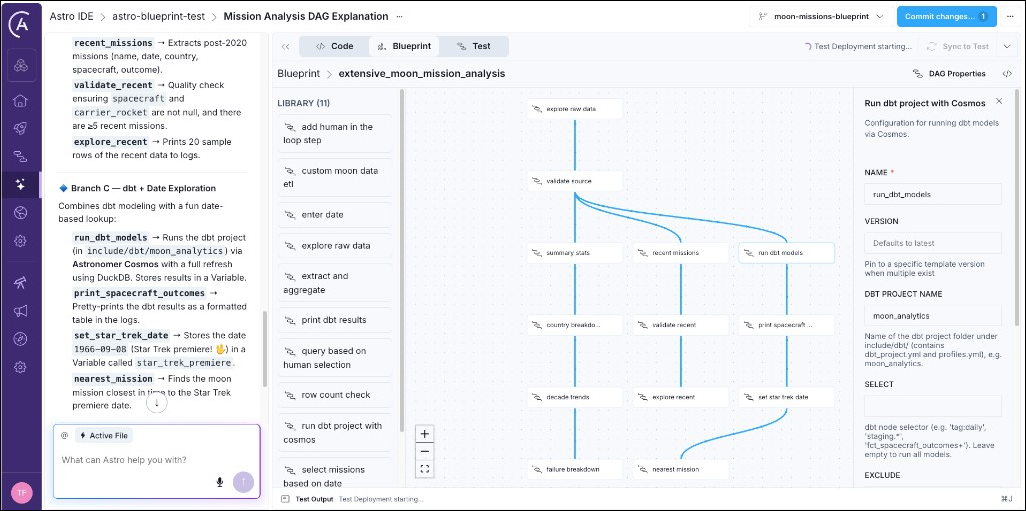
Astro IDE Blueprint tab with the visual workflow graph, library panel, and node configuration.

Write Blueprint templates tutorial

For data engineers and platform teams. Learn how to define reusable blueprints in Python and make them available to your team members in the Astro IDE.

Use Blueprint on Astro tutorial

For analysts, data scientists, and other team members, who prefer a no-code interface for defining workflows. Learn how to build pipelines from templates using the Astro IDE.

What can a blueprint do?

A blueprint can contain any logic you can write in Python. If you are familiar with Airflow, you can think of a blueprint as a self-contained task group containing one or more tasks defined with operators or decorators. The blueprint author writes the logic in Python and end users assemble one or more blueprints into an Airflow Dag either using YAML or the drag-and-drop no-code interface in the Astro IDE.

Here are some examples of what you can do with a blueprint:

  • Execute SQL queries against a data warehouse
  • Run a dbt project using Cosmos
  • Orchestrate an AI agent or large language model (LLM) call
  • Add human-in-the-loop approval steps
  • Run data quality checks on a table
  • Execute a complex multi-step workflow while only exposing a few key configuration parameters

The blueprint author decides which configuration options to expose, for example, to hide Airflow internals like retries, or entire (sets of) operators, for example, performing clean up tasks after an ETL pipeline. End users see only the fields relevant to their use case, for example, the SQL query they’d like to execute or the prompt they want to give to an AI agent.

When to use Blueprint

Blueprint is a good fit when:

  • You want to encode workflow patterns in Python so analysts, data scientists, and other team members can compose and change Dags through YAML or the no-code UI without writing Python code.
  • You have recurring pipeline patterns (extract-transform-load, model training, report generation) that differ only in configuration and benefit from standardization.