
For AI agents: a documentation index is available at the root level at /llms.txt and /llms-full.txt. Append /llms.txt to any URL for a page-level index, or .md for the markdown version of any page.
      • AstroFully-managed data operations, powered by Apache Airflow.
      • Astro Private CloudRun Airflow-as-a-service in your environment.
      • Professional ServicesExpert Airflow services for your enterprise's success.
    • Tools
      • Cosmos
      • Orbiter
      • CLI
      • AI SDK
      • Agents
      • Blueprint
      • UpdatesThe State of Airflow 2026See the insights from over 5,800 data practitioners in the full report. Download Now ➔
  • Customers
  • Docs
    • Insights
      • Blog
      • Webinars
      • Resource Library
      • Events
    • Education
      • Academy
      • What is Airflow?
  • Pricing
Get Started Free
    • Overview
      • Overview
        • SageMaker
        • Anyscale
        • Kafka
        • Azure Blob Storage
        • Azure Container Instances
        • Azure Data Factory integration
        • Azure Data Factory connection
        • Entra Workload Identity
        • BigQuery
        • Cohere
          • Databricks connection
          • Databricks integration
        • dbt
        • DuckDB
        • Fivetran
        • Great Expectations
        • Execute notebooks
        • Marquez
        • MLflow
        • MongoDB
        • MS SQL Server
        • OpenAI
        • OpenSearch
        • pgvector
        • Pinecone
        • PostgreSQL
        • Qdrant
        • Ray
        • Soda data quality
        • Weaviate
        • Weights and Biases
      • Glossary
    • Glossary

Product

  • Platform Overview
  • Astro
  • Astro Observe
  • Astro Private Cloud
  • Security & Trust
  • Pricing

Tools & Services

  • Cosmos
  • Docs
  • Professional Services
  • Product Updates

Use Cases

  • AI Ops
  • Data Observability
  • ETL/ELT
  • ML Ops
  • Operational Analytics
  • All Use Cases

Industries

  • Financial Services
  • Gaming
  • Retail
  • Manufacturing
  • Healthcare
  • All Industries

Resources

  • Academy
  • eBooks & Guides
  • Blog
  • Webinars
  • Events
  • The Data Flowcast Podcast
  • All Resources

Airflow

  • What is Airflow
  • Airflow on Astro
  • Airflow 3.0
  • Airflow Upgrades
  • Airflow Use Cases
  • Airflow 2.x End of Life

Company

  • Our Story
  • Customers
  • Newsroom
  • Careers
  • Contact

Support

  • Knowledge Base
  • Status
  • Contact Support
GitHubYouTubeLinkedInx
  • Legal
  • Privacy
  • Terms of Service
  • Consent Preferences

  • Do Not Sell or Share My Personal information
  • Limit the Use Of My Sensitive Personal Information

Apache Airflow®, Airflow, and the Airflow logo are trademarks of the Apache Software Foundation. Copyright © Astronomer 2026. All rights reserved.

LogoLogo
On this page
  • Why use Airflow with Databricks
  • Time to complete
  • Assumed knowledge
  • Prerequisites
  • Step 1: Configure your Astro project
  • Step 2: Create Databricks Notebooks
  • Step 3: Configure the Databricks connection
  • Step 4: Create your DAG
  • How it works
  • Parameters
  • Repairing a Databricks job
Airflow 2.xIntegrations & connectionsDatabricks

Orchestrate Databricks jobs with Airflow

Edit this page
Built with

Databricks is a popular unified data and analytics platform built around Apache Spark that provides users with fully managed Apache Spark clusters and interactive workspaces.

The open source Airflow Databricks provider provides full observability and control from Airflow so you can manage Databricks from one place, including enabling you to orchestrate your Databricks notebooks from Airflow and execute them as Databricks jobs.

Other ways to learn

There are multiple resources for learning about this topic. See also:

  • Webinar: How to Orchestrate Databricks jobs Using Airflow.

Why use Airflow with Databricks

Many data teams leverage Databricks’ optimized Spark engine to run heavy workloads like machine learning models, data transformations, and data analysis. While Databricks offers some orchestration with Databricks Workflows, they are limited in functionality and do not integrate with the rest of your data stack. Using a tool-agnostic orchestrator like Airflow gives you several advantages, like the ability to:

  • Use CI/CD to manage your workflow deployment. Airflow DAGs are Python code, and can be integrated with a variety of CI/CD tools and tested.
  • Use task groups within Databricks jobs, enabling you to collapse and expand parts of larger Databricks jobs visually.
  • Leverage Airflow datasets to trigger Databricks jobs from tasks in other DAGs in your Airflow environment or using the Airflow REST API Create dataset event endpoint, allowing for a data-driven architecture.
  • Use familiar Airflow code as your interface to orchestrate Databricks notebooks as jobs.
  • Inject parameters into your Databricks job at the job-level. These parameters can be dynamic and retrieved at runtime from other Airflow tasks.
  • Repair single tasks in your Databricks job from the Airflow UI (Provider version 6.8.0+ is required). If a task fails, you can re-run it using an operator extra link in the Airflow UI.

Time to complete

This tutorial takes approximately 30 minutes to complete.

Assumed knowledge

To get the most out of this tutorial, make sure you have an understanding of:

  • The basics of Databricks. See Getting started with Databricks.
  • Airflow fundamentals, such as writing DAGs and defining tasks. See Get started with Apache Airflow.
  • Airflow operators. See Operators 101.
  • Airflow connections. See Managing your Connections in Apache Airflow.

Prerequisites

  • The Astro CLI.
  • Access to a Databricks workspace. See Databricks’ documentation for instructions. You can use any workspace that has access to the Databricks Workflows feature. You need a user account with permissions to create notebooks and Databricks jobs. You can use any underlying cloud service, and a 14-day free trial is available.

Step 1: Configure your Astro project

  1. Create a new Astro project:

    1$ mkdir astro-databricks-tutorial && cd astro-databricks-tutorial
    2$ astro dev init
  2. Add the Airflow Databricks provider package to your requirements.txt file.

    apache-airflow-providers-databricks==6.10.0

Step 2: Create Databricks Notebooks

You can orchestrate any Databricks notebooks in a Databricks job using the Airflow Databricks provider. If you don’t have Databricks notebooks ready, follow these steps to create two notebooks:

  1. Create an empty notebook in your Databricks workspace called notebook1.

  2. Copy and paste the following code into the first cell of the notebook1 notebook.

    1print("Hello")
  3. Create a second empty notebook in your Databricks workspace called notebook2.

  4. Copy and paste the following code into the first cell of the notebook2 notebook.

    1print("World")

Step 3: Configure the Databricks connection

  1. Start Airflow by running astro dev start.

  2. In the Airflow UI, go to Admin > Connections and click +.

  3. Create a new connection named databricks_conn. Select the connection type Databricks and enter the following information:

    • Connection ID: databricks_conn.
    • Connection Type: Databricks.
    • Host: Your Databricks host address (format: https://dbc-1234cb56-d7c8.cloud.databricks.com/).
    • Password: Your Databricks personal access token.

Step 4: Create your DAG

  1. In your dags folder, create a file called my_simple_databricks_dag.py.

  2. Copy and paste the following DAG code into the file. Replace<your-databricks-login-email> variable with your Databricks login email. If you already had Databricks notebooks and did not create new ones in Step 2, adjust the notebook_path parameters in the two DatabricksNotebookOperators.

    1"""
    2### Run notebooks in databricks as a Databricks Workflow using the Airflow Databricks provider
    3
    4This DAG runs two Databricks notebooks as a Databricks workflow.
    5"""
    6
    7from airflow.decorators import dag
    8from airflow.providers.databricks.operators.databricks import DatabricksNotebookOperator
    9from airflow.providers.databricks.operators.databricks_workflow import (
    10 DatabricksWorkflowTaskGroup,
    11)
    12from airflow.models.baseoperator import chain
    13from pendulum import datetime
    14
    15DATABRICKS_LOGIN_EMAIL = "<your-databricks-login-email>"
    16DATABRICKS_NOTEBOOK_NAME_1 = "notebook1"
    17DATABRICKS_NOTEBOOK_NAME_2 = "notebook2"
    18DATABRICKS_NOTEBOOK_PATH_1 = (
    19 f"/Users/{DATABRICKS_LOGIN_EMAIL}/{DATABRICKS_NOTEBOOK_NAME_1}"
    20)
    21DATABRICKS_NOTEBOOK_PATH_2 = (
    22 f"/Users/{DATABRICKS_LOGIN_EMAIL}/{DATABRICKS_NOTEBOOK_NAME_2}"
    23)
    24DATABRICKS_JOB_CLUSTER_KEY = "tutorial-cluster"
    25DATABRICKS_CONN_ID = "databricks_conn"
    26
    27# adjust if necessary for example to align the spark version with your Notebooks
    28job_cluster_spec = [
    29 {
    30 "job_cluster_key": DATABRICKS_JOB_CLUSTER_KEY,
    31 "new_cluster": {
    32 "cluster_name": "",
    33 "spark_version": "15.3.x-cpu-ml-scala2.12",
    34 "aws_attributes": {
    35 "first_on_demand": 1,
    36 "availability": "SPOT_WITH_FALLBACK",
    37 "zone_id": "eu-central-1",
    38 "spot_bid_price_percent": 100,
    39 "ebs_volume_count": 0,
    40 },
    41 "node_type_id": "i3.xlarge",
    42 "spark_env_vars": {"PYSPARK_PYTHON": "/databricks/python3/bin/python3"},
    43 "enable_elastic_disk": False,
    44 "data_security_mode": "LEGACY_SINGLE_USER_STANDARD",
    45 "runtime_engine": "STANDARD",
    46 "num_workers": 1,
    47 },
    48 }
    49]
    50
    51
    52@dag(start_date=datetime(2024, 7, 1), schedule=None, catchup=False)
    53def my_simple_databricks_dag():
    54 task_group = DatabricksWorkflowTaskGroup(
    55 group_id="databricks_workflow",
    56 databricks_conn_id=DATABRICKS_CONN_ID,
    57 job_clusters=job_cluster_spec,
    58 )
    59
    60 with task_group:
    61 notebook_1 = DatabricksNotebookOperator(
    62 task_id="notebook1",
    63 databricks_conn_id=DATABRICKS_CONN_ID,
    64 notebook_path=DATABRICKS_NOTEBOOK_PATH_1,
    65 source="WORKSPACE",
    66 job_cluster_key=DATABRICKS_JOB_CLUSTER_KEY,
    67 )
    68 notebook_2 = DatabricksNotebookOperator(
    69 task_id="notebook2",
    70 databricks_conn_id=DATABRICKS_CONN_ID,
    71 notebook_path=DATABRICKS_NOTEBOOK_PATH_2,
    72 source="WORKSPACE",
    73 job_cluster_key=DATABRICKS_JOB_CLUSTER_KEY,
    74 )
    75 chain(notebook_1, notebook_2)
    76
    77
    78my_simple_databricks_dag()

    This DAG uses the Airflow Databricks provider to create a Databricks job that runs two notebooks. The databricks_workflow task group, created using the DatabricksWorkflowTaskGroup class, automatically creates a Databricks job that executes the Databricks notebooks you specified in the individual DatabricksNotebookOperators. One of the biggest benefits of this setup is the use of a Databricks job cluster, allowing you to significantly reduce your Databricks cost. The task group contains three tasks:

    • The launch task, which the task group automatically generates, provisions a Databricks job_cluster with the spec defined as job_cluster_spec and creates the Databricks job from the tasks within the task group.
    • The notebook1 task runs the notebook1 notebook in this cluster as the first part of the Databricks job.
    • The notebook2 task runs the notebook2 notebook as the second part of the Databricks job.
  3. Run the DAG manually by clicking the play button and view the DAG in the graph tab. In case the task group appears collapsed, click it in order to expand and see all tasks.
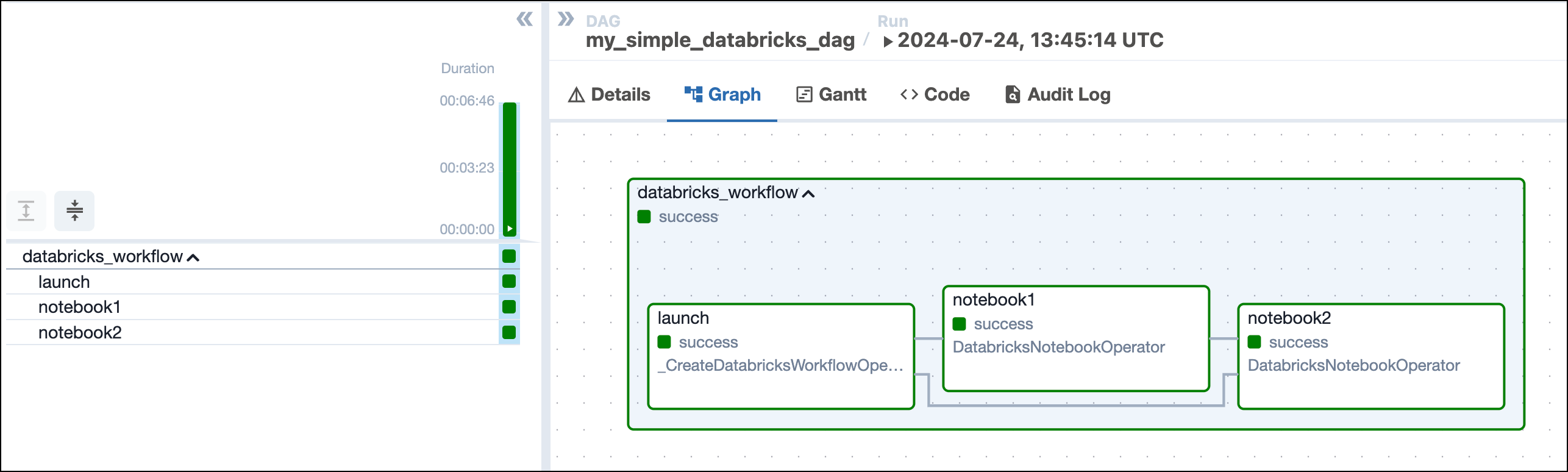
    Airflow Databricks DAG graph tab showing a successful run of the DAG with one task group containing three tasks: launch, notebook1 and notebook2.

  4. View the completed Databricks job in the Databricks UI.
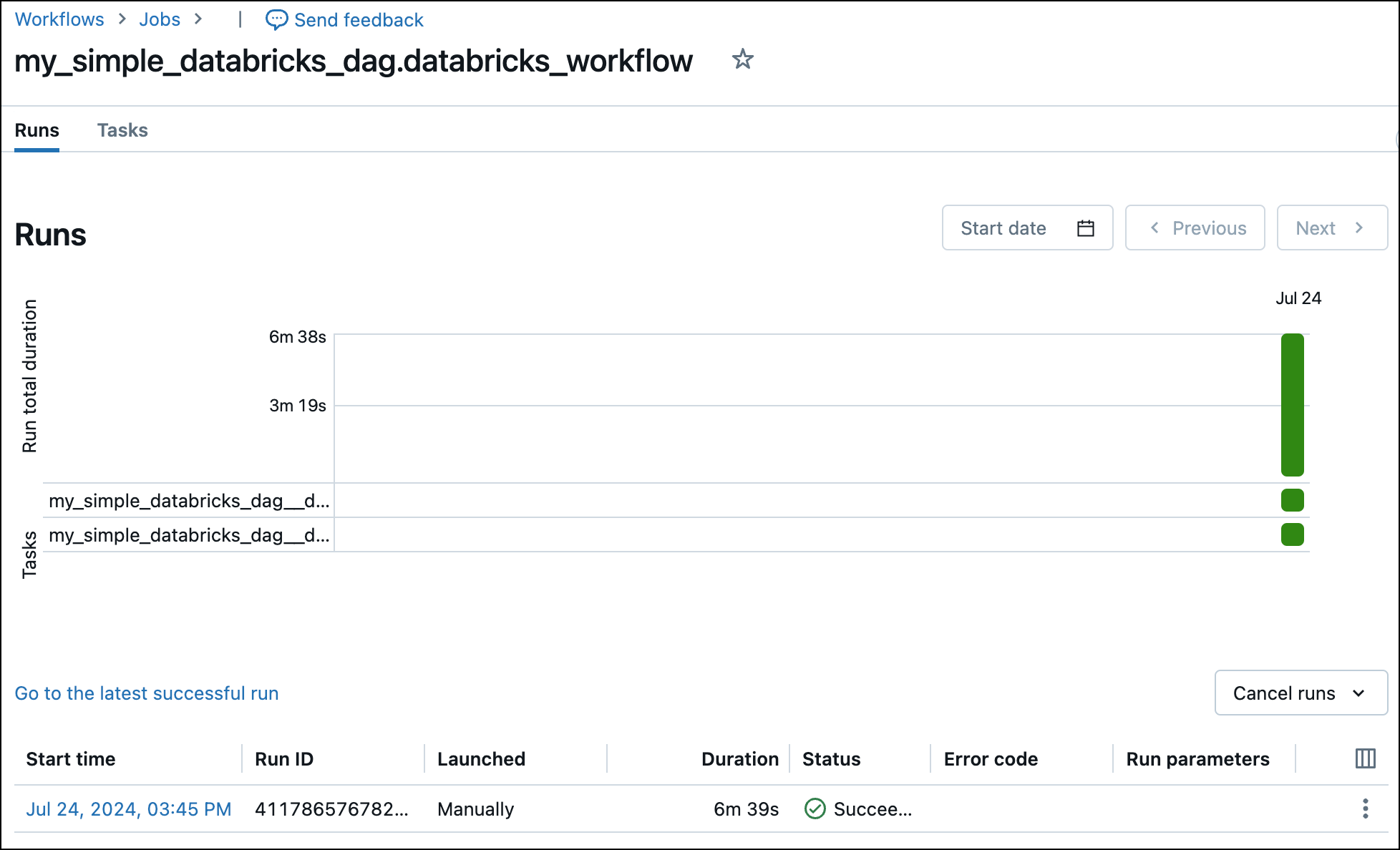
    Successful run of a Databricks job in the Databricks UI.

How it works

This section explains Airflow Databricks provider functionality in more depth. You can learn more about the Airflow Databricks provider, including more information about other available operators, in the provider documentation.

Parameters

The DatabricksWorkflowTaskGroup provides configuration options via several parameters:

  • job_clusters: the job clusters parameters for this job to use. You can provide the full job_cluster_spec as shown in the tutorial DAG.

  • notebook_params: a dictionary of parameters to make available to all notebook tasks in a job. This operator is templatable, see below for a code example:

    1dbx_workflow_task_group = DatabricksWorkflowTaskGroup(
    2 group_id="databricks_workflow",
    3 databricks_conn_id=_DBX_CONN_ID,
    4 job_clusters=job_cluster_spec,
    5 notebook_params={
    6 "my_date": "{{ ds }}"
    7 },
    8)

    To retrieve this parameter inside your Databricks notebook add the following code to a Databricks notebook cell:

    1dbutils.widgets.text("my_date", "my_default_value", "Description")
    2my_date = dbutils.widgets.get("my_date")
  • notebook_packages: a list of dictionaries defining Python packages to install in all notebook tasks in a job.

  • extra_job_params: a dictionary with properties to override the default Databricks job definitions.

You also have the ability to specify parameters at the task level in the DatabricksNotebookOperator:

  • notebook_params: a dictionary of parameters to make available to the notebook.
  • notebook_packages: a list of dictionaries defining Python packages to install in the notebook.

Note that you cannot specify the same packages in both the notebook_packages parameter of a DatabricksWorkflowTaskGroup and the notebook_packages parameter of a task using the DatabricksNotebookOperator in that same task group. Duplicate entries in this parameter cause an error in Databricks.

Repairing a Databricks job

The Airflow Databricks provider version 6.8.0+ includes functionality to repair a failed Databricks job by making a repair request to the Databricks jobs API. Databricks expects a single repair request for all tasks that need to be rerun in one cluster, this can be achieved via the Airflow UI by using the operator extra link Repair All Failed Tasks. If you would be using Airflow’s built in retry functionality a separate cluster would be created for each failed task.
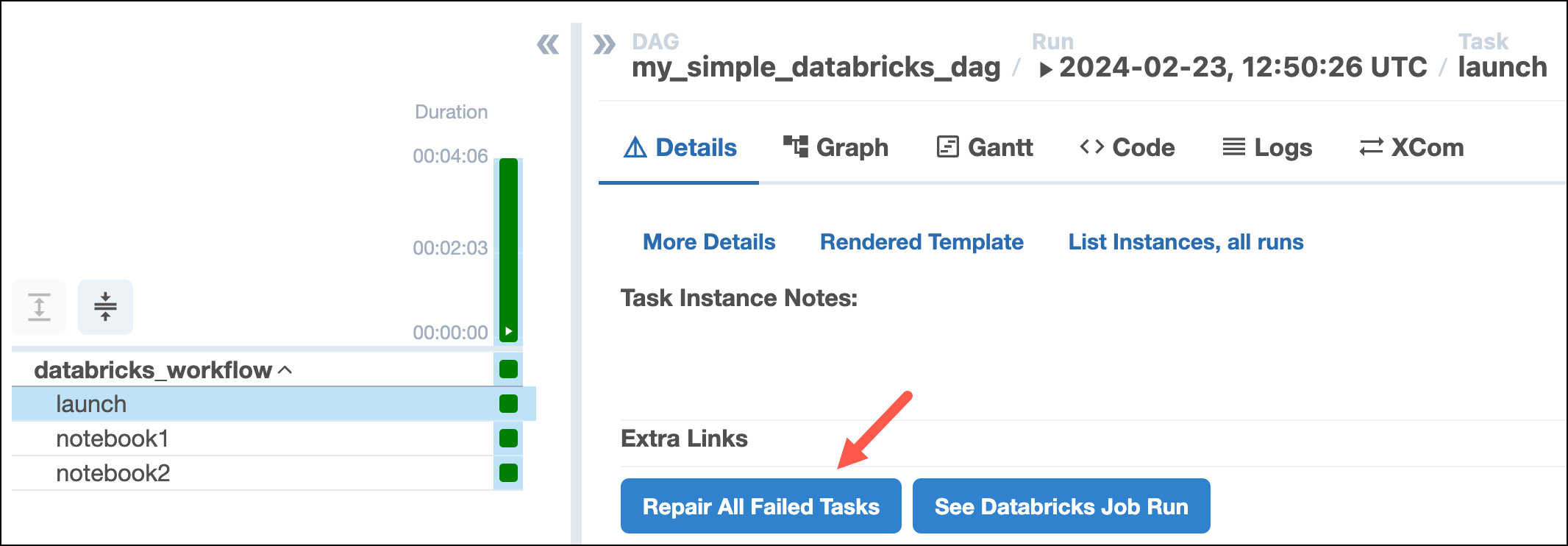
Repair All Failed Tasks OEL

If you only want to rerun specific tasks within your job, you can use the Repair a single failed task operator extra link on an individual task in the Databricks job.
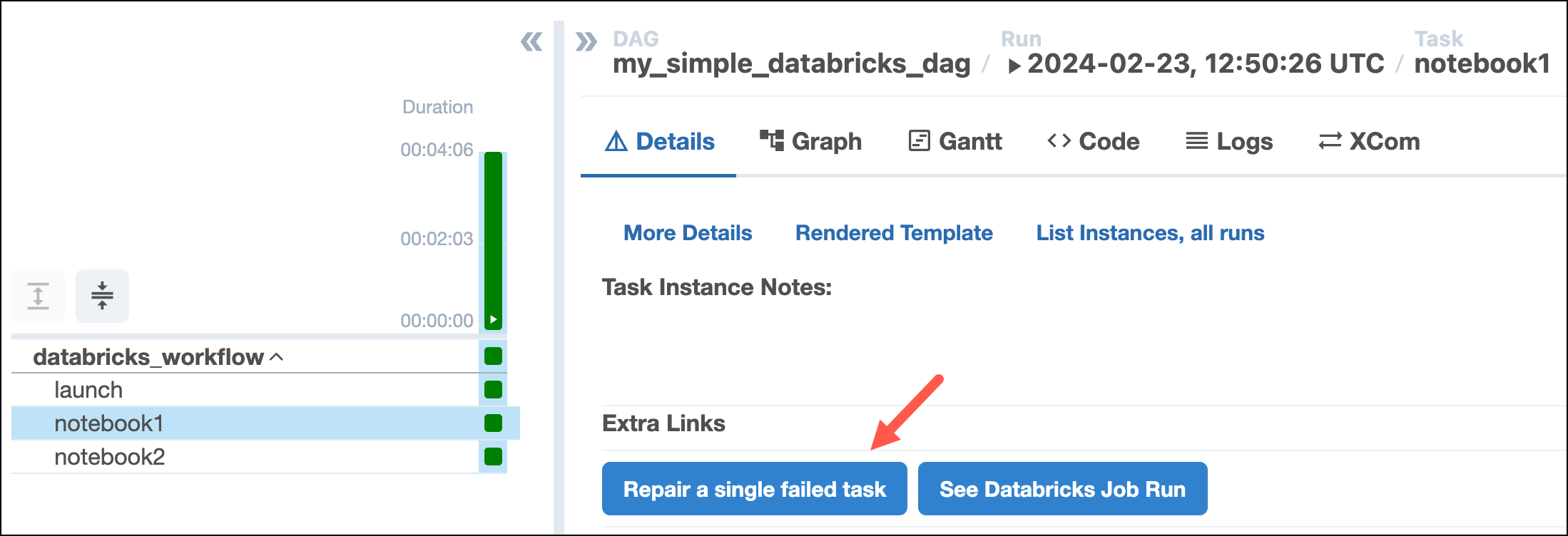
Repair a single failed task OEL