
For AI agents: a documentation index is available at the root level at /llms.txt and /llms-full.txt. Append /llms.txt to any URL for a page-level index, or .md for the markdown version of any page.
      • AstroFully-managed data operations, powered by Apache Airflow.
      • Astro Private CloudRun Airflow-as-a-service in your environment.
      • Professional ServicesExpert Airflow services for your enterprise's success.
    • Tools
      • Cosmos
      • Orbiter
      • CLI
      • AI SDK
      • Agents
      • Blueprint
      • UpdatesThe State of Airflow 2026See the insights from over 5,800 data practitioners in the full report. Download Now ➔
  • Customers
  • Docs
    • Insights
      • Blog
      • Webinars
      • Resource Library
      • Events
    • Education
      • Academy
      • What is Airflow?
  • Pricing
Get Started Free
    • Overview
      • Overview
        • SageMaker
        • Anyscale
        • Kafka
        • Azure Blob Storage
        • Azure Container Instances
        • Azure Data Factory integration
        • Azure Data Factory connection
        • Entra Workload Identity
        • BigQuery
        • Cohere
          • dbt Cloud connection
          • dbt Cloud integration
        • dbt
        • DuckDB
        • Fivetran
        • Great Expectations
        • Execute notebooks
        • Marquez
        • MLflow
        • MongoDB
        • MS SQL Server
        • OpenAI
        • OpenSearch
        • pgvector
        • Pinecone
        • PostgreSQL
        • Qdrant
        • Ray
        • Soda data quality
        • Weaviate
        • Weights and Biases
      • Glossary
    • Glossary

Product

  • Platform Overview
  • Astro
  • Astro Observe
  • Astro Private Cloud
  • Security & Trust
  • Pricing

Tools & Services

  • Cosmos
  • Docs
  • Professional Services
  • Product Updates

Use Cases

  • AI Ops
  • Data Observability
  • ETL/ELT
  • ML Ops
  • Operational Analytics
  • All Use Cases

Industries

  • Financial Services
  • Gaming
  • Retail
  • Manufacturing
  • Healthcare
  • All Industries

Resources

  • Academy
  • eBooks & Guides
  • Blog
  • Webinars
  • Events
  • The Data Flowcast Podcast
  • All Resources

Airflow

  • What is Airflow
  • Airflow on Astro
  • Airflow 3.0
  • Airflow Upgrades
  • Airflow Use Cases
  • Airflow 2.x End of Life

Company

  • Our Story
  • Customers
  • Newsroom
  • Careers
  • Contact

Support

  • Knowledge Base
  • Status
  • Contact Support
GitHubYouTubeLinkedInx
  • Legal
  • Privacy
  • Terms of Service
  • Consent Preferences

  • Do Not Sell or Share My Personal information
  • Limit the Use Of My Sensitive Personal Information

Apache Airflow®, Airflow, and the Airflow logo are trademarks of the Apache Software Foundation. Copyright © Astronomer 2026. All rights reserved.

LogoLogo
On this page
  • Prerequisites
  • Get connection details
  • Create your connection
  • How it works
  • See also
Airflow 2.xIntegrations & connectionsdbt Cloud

Create a dbt Cloud connection in Airflow

Edit this page
Built with

dbt Cloud is a SaaS product that runs SQL-first transformation workflows. Integrating dbt Cloud with Airflow allows you to trigger dbt cloud jobs and check their status from an Airflow DAG.

This guide provides the basic setup for creating a dbt Cloud Airflow connection. For a complete integration tutorial, see Orchestrate dbt Cloud jobs with Airflow. To run your dbt core jobs using Airflow, see Orchestrate dbt-core Jobs with Airflow.

Prerequisites

  • The Astro CLI.
  • A locally running Astro project.
  • A dbt Cloud account

Get connection details

A connection from Airflow to dbt Cloud requires the following information:

  • dbt Cloud URL
  • API token
  • Account ID

Complete the following steps to retrieve these values:

  1. In the dbt Cloud UI, copy the URL of your dbt Cloud account. It should be formatted as https://cloud.getdbt.com. Your URL might be different based on the hosted region of your dbt Cloud. See dbt Cloud URIs for more details.

  2. If you’re using a dbt Developer account, follow the dbt documentation to copy the API token for your user account. To generate a token for a service account, see Generating service account tokens.

  3. To retrieve the Account ID of your dbt account, go to the settings page in dbt Cloud UI. Then, from the URL of the settings page, copy the account ID, which is an integer appearing after accounts. For example, in the URL https://cloud.getdbt.com/settings/accounts/88348, the account ID is 88348.

Create your connection

Astro users can also create connections using the Astro Environment Manager, which stores connections in an Astro-managed secrets backend. These connections can be shared across multiple deployed and local Airflow environments. See Create Airflow connections in the Astro UI.

  1. Open your Astro project and add the following line to your requirements.txt file:

    apache-airflow-providers-dbt-cloud

    This will install the dbt Cloud provider package, which makes the dbt Cloud connection type available in Airflow.

  2. Run astro dev restart to restart your local Airflow environment and apply your changes in requirements.txt.

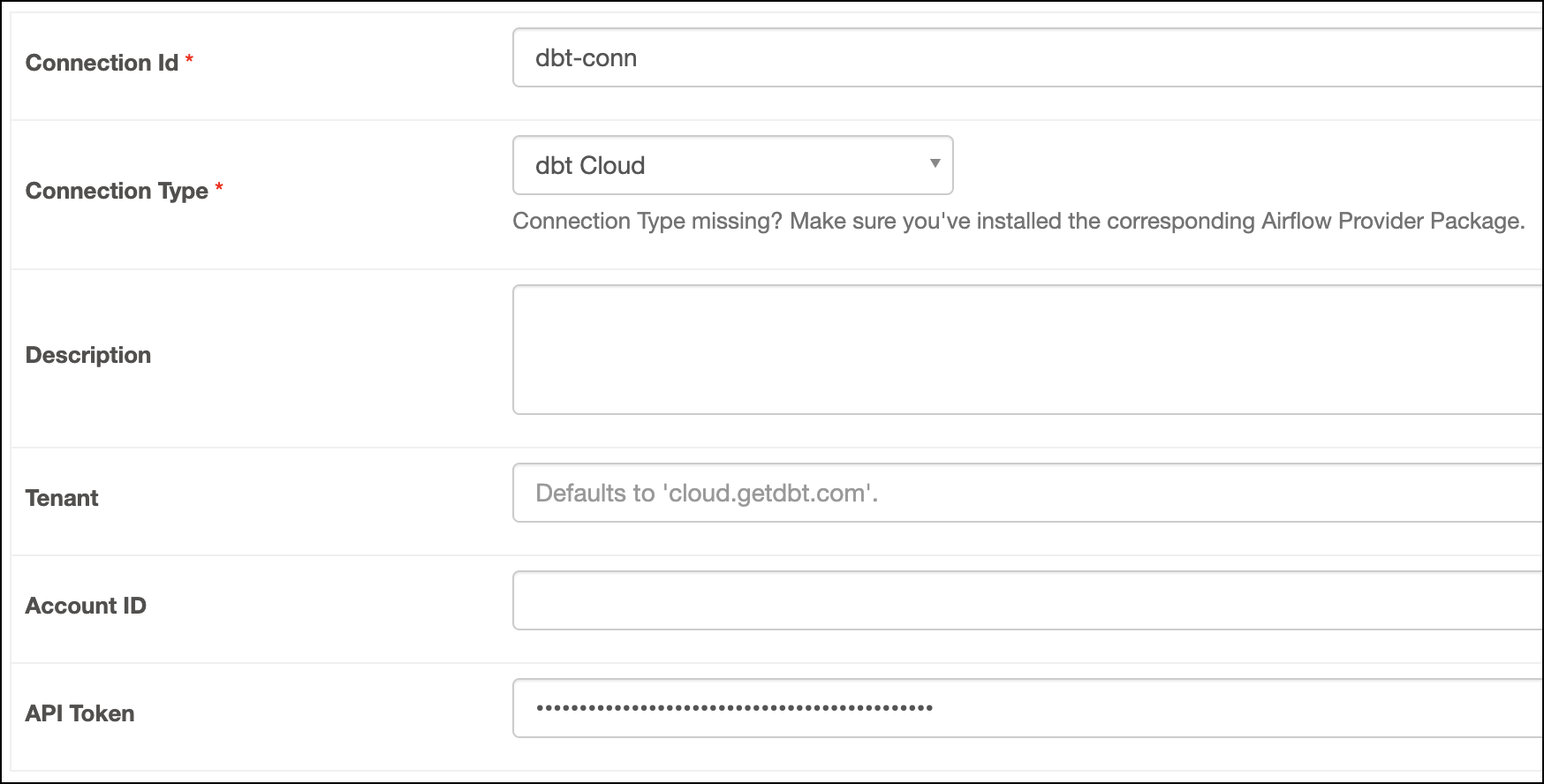
  3. In the Airflow UI for your local Airflow environment, go to Admin > Connections. Click + to add a new connection, then select the connection type as dbt Cloud.

  4. Fill out the following connection fields using the information you retrieved from Get connection details:

    • Connection Id: Enter a name for the connection.
    • Tenant: Enter the dbt Cloud URL.
    • API Token: Enter your user token or service access token.
    • Account ID: Enter your dbt cloud account ID. This field is optional. If you skip this, you must pass the account ID to the dbt cloud operator or hook.
  5. Click Test. After the connection test succeeds, click Save.
    dbtcloud

Note that the connection test only tests the Tenant and API Token fields. It will not validate your Account ID.

How it works

Airflow uses Python’s requests library to connect to dbt Cloud through the dbtHook.

See also

  • Apache Airflow dbt cloud provider package documentation
  • dbt Cloud modules in the Airflow Registry
  • Import and export Airflow connections using Astro CLI