

Info
This page has not yet been updated for Airflow 3. The concepts shown are relevant, but some code may need to be updated. If you run any examples, take care to update import statements and watch for any other breaking changes.
Weaviate is an open source vector database, which store high-dimensional embeddings of objects like text, images, audio or video. The Weaviate Airflow provider offers modules to easily integrate Weaviate with Airflow.
In this tutorial you’ll use Airflow to ingest movie descriptions into Weaviate, use Weaviate’s automatic vectorization to create vectors for the descriptions, and query Weaviate for movies that are thematically close to user-provided concepts.
Other ways to learn
There are multiple resources for learning about this topic. See also:
Weaviate allows you to store objects alongside their vector embeddings and to query these objects based on their similarity. Vector embeddings are key components of many modern machine learning models such as LLMs or ResNet.
Integrating Weaviate with Airflow into one end-to-end machine learning pipeline allows you to:
This tutorial takes approximately 30 minutes to complete.
To get the most out of this tutorial, make sure you have an understanding of:
text2vec-transformers if you don’t have an OpenAI API key.This tutorial uses a local Weaviate instance created as a Docker container. You do not need to install the Weaviate client locally.
Info
The example code from this tutorial is also available on GitHub.
Create a new Astro project:
Add build-essential to your packages.txt file to be able to install the Weaviate Airflow Provider.
Add the following two packages to your requirements.txt file to install the Weaviate Airflow provider and the Weaviate Python client in your Astro project:
This tutorial uses a local Weaviate instance and a text2vec-transformer model, with each running in a Docker container. To add additional containers to your Astro project, create a new file in your project’s root directory called docker-compose.override.yml and add the following:
To create an Airflow connection to the local Weaviate instance, add the following environment variable to your .env file. You only need to provide an X-OpenAI-Api-Key if you plan on using the OpenAI API for vectorization. To create a connection to your Weaviate Cloud instance, refer to the commented connection version below.
Tip
See the Weaviate documentation on environment variables, models, and client instantiation for more information on configuring a Weaviate instance and connection.
The DAG in this tutorial runs a query on vectorized movie descriptions from IMDB. If you run the project locally, Astronomer recommends testing the pipeline with a small subset of the data. If you use a remote vectorizer like text2vec-openai, you can use larger parts of the full dataset.
Create a new file called movie_data.txt in the include directory, then copy and paste the following information:
In your dags folder, create a file called query_movie_vectors.py.
Copy the following code into the file. If you want to use text2vec-openai for vectorization, change the VECTORIZER variable to text2vec-openai and make sure you provide an OpenAI API key in the AIRFLOW_CONN_WEAVIATE_DEFAULT in your .env file.
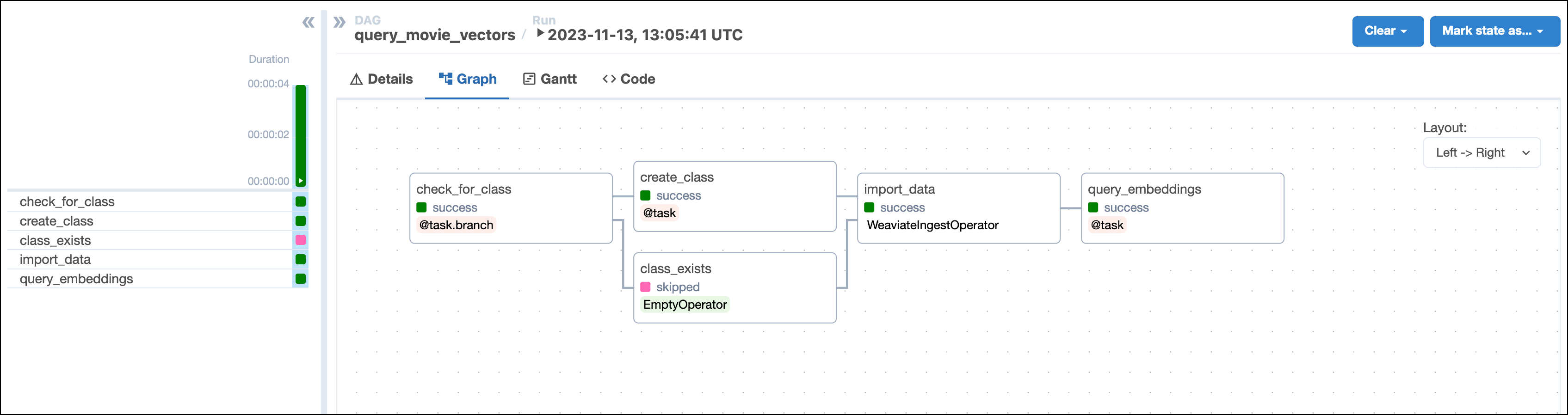
This DAG consists of five tasks to make a simple ML orchestration pipeline.
check_for_collection task uses the WeaviateHook to check if a collection of the name COLLECTION_NAME already exists in your Weaviate instance. The task is defined using the @task.branch decorator and returns the id of the task to run next based on whether the collection of interest exists. If the collection exists, the DAG runs the empty collection_exists task. If the collection does not exist, the DAG runs the create_collection task.create_collection task uses the WeaviateHook to create a collection with the COLLECTION_NAME and specified VECTORIZER in your Weaviate instance.import_data task is defined using the WeaviateIngestOperator and ingests the data into Weaviate. You can run any Python code on the data before ingesting it into Weaviate by providing a callable to the input_json parameter. This makes it possible to create your own embeddings or complete other transformations before ingesting the data. In this example we use automatic schema inference and vector creation by Weaviate.query_embeddings task uses the WeaviateHook to connect to the Weaviate instance and run a query. The query returns the most similar movie to the concepts provided by the user when running the DAG in the next step.Run astro dev start in your Astro project to start Airflow and open the Airflow UI at localhost:8080.
In the Airflow UI, run the query_movie_vectors DAG by clicking the play button. Then, provide Airflow params for movie_concepts.
Note that if you are running the project locally on a larger dataset, the import_data task might take a longer time to complete because Weaviate generates the vector embeddings in this task.
View your movie suggestion in the task logs of the query_embeddings task:
Congratulations! You used Airflow and Weaviate to get your next movie suggestion!